Best Tech Pack Software for Fashion Designers in 2026 (7 Tools Compared)

Harman Chawla · 2026-03-31 · 11 min read

The best tech pack software depends on your production volume, budget, and technical skill level. For indie and mid-size brands producing up to 50 styles per season, AI-powered platforms like Adstronaut AI deliver factory-ready tech packs in 5–15 minutes for $3–$7 per style with zero design-software experience required — including dedicated workflows for knitwear, footwear, and leather goods. For larger teams that need cross-season spec libraries and structured multi-user approval flows, Techpacker ($49–$149/month) remains the most established option. For technical designers with deep Illustrator fluency, Adobe Illustrator + Excel still offers the most granular control, at the cost of 2–8 hours per style and a 2–6 month learning curve.

This guide compares 7 tech pack tools — updated for 2026 — with honest pricing, capability gaps, and recommended use cases for each. If you're new to tech packs entirely, start with our complete guide to fashion tech packs or what a tech pack actually is before picking a tool.

Table of Contents

Fashion designer evaluating tech pack software on dual monitors showing technical sketches and measurement tables Fashion designer evaluating tech pack software on dual monitors showing technical sketches and measurement tables

Quick Comparison Table

Tool Price Per-Style Cost Speed Skill Required Best For
Adstronaut AI Free + $29–$149/mo ~$3–$7 5–15 min None Indie & mid-size brands; speed and breadth
Techpacker $49–$149/mo $4–$15 (at volume) 30–60 min Low Teams; cross-season spec library
Illustrator + Excel $23/mo $0 (your time) 2–8 hrs High Full creative control
Techpack.co $29–$99/mo $3–$10 (at volume) 30–90 min Low Budget; simple garments
CLO 3D $50–$100/mo N/A (3D focused) 2–4 hrs Very High 3D prototyping
Browzwear Enterprise pricing N/A Variable Very High Large enterprises
Free templates Free $0 2–6 hrs Medium Zero budget startups

1. Adstronaut AI — Best for Speed, Breadth, and Specialized Categories {#adstronaut-ai}

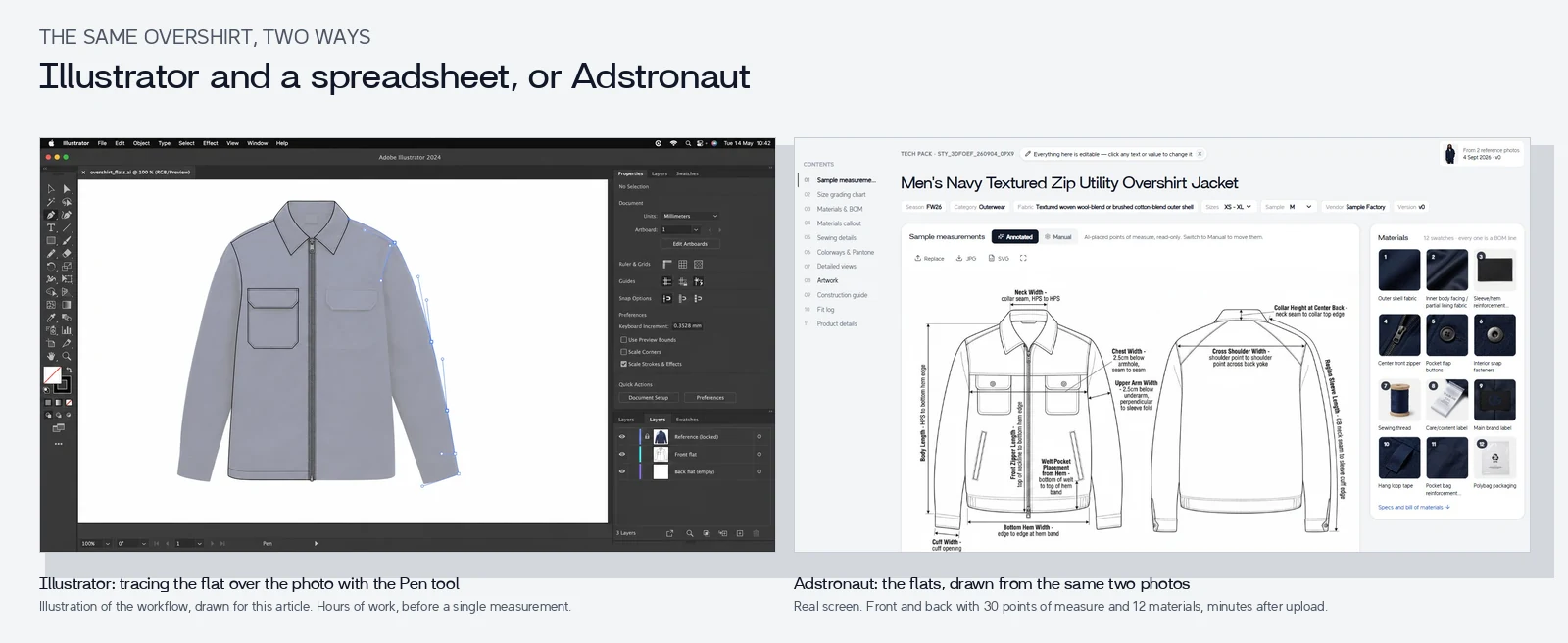
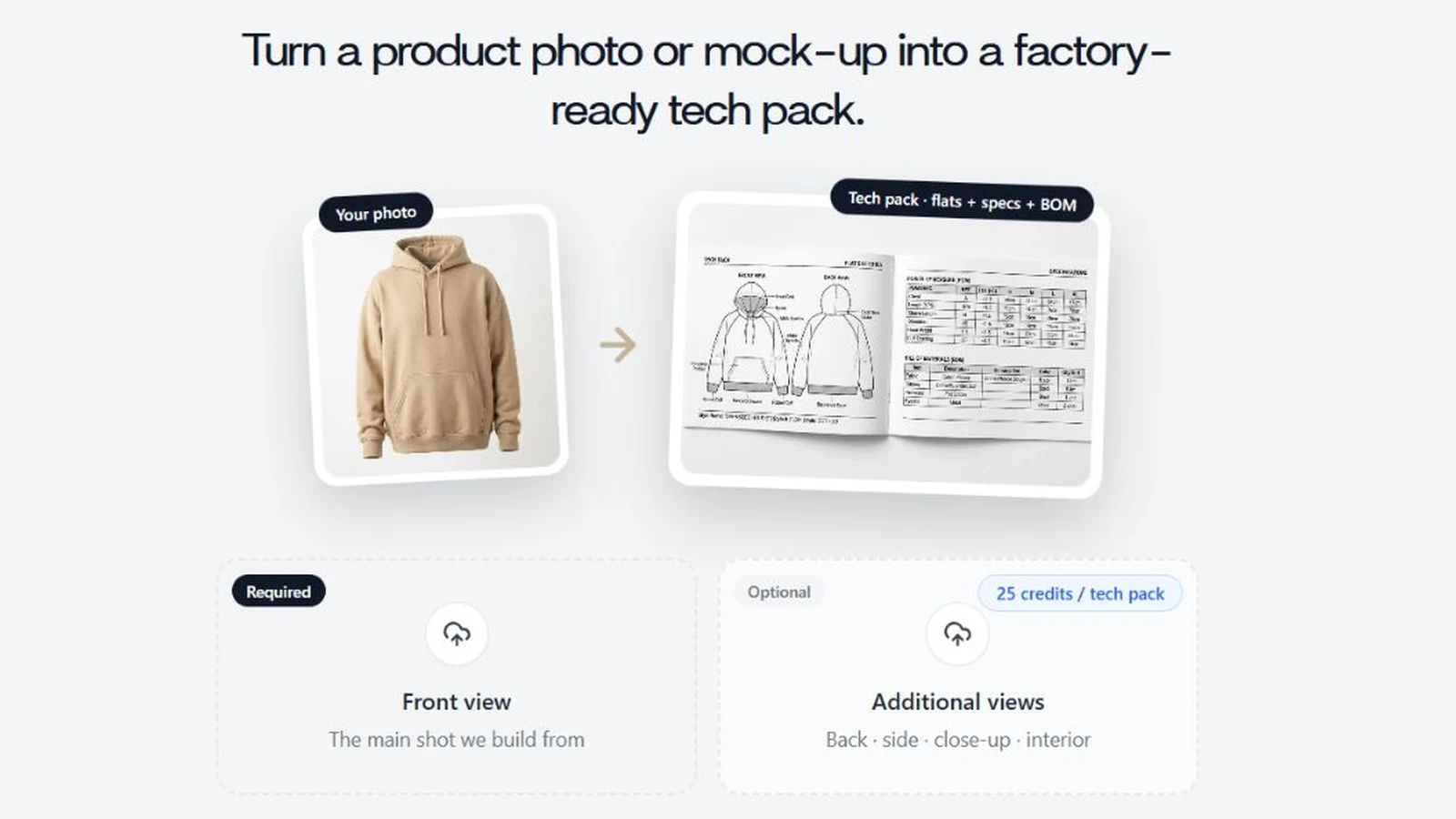
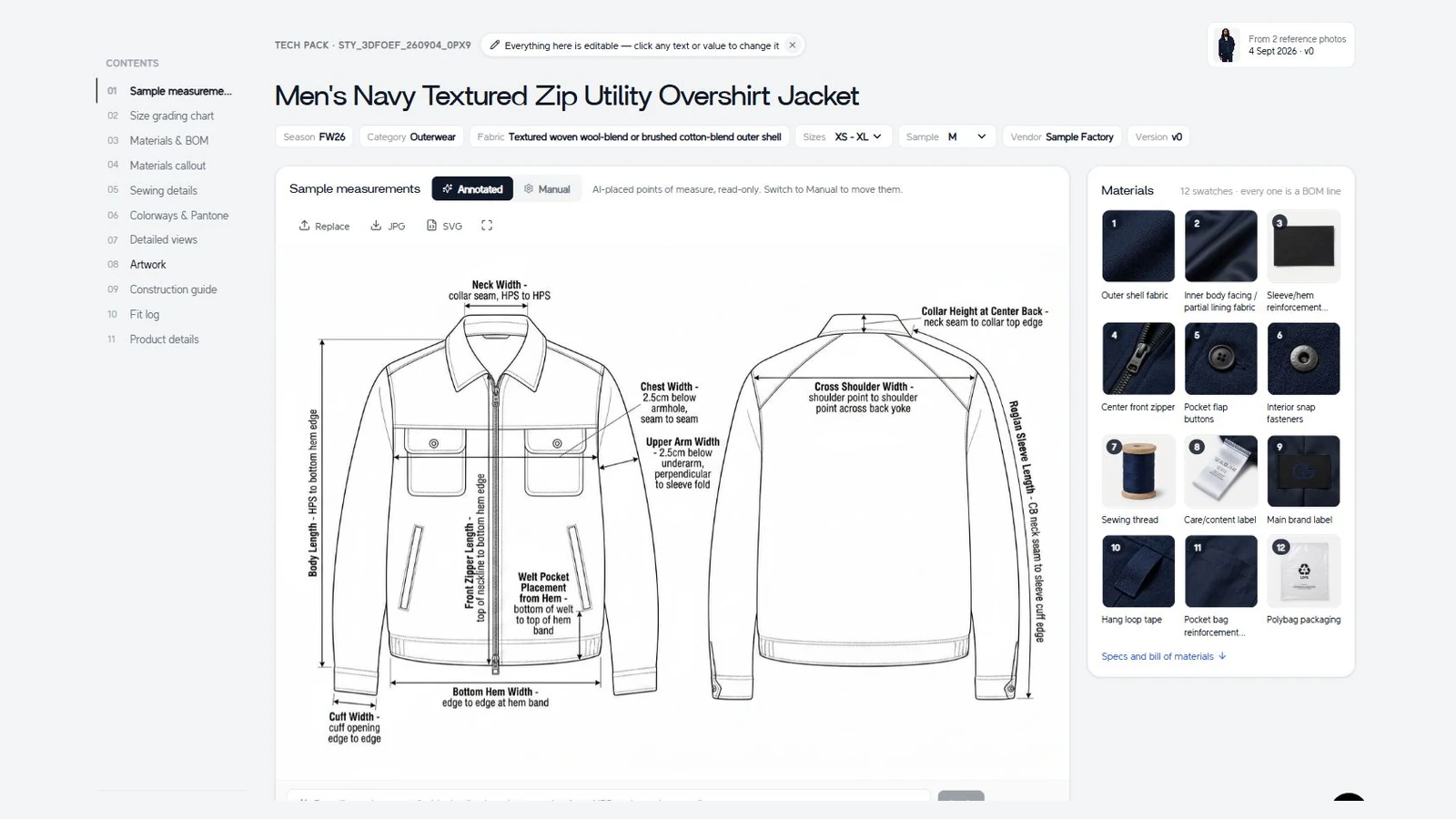
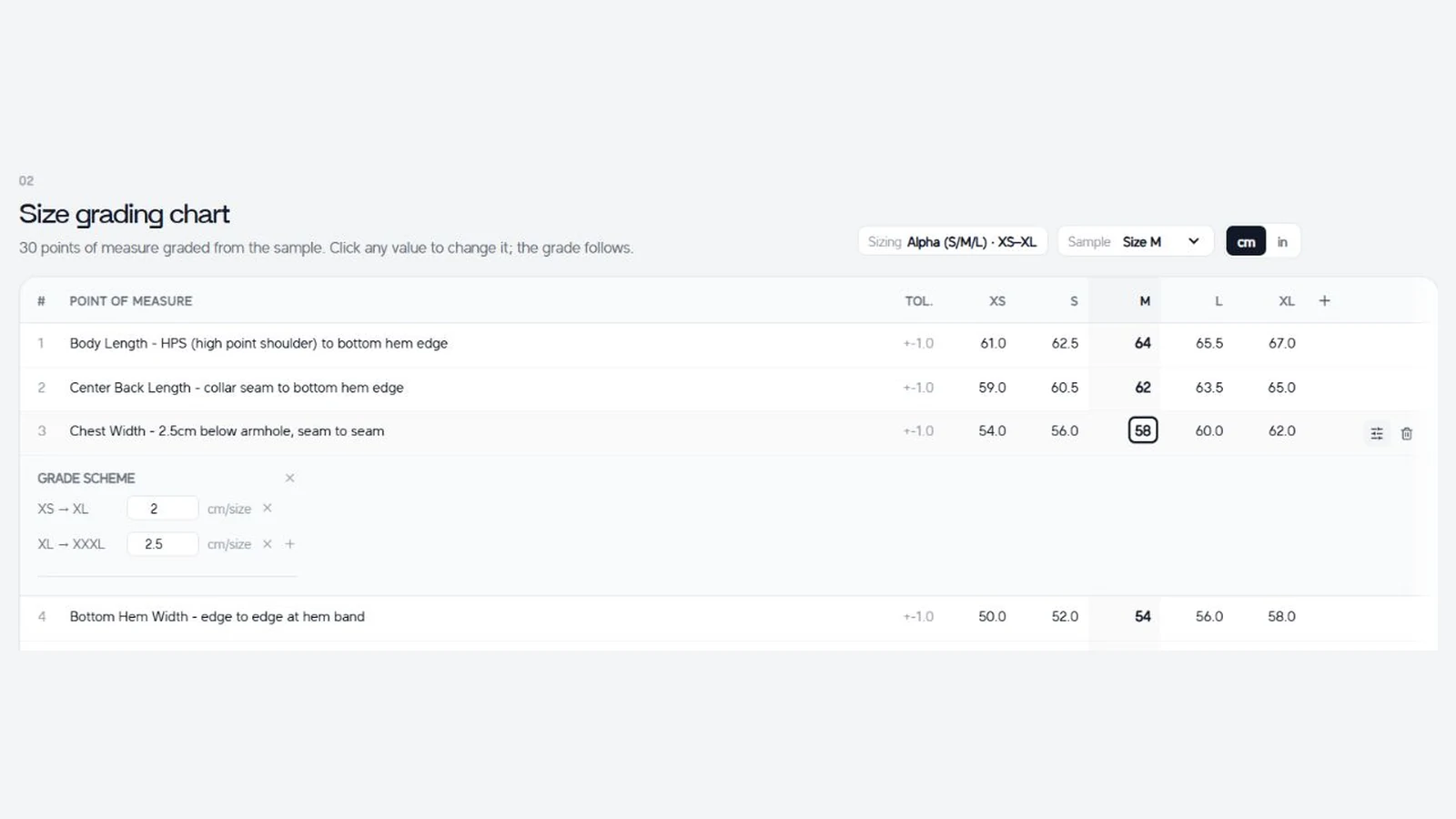
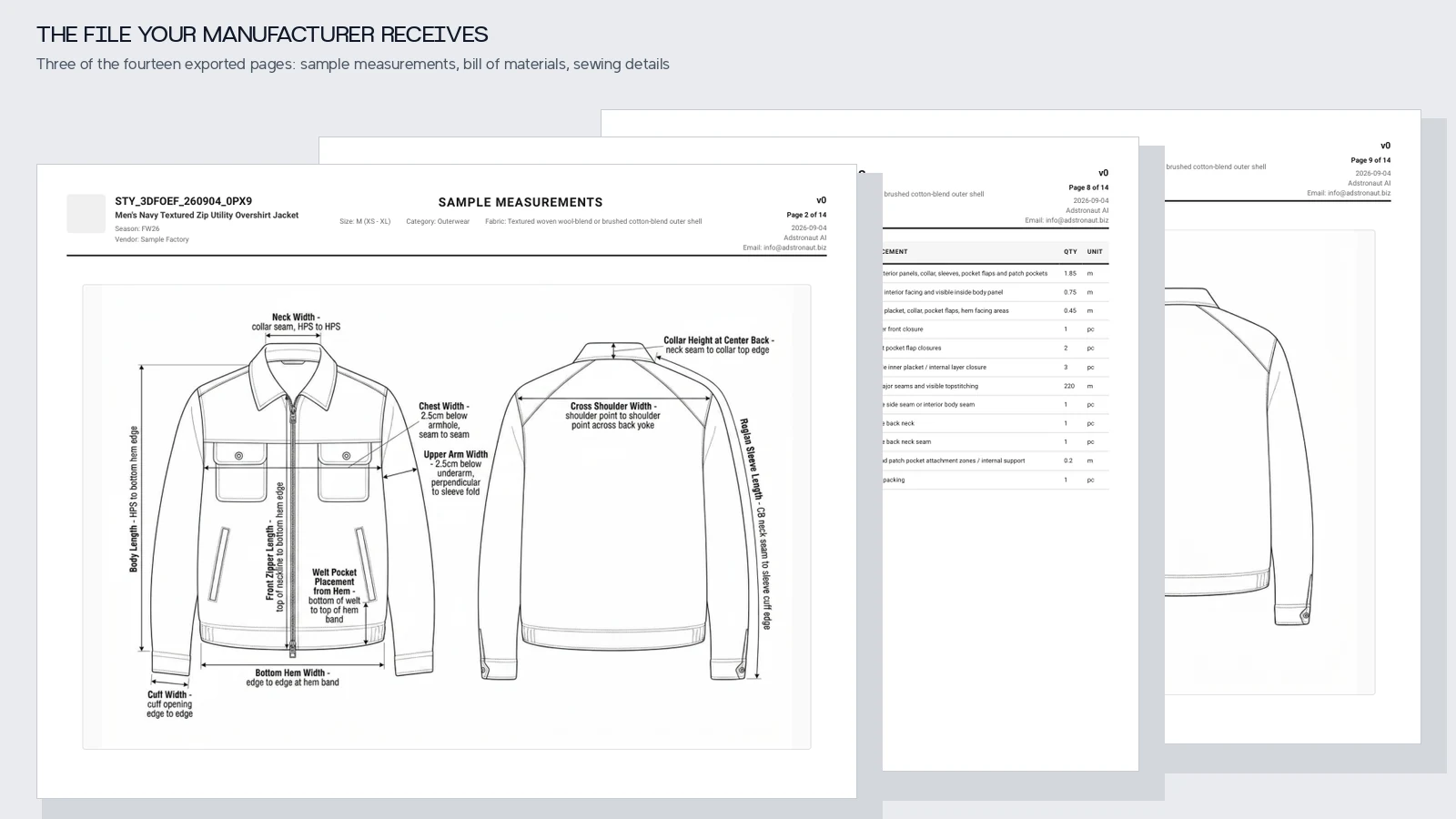
How it works: Upload one or two photos of your garment — a model shot, mannequin shot, flat lay, or even a hand sketch. Adstronaut AI runs a single pass through its multi-modal pipeline and returns a complete, production-ready tech pack: a clean 3:2 flat sketch, a colored mockup, an 11-line Bill of Materials (with a 4×4 grid of auto-generated material visuals), a 25-point graded measurement chart with AI-drawn leader lines on the sketch, construction details and sewing annotations, detailed front/back/side views, artwork callouts, and a factory-ready PDF — all in 5–15 minutes. The system auto-detects garment category and runs dedicated extraction pipelines for standard apparel, knitwear, footwear, and leather goods, each with category-specific spec fields (yarn count and gauge for knits; last reference, toe spring, and heel height for footwear; hardware and edge finishing for leather).

Pricing: Free tier (25 credits, ~1 tech pack with watermarked output, no card required). Paid plans: Standard $29/mo (125 credits ≈ 5 tech packs/mo), Pro $69/mo (375 credits ≈ 15/mo), Studio $149/mo (1,000 credits ≈ 40/mo). Annual plans add ~17% discount. Per-style cost lands in the $3–$7 range depending on plan and garment complexity. See the full pricing breakdown.

Strengths:

  • Fastest end-to-end workflow available. 5–15 minutes from photo upload to factory-ready PDF — vs. 30–60 minutes for Techpacker (which still needs Illustrator-drawn sketches uploaded), 2–8 hours for Illustrator + Excel, or 3–14 days for a freelance technical designer (full cost comparison).
  • Photo-to-sketch generation — no Illustrator skills required at any step. The generated flat sketch is in the same 3:2 industry-standard format factories expect.
  • Garment-type-specific outputs — dedicated workflows for standard apparel, knitwear (knitwear tech pack guide), footwear (footwear tech pack guide), and leather goods (leather goods tech pack guide). No other tool in this comparison ships with category-specific extraction pipelines.
  • AI-annotated sketches. Leader lines for measurements and sewing details are drawn directly on the flat sketch — the same format senior technical designers produce manually. Smart POM selection picks the 8–12 visual measurement points appropriate for the garment rather than dumping all 25 onto one sketch.
  • Auto-generated material visuals. A 4×4 image grid is generated alongside the BOM so factories can immediately see what each fabric, trim, label, and packaging line item should look like.
  • Sizing-system auto-detection. US women's, US men's, UK, EU, kids — the system picks the right grade chart from garment classification.
  • Integrated suite. Same platform also handles AI photoshoots, fabric swapping, color changes, design variations, and lookbook creation, so the source photo flows across all post-production work without re-uploading. Useful for brands that want one tool from concept through e-commerce listing.
  • Free trial with no card required — 25 credits at signup is enough to test a full tech pack against your existing workflow before committing.

Weaknesses:

  • Single-user editing. No built-in multi-user commenting or approval workflow yet (workaround: export PDF, share for feedback, regenerate). Spec library across seasons is in active development; today each tech pack is generated fresh rather than re-used from a stored template.
  • Input quality matters. Two-angle inputs (front + back) produce noticeably better results than single-photo inputs. Blurry or poorly lit images reduce sketch fidelity. Clean references in, clean tech packs out.
  • Not a PLM replacement. For brands running Centric, Flex PLM, or Backbone, Adstronaut produces the tech pack PDF that feeds your PLM — it doesn't replace the PLM itself.

Ideal user: Indie designers, DTC brands, and small-to-mid-size production teams (1–50 styles per season) who need factory-ready tech packs without Illustrator skills, freelancer fees, or hours of formatting work. Increasingly used by mid-size brands as the primary tech pack tool for fast-turnaround drops, with Techpacker or a PLM reserved for cross-season library management.

Verdict: Strongest indie-to-mid-size tech pack tool on the market in 2026. The combination of photo-to-sketch generation, AI-annotated measurements, category-specific workflows for knits/footwear/leather, and auto-generated material visuals collapses what used to be 4–8 hours of skilled technical work into 5–15 minutes — and delivers it at a price that beats freelance technical designers by 50–200×. For any brand that doesn't need full PLM integration, this is the best price-to-output ratio currently available, and the only tool where you can go from photo to factory-ready PDF without ever opening Illustrator. The free tier means you can validate it against your existing process before paying for anything.

Upload a photo, get a complete tech pack in minutes →

2. Techpacker — Best for Team Collaboration {#techpacker}

How it works: Cloud-based platform with structured tech pack templates. You fill in specifications using a card-based interface, attach images, and export to PDF or Excel.

Pricing: $49/month (Starter), $99/month (Pro), $149/month (Business). Free trial available.

Strengths:

  • Industry standard for mid-size brands; trusted by 10,000+ companies
  • Strong collaboration features (multi-user access, commenting, version history)
  • Spec library — save and reuse specs across seasons
  • Integrations with PLM systems
  • Clean, professional PDF exports that factories are familiar with

Weaknesses:

  • Does not generate flat sketches — you still need to create these in Illustrator and upload them
  • Monthly subscription regardless of usage (not ideal for seasonal brands)
  • Learning curve for new users (1–2 weeks to get comfortable)
  • No AI assistance — every field is manually filled

Ideal user: Growing brands with 2+ team members who need structured collaboration and a growing spec library across seasons.

Verdict: The most mature and proven tech pack platform. Excellent for teams, but the lack of AI-assisted generation means it saves formatting time, not creation time. You still need Illustrator for flat sketches.

3. Adobe Illustrator + Excel — Best for Full Control {#adobe-illustrator}

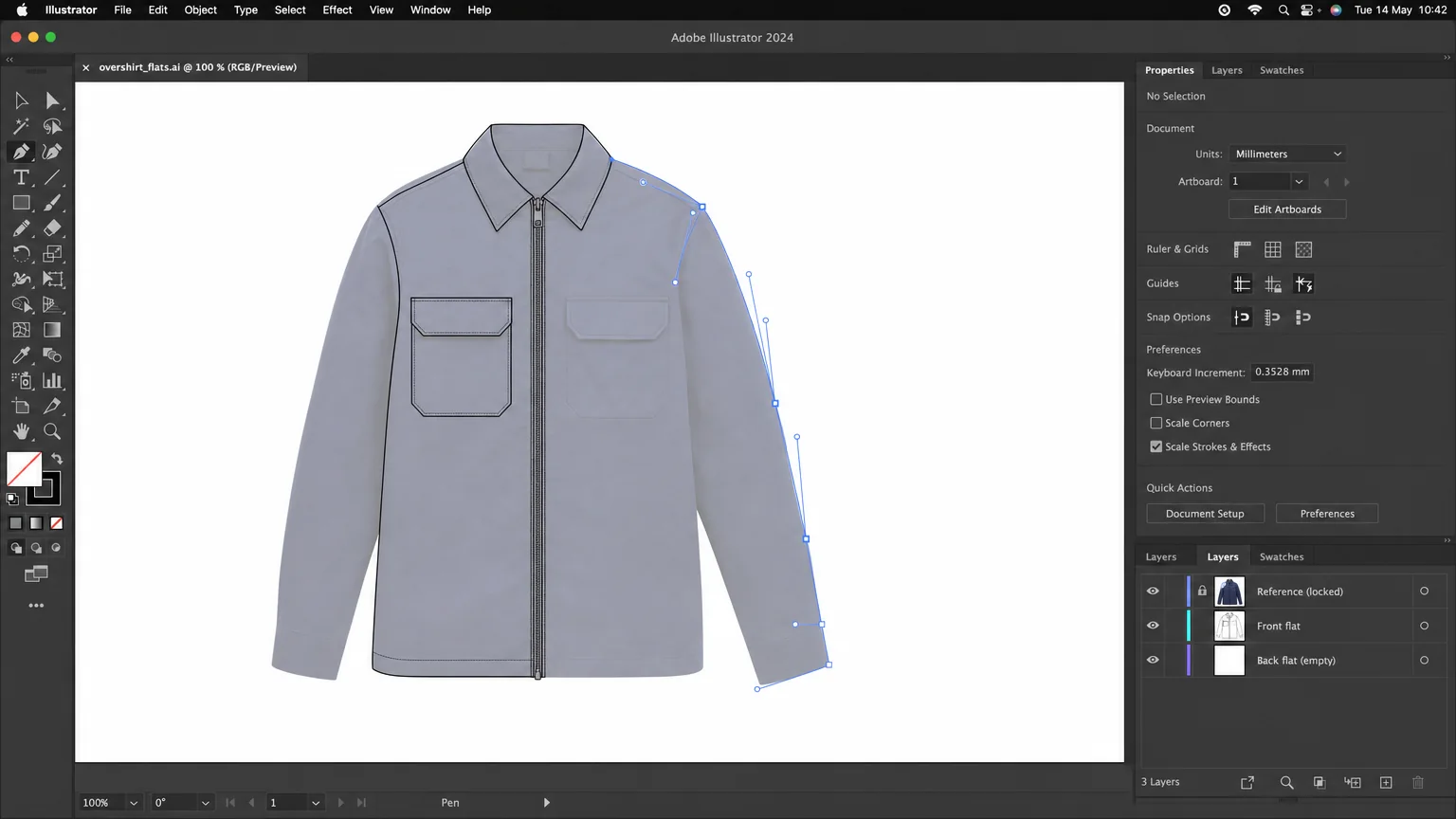
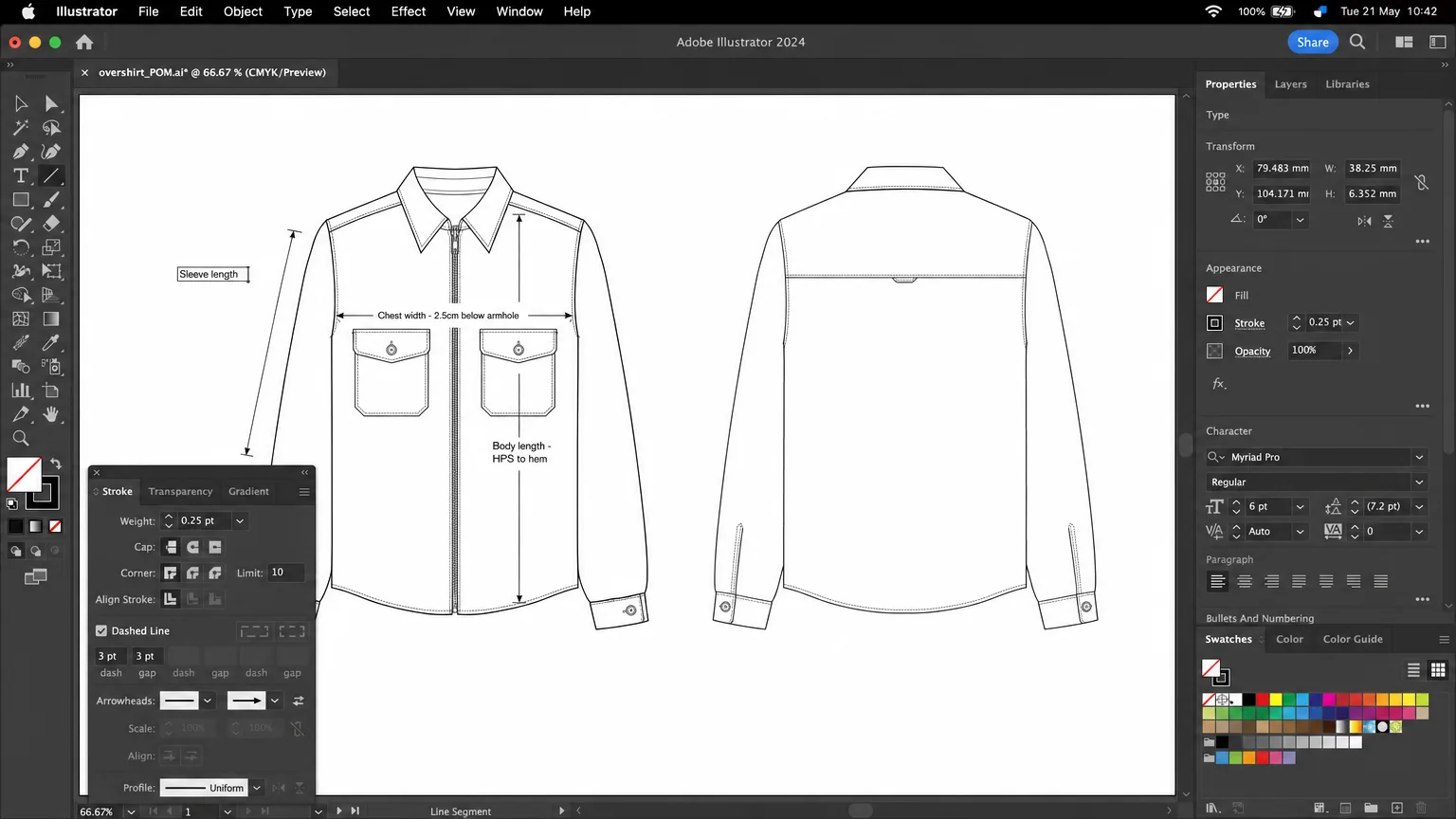
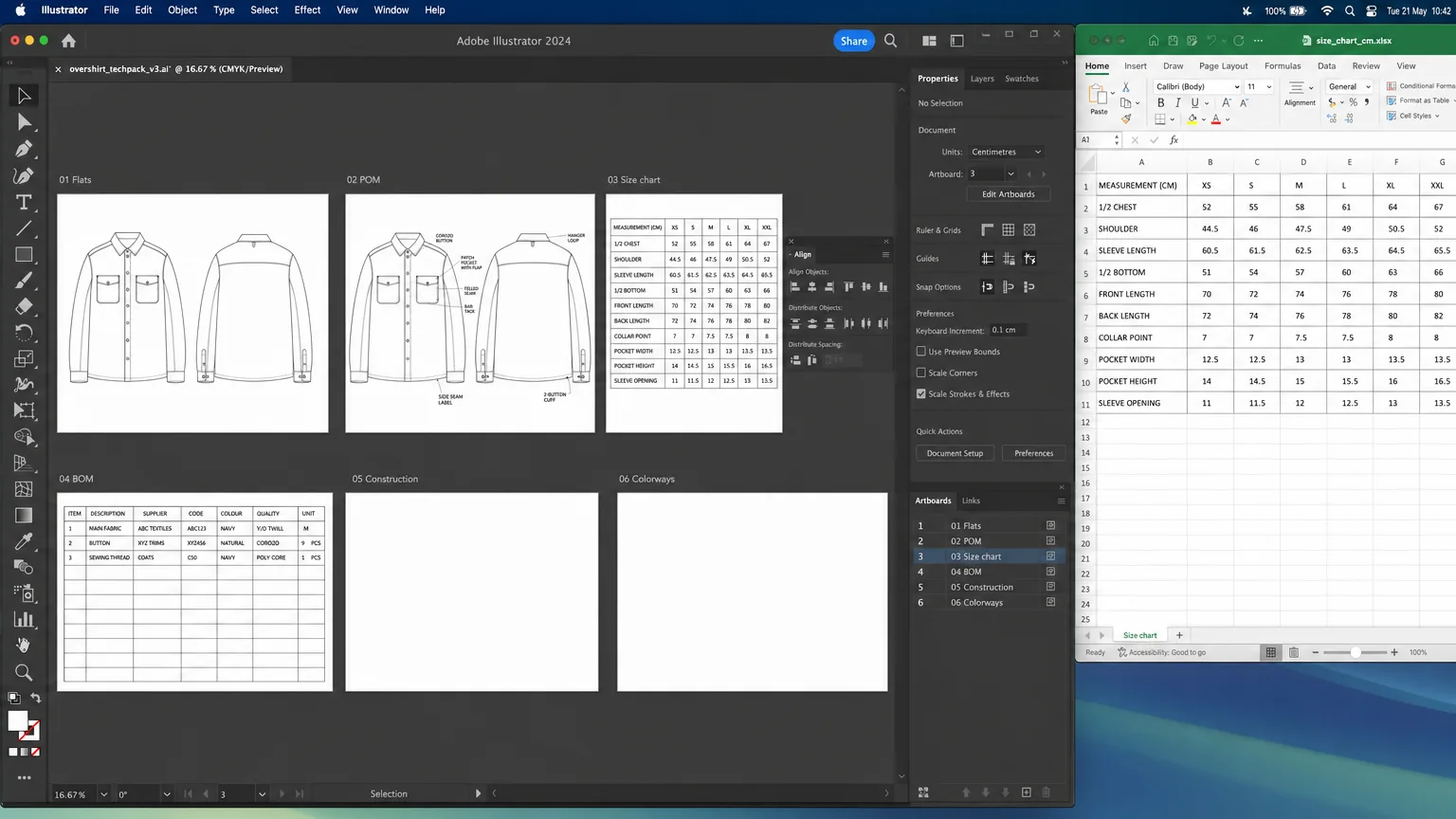
How it works: Create flat sketches in Illustrator, build measurement charts and BOMs in Excel, compile into a PDF. This is the traditional industry-standard workflow used by technical designers at major brands.

Pricing: Adobe Illustrator: $23/month. Excel: included with Microsoft 365 ($7/month) or free via Google Sheets.

Strengths:

  • Complete creative control over every line, measurement, and layout
  • Industry-standard format — no factory will question an Illustrator-produced tech pack
  • No per-style costs (once you have the software)
  • Unlimited customization for any garment type
  • Thousands of tutorials, courses, and templates available

Weaknesses:

  • Steep learning curve — 2–6 months to produce factory-acceptable flat sketches
  • Time-intensive: 2–8 hours per style for experienced users
  • No built-in collaboration (manual file sharing, version control issues)
  • Requires knowledge of garment construction, grading, and manufacturing terminology
  • Easy to produce inconsistent formatting across styles

Ideal user: Technical designers with Illustrator proficiency, or brands willing to invest in learning the skill for long-term independence.

Verdict: Still the gold standard for quality and control. If you already know Illustrator and garment construction, this is the most powerful option. But the learning curve makes it impractical for most indie designers without technical training.

4. Techpack.co — Best Budget Template Tool {#techpackco}

How it works: Web-based tool with pre-built tech pack templates. Fill in fields for measurements, materials, and construction details. Upload your own flat sketches.

Pricing: $29/month (Basic), $59/month (Pro), $99/month (Business).

Strengths:

  • Lower price point than Techpacker
  • Simple, clean interface — easy to learn
  • Decent template library for common garment types
  • Good for brands producing simple garments (t-shirts, hoodies, basic dresses)

Weaknesses:

  • No flat sketch generation — you must create or source these externally
  • Limited customization compared to Illustrator or Techpacker
  • Smaller user community and less documentation
  • Templates can feel restrictive for complex or non-standard garments
  • Limited export options

Ideal user: Budget-conscious brands producing simple garments who want a structured format without the Techpacker price tag.

Verdict: A serviceable budget option for basic garments. Falls short for complex styles or brands that need sophisticated collaboration features.

Organized desk with tech pack design tools: laptop with flat sketches, Pantone guide, measurement tape, and printed specifications Organized desk with tech pack design tools: laptop with flat sketches, Pantone guide, measurement tape, and printed specifications

5. CLO 3D — Best for 3D Visualization {#clo-3d}

How it works: Full 3D garment simulation software. Create patterns, drape them on virtual models, and generate photorealistic 3D renders. Can export 2D flat sketches and measurement data.

Pricing: $50/month (Individual), $100/month (Business). Free 30-day trial.

Strengths:

  • Industry-leading 3D garment simulation
  • See how fabric drapes and fits before cutting a single sample
  • Can reduce physical sampling by 50–80%
  • Generates flat patterns that can be sent directly to factory
  • Growing adoption at major brands (Adidas, Hugo Boss, Tommy Hilfiger)

Weaknesses:

  • Not a dedicated tech pack tool — tech pack creation requires additional steps
  • Very steep learning curve (3–6 months to become productive)
  • Requires understanding of pattern making and fabric physics
  • Expensive for small brands when combined with other tools
  • Overkill for brands that don't need 3D prototyping

Ideal user: Brands that need 3D virtual sampling AND tech pack creation, and have team members with pattern-making expertise.

Verdict: A powerful tool for reducing physical samples, but not a direct tech pack solution. Best used in combination with a dedicated tech pack tool. The learning curve is the biggest barrier — this is professional-grade software.

6. Browzwear — Best for Enterprise {#browzwear}

How it works: Enterprise-grade 3D design and product development platform. Full PLM integration, digital twin creation, and collaborative design workflows.

Pricing: Custom enterprise pricing (typically $10,000–$50,000+/year per team).

Strengths:

  • Most comprehensive enterprise solution
  • Full integration with PLM systems (Centric, Flex PLM)
  • Used by global brands (Under Armour, Levi's, PVH)
  • Collaborative digital workflow from design to manufacturing
  • Advanced fabric simulation library

Weaknesses:

  • Prohibitively expensive for small and mid-size brands
  • Complex implementation (weeks to months)
  • Requires dedicated training and IT support
  • Not practical for brands under 100 styles per season

Ideal user: Large fashion enterprises with 100+ styles/season and dedicated technical design teams.

Verdict: Industry leader for enterprise fashion technology, but completely out of scope for indie brands and startups. Included here for completeness.

7. Free Templates — Best for Zero Budget {#free-templates}

How it works: Download free tech pack templates (typically Excel or PDF) and manually fill in your specifications. Sources include Maker's Row, fashion blogs, and design school resources.

Pricing: Free.

Strengths:

  • Zero cost
  • Good for learning the structure of a tech pack
  • Can produce acceptable results for very simple garments
  • No subscription commitment

Weaknesses:

  • You must create your own flat sketches (Illustrator, hand-drawn, or AI-generated)
  • Manual data entry for every field
  • No standardization — each template is formatted differently
  • No version control or collaboration features
  • Time-intensive: 3–8 hours per style including sketch creation
  • Output quality varies significantly

Ideal user: First-time designers who want to learn tech pack structure before investing in software, or brands with zero budget creating their first 1–2 tech packs.

Verdict: A learning tool, not a production tool. Acceptable for creating 1–3 tech packs to understand the process, but unsustainable for ongoing production.

Feature-by-Feature Comparison {#feature-comparison}

Feature Adstronaut AI Techpacker Illustrator Techpack.co CLO 3D
AI flat sketch generation (from photo) Yes No No No No (3D only)
AI-annotated sketches (POMs + sewing leader lines) Yes No Manual No No
Auto BOM with material visuals Yes (4×4 visual grid) No No No No
Graded size charts Yes (auto-detected sizing system) Yes Manual Yes Partial
Knitwear-specific workflow (yarn, gauge, finishing) Yes No Manual No Partial
Footwear-specific workflow (last, toe spring, heel) Yes No Manual No No
Leather goods workflow (hardware, edge finish) Yes No Manual No No
Team collaboration Limited Excellent No Basic Basic
Cross-season spec library In development Yes Manual Limited No
PDF export (factory-ready) Yes Yes Yes Yes Yes
3D visualization No No No No Yes
No Illustrator needed Yes No* No No* No
Free tier (no card) Yes (25 credits) Trial only No Trial only 30-day trial
Per-style cost (at 20 styles) $3–$7 $2.50–$7.50 $0 (your time) $1.50–$5 N/A

*Techpacker and Techpack.co don't require Illustrator for data entry, but you still need it (or another tool) to create flat sketches to upload.

Which Tool Is Right for You? {#which-tool-is-right-for-you}

Your Situation Recommended Tool Why
Solo designer, < 15 styles/season, no Illustrator Adstronaut AI Fastest, cheapest, no skills needed; free trial
Indie or mid-size brand, 15–50 styles/season Adstronaut AI Same speed advantage at scale; integrated photoshoot/recolor/swap pipeline cuts post-tech-pack work too
Knitwear, footwear, or leather goods specialist Adstronaut AI Only tool with category-specific extraction (yarn/gauge, last/toe spring, hardware/edge finish)
Team of 5+ needing structured approval and spec library Techpacker + Adstronaut AI Use Adstronaut to generate the tech pack, Techpacker for collaboration and historical spec storage
Technical designer with Illustrator skills Illustrator + Excel Maximum control, zero per-style cost (if you have the time)
Budget-constrained, very simple garments only Techpack.co or Free templates Lowest cost; quality acceptable for basic items
Need 3D prototyping + tech packs CLO 3D + Adstronaut AI CLO for fit/drape, Adstronaut for the tech pack documentation
Enterprise, 100+ styles/season + full PLM Browzwear or Techpacker Business PLM integration; deep enterprise workflows

Skip the learning curve — generate your first tech pack free →

Frequently Asked Questions

What is the best free tech pack software?

For a fully free, factory-ready tech pack with no card required, Adstronaut AI's free tier is the strongest option in 2026: 25 credits at signup buys you a complete tech pack (with a watermarked PDF) generated from a single garment photo in under 15 minutes — sketch, BOM, measurements, construction, and detailed views included. For an entirely free indefinite workflow, the closest options are: (1) Google Sheets or Excel with downloadable tech pack templates from Maker's Row or design schools, paired with (2) Inkscape (free Illustrator alternative) for hand-drawing flat sketches. Techpacker and Techpack.co also offer time-limited trials that produce 1–3 tech packs.

Do I really need tech pack software, or can I use Excel?

You can create a serviceable tech pack with Excel + Illustrator — many professional technical designers still do. Dedicated tech pack software mainly saves time on formatting, ensures consistency, and provides structured templates. If you produce fewer than 5 styles per season and have Illustrator skills, Excel may be sufficient. Beyond that volume, dedicated tools pay for themselves in time savings.

Can Techpacker generate flat sketches?

No. Techpacker is a tech pack management and formatting tool, not a design tool. You need to create flat sketches in Adobe Illustrator (or another vector editor) and upload them to Techpacker. Adstronaut AI is currently the only major tech pack tool that generates flat sketches automatically from product photos — and it goes further by drawing measurement leader lines and sewing-detail annotations directly on the generated sketch (see our walkthrough on creating a tech pack without Illustrator).

Is CLO 3D a tech pack tool?

CLO 3D is primarily a 3D garment design and simulation tool, not a dedicated tech pack platform. It can export flat patterns, measurement data, and 2D views that can be used in tech packs, but you typically need a separate tool (Techpacker, Excel) to compile the full tech pack document. Many brands use CLO 3D for design/prototyping and a separate tool for tech pack documentation.

How do I switch from Illustrator to tech pack software?

Most tech pack software accepts uploaded Illustrator files (.ai, .pdf, .png). The transition path is: (1) Keep creating flat sketches in Illustrator, (2) Use tech pack software for measurements, BOM, construction, and formatting, (3) Gradually adopt AI-generated sketches if quality meets your standards. You don't need to abandon Illustrator entirely — many brands use it alongside tech pack software.

Which tech pack software do manufacturers prefer?

Manufacturers care about the content of your tech pack, not which software created it. A well-organized PDF with clear flat sketches, complete measurements, detailed BOM, and construction specs will be accepted regardless of whether it came from Illustrator, Techpacker, Adstronaut AI, or Excel. That said, some factories appreciate standardized formats — ask your manufacturer if they have a preferred template.

Try Adstronaut AI — generate a tech pack in minutes →


Sources and further reading: