Best AI Tools for Fashion Product Photography and Color Visualization in 2026
Fashion brands spend between $50,000 and $500,000 annually on product photography and physical color sampling, according to McKinsey's State of Fashion 2025 report. AI-powered visualization tools now reduce those costs by 60–90% while producing catalog-ready imagery in minutes instead of weeks. The best options in 2026 are Adstronaut AI for color visualization and on-model photoshoots, CLO 3D for 3D garment simulation, and Botika for mannequin-to-model conversion.
This guide compares every major tool on the market — with pricing, feature matrices, and specific recommendations based on your brand's size and needs.
Turn flat-lay product photos into on-model images with AI →
Table of Contents
- Why Fashion Brands Are Moving to AI Visualization
- Quick Comparison: 6 Tools at a Glance
- Tool-by-Tool Deep Dive
- Feature Comparison Matrix
- Cost Comparison: Annual Spend by Brand Size
- When to Use Which Tool
- Frequently Asked Questions
Why Fashion Brands Are Moving to AI Visualization
The economics of traditional fashion photography are brutal. A single on-model photoshoot for 50 SKUs in 3 colorways costs $15,000–$40,000 when you factor in studio rental, photographer fees, models, stylists, and post-production. Physical color sampling — dyeing lab dips, shipping swatches, and photographing each colorway — adds another $2,000–$8,000 per style.
The result: most emerging brands can only afford to photograph 1–2 colorways per style, leaving 60–70% of their color options without dedicated imagery. According to Shopify's Commerce Trends 2025 report, products with dedicated color-specific imagery convert 24–35% higher than products using only color swatches. That means brands are leaving significant revenue on the table simply because they cannot afford to photograph every option.
AI visualization tools solve this by generating photorealistic product images from a single source photo or 3D file. The technology has matured dramatically since 2024 — today's best tools produce output that is indistinguishable from studio photography in blind tests conducted by Business of Fashion in early 2026.
| Traditional Photography Pain Point | AI Solution | Time Savings |
|---|---|---|
| Studio shoot for 50 SKUs (3 colorways each) | AI recoloring from 1 photo per SKU | 2–3 weeks reduced to 1–2 hours |
| Physical lab dip samples ($40–$150 each) | Digital Pantone-matched preview | 4–6 weeks reduced to seconds |
| Model booking for on-body shots | Flat-lay-to-on-model AI generation | $2,000–$5,000 per day saved |
| Re-shooting discontinued colorways | AI-generated archival imagery | Eliminates re-shoot entirely |
According to Statista's Fashion eCommerce Report 2025, global fashion ecommerce reached $1.2 trillion in 2025, with product imagery cited as the #1 factor influencing purchase decisions by 73% of online shoppers. Brands that invest in comprehensive visual catalogs see 2–3x higher engagement across marketplaces and social channels.
Quick Comparison: 6 Tools at a Glance
| Tool | Best For | Starting Price | Color Visualization | On-Model Photos | Pantone Support |
|---|---|---|---|---|---|
| Adstronaut AI | Color recoloring + AI photoshoots | Free trial / credits | Yes (zone-based) | Yes (flat-lay to on-model) | Yes (TCX matching) |
| CLO 3D | 3D garment simulation | $50/mo (indie) | Yes (3D material) | Yes (3D avatar) | Limited |
| Browzwear | Enterprise 3D visualization | Custom (enterprise) | Yes (3D material) | Yes (3D avatar) | Limited |
| Botika | Mannequin-to-model swap | $29/mo | No | Yes (face/body swap) | No |
| Vue.ai | Catalog automation at scale | Custom (enterprise) | Limited | Yes (AI-generated) | No |
| Adobe Photoshop | Manual editing baseline | $23/mo | Manual only | No | Manual only |
Tool-by-Tool Deep Dive
1. Adstronaut AI — Color Visualization + AI Photoshoots
Adstronaut AI offers two core products for fashion visualization: a zone-based color changer that recolors specific garment components independently, and an AI photoshoot tool that transforms flat-lay product photos into on-model imagery.
Color Changer: Zone-Based Recoloring
Unlike simple hue-shift tools, Adstronaut's color changer uses computer vision to identify distinct garment zones — body, sleeves, collar, trim, embroidery, hardware — and lets you recolor each zone independently. This matters because real garments rarely have uniform color: a jacket might have a navy body, white trim, and gold zippers.
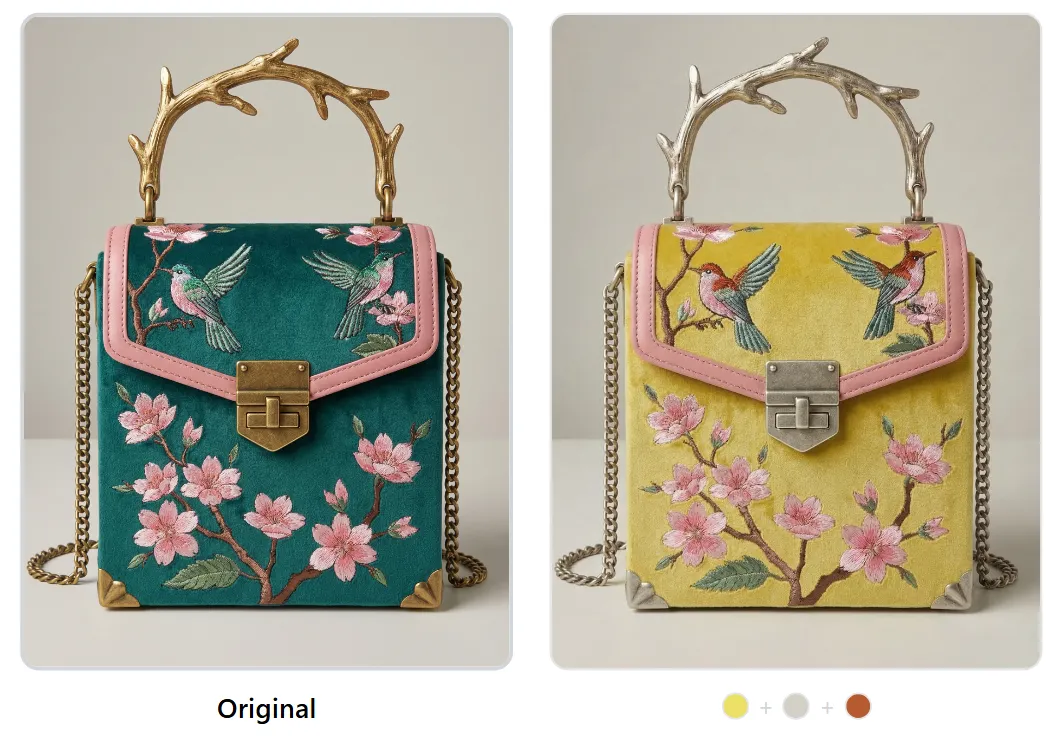 Zone-based recoloring preserves embroidery detail, texture, and shadows while changing only the target color zones.
The tool integrates a Pantone TCX color picker that suggests the nearest standardized color match for any selection, bridging the gap between digital visualization and physical production.
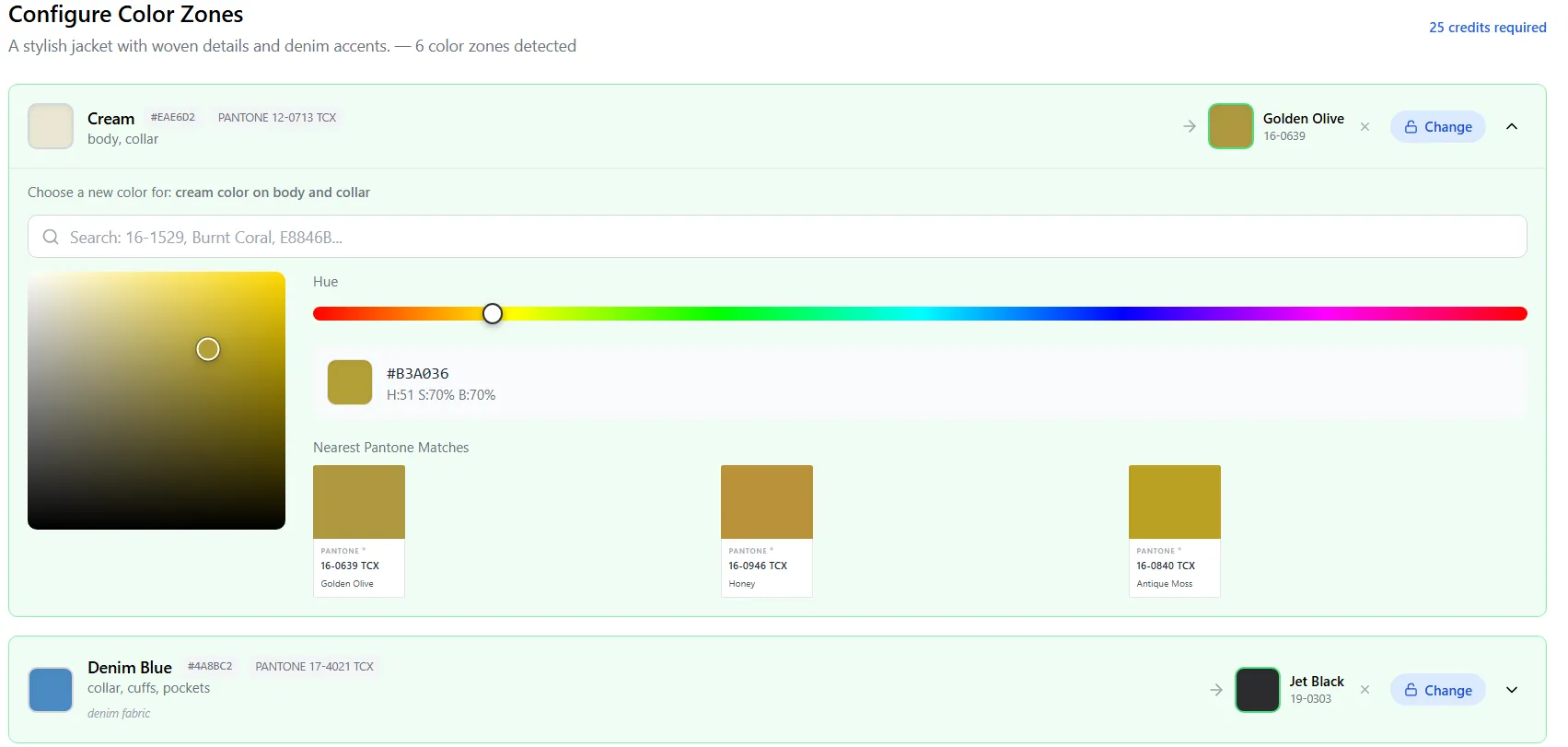 Pantone TCX matching ensures the colors you visualize digitally translate accurately to dyed fabric.
Key capabilities:
- Zone-based control: Recolor body, sleeves, collar, pockets, trim, and hardware independently
- Pantone TCX matching: Auto-suggests nearest Pantone code for any selected color
- Texture preservation: Embroidery, prints, knit textures, and fabric grain are maintained through recoloring
- Product type flexibility: Works on garments, handbags, shoes, accessories, and home textiles
- Batch-ready workflow: Process an entire colorway collection in minutes
AI Photoshoots: Flat Lay to On-Model
The AI photoshoot tool takes a flat-lay or ghost-mannequin product photo and generates on-model imagery with controllable poses, backgrounds, and styling. This eliminates the need for model bookings for standard catalog imagery.
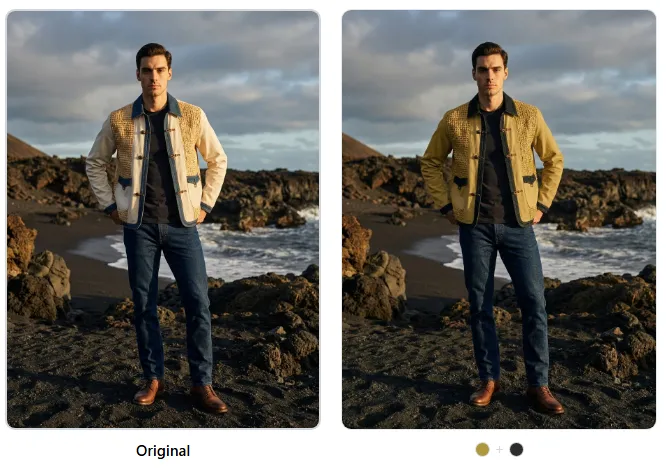 AI-generated on-model imagery preserves garment details, fit characteristics, and natural lighting.
According to Business of Fashion's 2026 technology report, brands using AI-generated on-model imagery reported 40–60% reductions in photography costs while maintaining or improving conversion rates.
Best for: Brands needing color exploration, colorway visualization, and affordable on-model catalog imagery. Particularly strong for accessories and complex multi-color garments.
Try the Color Changer free | Try AI Photoshoots free
2. CLO 3D — 3D Garment Simulation
CLO 3D is a professional 3D garment simulation tool used by major brands including Adidas, Lululemon, and PVH. It creates photorealistic 3D renders of garments on customizable virtual avatars with accurate drape physics.
Strengths:
- Industry-leading drape and fabric physics simulation
- Full pattern-making integration (import DXF patterns)
- Accurate fit visualization across size ranges
- Animation capabilities for video content
- Large material library with physically-based rendering
Limitations:
- Steep learning curve (40–80 hours to proficiency)
- Requires 3D pattern files — cannot work from photos alone
- $50/month (indie), $100/month (business), $500/month (enterprise)
- Rendering time: 2–15 minutes per image depending on complexity
- Not practical for quick color exploration of existing products
Best for: Brands with dedicated 3D design teams who need fit simulation and virtual prototyping during the design phase.
3. Browzwear — Enterprise 3D Visualization
Browzwear targets enterprise fashion brands with end-to-end 3D design and visualization. Its VStitcher and Lotta platforms compete directly with CLO 3D but focus more heavily on supply chain integration.
Strengths:
- Deep PLM (Product Lifecycle Management) integration
- Supply chain collaboration tools
- Enterprise-grade security and access controls
- Accurate fabric simulation with measured material properties
Limitations:
- Enterprise pricing (typically $10,000–$50,000+ annually)
- Requires significant infrastructure and training investment
- Overkill for brands with fewer than 200 SKUs per season
- Like CLO 3D, requires 3D patterns rather than photos
Best for: Enterprise brands (500+ SKUs/season) with existing 3D design pipelines and PLM systems.
4. Botika — Mannequin-to-Model Conversion
Botika specializes in replacing mannequin or ghost-mannequin product photos with AI-generated on-model imagery. It works from existing product photography, making it accessible to brands without 3D capabilities.
Strengths:
- Works from existing product photos (no 3D files needed)
- Fast turnaround (minutes per image)
- Diverse model generation (customizable ethnicity, body type, age)
- Affordable entry point ($29/month for 100 images)
Limitations:
- No color changing capability
- No Pantone integration
- Limited control over garment positioning and fit appearance
- Results vary significantly by input image quality
- Pricing scales quickly: $149/month for 1,000 images
Best for: Brands that already have mannequin photography and want to add on-model imagery without reshooting.
5. Vue.ai — Catalog Automation at Scale
Vue.ai (by Mad Street Den) offers AI-powered catalog automation including virtual try-on, background generation, and automated image tagging. It targets enterprise retailers processing thousands of SKUs.
Strengths:
- End-to-end catalog automation (tagging, background removal, on-model generation)
- Integration with major ecommerce platforms (Shopify, Magento, Salesforce Commerce)
- Virtual try-on capabilities for consumer-facing applications
- Large-scale batch processing
Limitations:
- Enterprise pricing (custom quotes, typically $20,000+/year)
- Limited color visualization capabilities
- No Pantone matching or zone-based recoloring
- Setup and integration timeline: 4–8 weeks
Best for: Large retailers processing 1,000+ SKUs per season who need automated catalog production pipelines.
6. Adobe Photoshop — The Manual Baseline
Photoshop remains the default tool for product image editing. While not AI-native for fashion visualization, its generative fill and color replacement tools provide a manual alternative.
Strengths:
- Complete creative control over every pixel
- Industry-standard file formats and workflows
- Generative fill for background replacement
- $23/month (Photography plan)
Limitations:
- Fully manual process: 15–45 minutes per color change
- Requires skilled operator ($30–$80/hour for retoucher)
- No Pantone integration without third-party plugins
- No automated on-model generation
- Does not scale for large catalogs
Best for: One-off edits, creative campaigns requiring artistic direction, and brands with in-house retouching teams.
Feature Comparison Matrix
| Feature | Adstronaut AI | CLO 3D | Browzwear | Botika | Vue.ai | Photoshop |
|---|---|---|---|---|---|---|
| Zone-based color control | Yes | Partial (3D) | Partial (3D) | No | No | Manual |
| Pantone TCX matching | Yes | Limited | Limited | No | No | Plugin only |
| Works from photos | Yes | No (needs 3D) | No (needs 3D) | Yes | Yes | Yes |
| On-model generation | Yes | Yes (3D avatar) | Yes (3D avatar) | Yes | Yes | No |
| Batch processing | Yes | Yes | Yes | Yes | Yes | Manual/Actions |
| Texture preservation | Yes | N/A (3D) | N/A (3D) | N/A | Partial | Manual |
| Accessories support | Yes | Limited | Limited | No | Limited | Manual |
| No design skills needed | Yes | No | No | Yes | Yes | No |
| Setup time | Minutes | Weeks | Weeks | Hours | Weeks | Hours |
| Output in minutes | Yes | No (hours) | No (hours) | Yes | Yes | No (hours) |
Generate on-model catalog images in minutes — free trial →
Cost Comparison: Annual Spend by Brand Size
The true cost of fashion product visualization depends on your catalog size, colorway count, and whether you need on-model imagery. Here's how the tools compare for three typical brand profiles.
Small Brand: 50 styles, 3 colorways each, 150 total images
| Solution | Annual Cost | Time to Complete | Notes |
|---|---|---|---|
| Traditional photography | $15,000–$30,000 | 3–6 weeks | Studio + model + post-production |
| Adstronaut AI | $200–$600 | 1–2 days | Credits-based, pay per image |
| CLO 3D | $600–$1,200 | 2–4 weeks | Plus 40+ hours learning curve |
| Botika | $348–$1,788 | 1–3 days | On-model only, no color changes |
| Photoshop (outsourced) | $4,500–$10,000 | 2–4 weeks | At $30–$65/image retouching |
Mid-Size Brand: 200 styles, 4 colorways each, 800 total images
| Solution | Annual Cost | Time to Complete | Notes |
|---|---|---|---|
| Traditional photography | $60,000–$150,000 | 8–16 weeks | Multiple shoot days + color sampling |
| Adstronaut AI | $800–$2,400 | 3–5 days | Significant ROI at this volume |
| CLO 3D | $1,200–$6,000 | 6–12 weeks | Requires dedicated 3D designer |
| Vue.ai | $20,000–$40,000 | 4–8 weeks setup | Enterprise contract required |
| Photoshop (outsourced) | $24,000–$52,000 | 8–16 weeks | Scales linearly with volume |
Enterprise Brand: 1,000+ styles, 5+ colorways each, 5,000+ total images
| Solution | Annual Cost | Time to Complete | Notes |
|---|---|---|---|
| Traditional photography | $250,000–$500,000+ | Ongoing | Dedicated studio + full-time team |
| Adstronaut AI | $4,000–$12,000 | 2–4 weeks | 95%+ cost reduction |
| Browzwear | $10,000–$50,000 | Ongoing | Requires 3D pipeline investment |
| Vue.ai | $40,000–$100,000 | Ongoing | Full catalog automation |
| Hybrid (AI + selective shoots) | $50,000–$100,000 | Ongoing | AI for colorways, shoots for hero images |
According to McKinsey's State of Fashion 2025, brands that adopted AI-powered visualization reported an average 68% reduction in time-to-market for new colorways and a 45% reduction in sample-related costs.
When to Use Which Tool
Choosing the right tool depends on three factors: what you already have (photos vs. 3D files), what you need to produce (color variants vs. on-model shots), and your budget.
Choose Adstronaut AI if you:
- Have existing product photos and need color variants fast
- Want Pantone-matched color visualization for production planning
- Need both color exploration and on-model imagery
- Work with accessories, handbags, shoes — not just garments
- Want results in minutes without learning 3D software
Start with the Color Changer for color visualization or AI Photoshoots for on-model generation.
Choose CLO 3D or Browzwear if you:
- Have an in-house 3D design team or plan to build one
- Need accurate fit simulation across size ranges
- Want to reduce physical prototyping (not just photography)
- Process 500+ styles per season and can justify the learning investment
Choose Botika if you:
- Have mannequin/ghost-mannequin photos and only need on-model conversion
- Don't need color changing or Pantone matching
- Want an affordable entry point for on-model imagery
Choose Vue.ai if you:
- Are an enterprise retailer with 1,000+ SKUs
- Need end-to-end catalog automation (tagging, background, on-model)
- Have budget for enterprise contracts and 4–8 week integration
Keep Photoshop for:
- Hero campaign images requiring artistic direction
- One-off creative edits where full manual control matters
- Touch-ups and final adjustments on AI-generated output
The Shift Is Already Happening
The transition from traditional photography to AI visualization is not hypothetical — it is underway. Statista projects that the AI fashion technology market will reach $4.4 billion by 2027, with product visualization being the fastest-growing segment. Brands that adopt these tools now gain a compounding advantage: faster time to market, lower costs per SKU, and the ability to test colorways digitally before committing to physical samples.
The question is no longer whether to use AI for fashion product imagery, but which combination of tools best fits your workflow.
Explore AI Color Visualization | Try AI Photoshoots
Create on-model product photos from a single flat-lay →
Frequently Asked Questions
Can AI-generated product photos be used on Amazon, Shopify, and other marketplaces?
Yes. AI-generated product images that meet the platform's technical specifications (white background, minimum resolution, accurate product representation) are accepted on all major marketplaces including Amazon, Shopify, Zalando, and ASOS. The key requirement is that the image accurately represents the product the customer will receive. AI-recolored images should match the actual production colorway.
How accurate is AI color visualization compared to physical samples?
Modern AI color visualization tools like Adstronaut AI achieve Delta E values of 3–5 when compared to calibrated monitor displays, which is within the range considered acceptable for commercial preview purposes. However, AI visualization is designed for exploration and pre-production planning — final color approval should still involve physical lab dips or strike-offs, especially for colors that are difficult to reproduce digitally (e.g., neons, metallics, deep blacks).
Will AI product photography replace traditional photoshoots entirely?
Not entirely. AI excels at generating color variants, standard catalog imagery, and marketplace listings. However, editorial campaigns, lifestyle photography with specific settings, and hero images for brand storytelling still benefit from traditional photography. Most brands are adopting a hybrid model: AI for 80% of catalog imagery and targeted photoshoots for 20% of hero and campaign content.
What image quality and resolution do I need for the input photo?
For best results with photo-based tools like Adstronaut AI and Botika, input images should be at least 1024x1024 pixels, well-lit with even lighting, shot on a clean background (white or light gray), and free of heavy shadows or color casts. Higher-resolution inputs (2048x2048 or above) produce better results for detailed garments with embroidery, prints, or complex textures.
How does zone-based recoloring differ from Photoshop's color replacement?
Photoshop's color replacement tool works on a pixel-by-pixel basis using color range selection, which struggles with gradients, shadows, and textured fabrics. Zone-based recoloring uses AI segmentation to identify garment components semantically — it understands that a sleeve is a sleeve, regardless of its color, shadow, or texture. This produces natural-looking results that preserve fabric texture, embroidery detail, and lighting without manual masking. A typical Photoshop recolor takes 15–45 minutes; zone-based AI recoloring takes under 30 seconds.
Can I use AI visualization for Pantone color matching in production?
Adstronaut AI's color changer includes Pantone TCX integration that suggests the nearest standardized color match for any selected color. This is valuable for pre-production color exploration — you can visualize a garment in Pantone 19-4052 (Classic Blue) before ordering lab dips. The Pantone code output can be shared directly with your manufacturer or dye house as a starting reference, reducing the number of physical samples needed from 3–5 rounds to 1–2 rounds.
What types of products work best with AI color visualization?
AI color visualization works across a wide range of product types: t-shirts, jackets, dresses, pants, hoodies, handbags, shoes, hats, scarves, and home textiles. Products with distinct color zones (e.g., a two-tone jacket or a handbag with contrasting trim) benefit most from zone-based tools. Products where texture is critical — like heavily embroidered garments or beaded accessories — also see strong results because AI preserves these details during recoloring.
How do I get started with AI product visualization if I have never used these tools?
Start with a tool that works from existing product photos — no 3D files or technical skills required. Upload a product photo to Adstronaut AI's color changer to generate your first color variant in under a minute. Then try the AI photoshoot tool to see how a flat-lay image looks on a model. Both tools offer free trials, so you can evaluate results with your actual products before committing to a workflow change.
What is the difference between 3D visualization (CLO 3D, Browzwear) and photo-based AI visualization (Adstronaut AI)?
3D visualization tools create garments from digital patterns and render them on virtual avatars using physics simulation. They require technical 3D skills and pattern files but offer precise fit visualization and fabric drape accuracy. Photo-based AI visualization starts from an existing product photo and uses machine learning to modify colors, add models, or change backgrounds. It requires no technical skills and works in seconds, but does not simulate fit or drape. Most brands use 3D tools during design/development and photo-based AI tools during sales and marketing phases.
Sources
- McKinsey: State of Fashion 2025 — benchmark data on photography spend, AI adoption, and 68% time-to-market reductions cited above.
- Business of Fashion: Technology Reports — AI imagery blind tests and cost-reduction findings referenced in the tool comparison.
- Shopify: Commerce Trends — conversion-rate data for color-specific product imagery.
- Statista: Fashion eCommerce Market — global fashion e-commerce scale and the $4.4B AI fashion tech market projection.
- Pantone: Fashion, Home + Interiors — TCX color system referenced in the Pantone matching sections.