How to Create Product Colorways Without Physical Samples
Creating product colorways without physical samples is now possible using AI-powered recoloring tools that cost $0.50–$2 per variation, compared to $500–$1,500 per physical color sample and 2–4 weeks of lead time. According to McKinsey's 2025 State of Fashion report, brands that adopted digital color sampling reduced pre-production timelines by 40–60% and color-related sampling costs by up to 85%. The technology works by using AI semantic masking to detect distinct color zones on a product photograph and letting you independently recolor each zone with industry-standard Pantone references.
This guide compares every method for creating digital colorways — from manual Photoshop recoloring to 3D rendering to AI-powered zone-based recoloring — with honest cost, time, and quality comparisons so you can choose the right approach for your brand.
Table of Contents
- The Problem: Physical Color Sampling Is Expensive and Slow
- What Is Digital Colorway Creation?
- Method 1: Photoshop Manual Recoloring
- Method 2: 3D Rendering with CLO or Browzwear
- Method 3: AI-Powered Recoloring
- Zone-Based vs Whole-Garment Recoloring
- Pantone Integration: Industry-Standard Color Matching
- Step-by-Step Workflow: Creating Colorways with Adstronaut AI
- Cost Comparison: All Methods Side by Side
- Frequently Asked Questions
The Problem: Physical Color Sampling Is Expensive and Slow
Every colorway in your collection traditionally requires a separate physical sample. If you have a jacket available in 5 colors, that means 5 separate samples — each requiring fabric sourcing, dye-lot matching, cutting, sewing, and shipping. The costs add up fast:
| Expense | Cost Per Colorway | Timeline |
|---|---|---|
| Fabric sourcing and dye matching | $100–$400 | 1–2 weeks |
| Sample construction | $200–$600 | 2–3 weeks |
| Shipping (international) | $50–$150 | 1–2 weeks |
| Designer review and revision | $100–$300 | 1 week |
| Total per colorway | $450–$1,450 | 5–8 weeks |
For a 30-style collection with an average of 4 colorways per style, that is 120 color samples at a total cost of $54,000–$174,000 — just for color exploration. According to the Fashion Industry Benchmark Report by the Sustainable Apparel Coalition (2024), 67% of physical color samples are rejected after review, meaning two-thirds of that investment produces samples that never reach production.
The waste is not just financial. The Ellen MacArthur Foundation's 2023 Textiles Economy report estimated that the fashion industry produces 92 million tons of textile waste annually, with pre-production sampling contributing a measurable share. Physical color samples that fail review go straight to landfill.
The result: most brands limit themselves to 2–3 colorways per style, not because they lack creative ideas, but because the economics of physical sampling make broad color exploration impossible.
What Is Digital Colorway Creation?
Digital colorway creation is the process of generating photorealistic visualizations of a product in different colors without producing physical samples. Instead of dyeing fabric, sewing a new garment, and photographing it, you start with a single photograph and use software to change the colors digitally.
The key requirements for production-quality digital colorways are:
- Photorealism — the recolored product must look like a real photograph, not a Photoshop filter
- Component control — you need to change specific parts (body, collar, buttons, lining) independently
- Industry color standards — colors must map to Pantone TCX/TPX codes that factories can match
- Texture preservation — fabric weave, grain, shadows, and highlights must remain intact after recoloring
- Consistency — the same Pantone code should produce visually identical results across different product photos
There are three main methods for achieving this, each with different trade-offs in cost, quality, speed, and required skill level.
Method 1: Photoshop Manual Recoloring
The traditional approach to digital colorway creation involves manually selecting and recoloring areas in Adobe Photoshop using tools like Hue/Saturation adjustment layers, Color Replacement, and manual masking.
Typical workflow:
- Open the product photograph in Photoshop
- Manually draw selection masks around each area you want to recolor (pen tool or lasso)
- Apply Hue/Saturation or Color Balance adjustment layers to each selection
- Manually adjust shadows, highlights, and mid-tones to maintain realism
- Touch up edges, reflections, and transitions
- Repeat for each colorway
Time required: 8–12 hours per style for a skilled Photoshop artist, according to a 2024 survey by CreativeBloq of 500 fashion graphic designers. Complex products with multiple color zones (jackets with contrasting trim, embroidered bags) can take 15–20 hours.
Quality assessment: Results range from acceptable to poor. The fundamental problem is that Photoshop Hue/Saturation adjustments shift existing pixel colors rather than generating new texture-accurate colors. Changing a navy garment to yellow often produces flat, washed-out results because the tool cannot invent the fabric texture details that a light color reveals. Shadows and highlights behave unrealistically, and fabric grain patterns degrade.
Cost: $22.99/month for Adobe Creative Cloud Photography plan, plus 8–12 hours of labor per style. At a graphic designer rate of $35–$75/hour, each colorway costs $280–$900 in labor alone.
Verdict: Feasible for simple, single-color products (solid t-shirts). Impractical and unrealistic for multi-component products like jackets, bags, or shoes with distinct zones.
Method 2: 3D Rendering with CLO or Browzwear
3D garment simulation software like CLO 3D and Browzwear VStitcher can render garments in any color with accurate fabric drape and lighting. You build the garment digitally from pattern pieces, assign fabric materials, and change colors by adjusting material properties.
Typical workflow:
- Create or import pattern pieces
- Stitch the digital garment on a virtual avatar
- Assign fabric materials with accurate physical properties
- Change color values and render
- Export photorealistic images
Time required: If you already have the 3D model built, changing a color takes 5–15 minutes. But building the initial 3D model takes 4–12 hours per style, and that requires technical pattern-making expertise.
Quality assessment: Excellent color accuracy and fabric behavior simulation. 3D renders produce the most technically accurate results of any digital method. However, results look like 3D renders — not photographs. Buyers and consumers increasingly distinguish between 3D renders and real product photography, and according to a 2024 Baymard Institute e-commerce study, 78% of online shoppers prefer real photographs over 3D renderings when making purchase decisions.
Cost: CLO 3D licenses range from $50–$500/month. Browzwear pricing is custom (typically $300–$1,000/month for enterprise licenses). Plus 4–12 hours of skilled 3D artist labor to build each initial model at $50–$100/hour.
Verdict: Best suited for large brands with existing 3D workflows and dedicated technical teams. Overkill and cost-prohibitive for small and mid-size brands exploring colorways on existing products.
Method 3: AI-Powered Recoloring
AI-powered recoloring uses computer vision and generative AI to analyze a real product photograph, detect distinct color regions, and recolor them independently while preserving photorealistic texture, shadows, and fabric properties. This is the newest and fastest-growing approach.
How it works: The AI performs semantic segmentation to identify what each part of the product is — body fabric, collar, buttons, hardware, embroidery, stitching — and creates precise masks for each zone. You then select a target color (including Pantone codes) for any zone, and the AI generates a new photorealistic image with accurate color rendering.
Typical workflow:
- Upload a product photograph
- AI automatically detects 4–8 color zones
- Select which zones to change and pick target colors
- Generate the recolored result
- Download production-ready imagery
Time required: Under 60 seconds per colorway after initial upload and zone detection.
Quality assessment: Modern AI recoloring produces photorealistic results that are difficult to distinguish from real photographs. The AI preserves fabric grain, weave texture, shadow depth, and highlight behavior because it generates new pixel data rather than shifting existing hue values. The result is a cream jacket recolored to olive green that shows the correct shadow tones, fabric nap direction, and button reflections for that specific color.
Cost: $0.50–$2 per colorway with Adstronaut AI's Color Changer.
Verdict: The fastest, most cost-effective method for creating photorealistic colorways from existing product photography. Best for brands that have product photos and want to explore colorways without building 3D models or hiring Photoshop artists.
Zone-Based vs Whole-Garment Recoloring
Not all AI recoloring tools are equal. The critical differentiator is whether the tool offers zone-based recoloring (changing individual components independently) or whole-garment recoloring (changing everything at once).
Why Zone-Based Control Matters
Real products have multiple color components. A jacket has a body, collar, cuffs, buttons, zipper tape, and lining. A handbag has a body, trim, hardware, stitching, and embroidery. A sneaker has an upper, midsole, outsole, laces, and eyelets.
Whole-garment recoloring treats the product as a single unit and shifts everything together. This is fine for solid-color t-shirts but produces unusable results for anything with contrasting details. Changing a jacket from navy/gold to burgundy/silver is impossible with whole-garment tools — you get burgundy everything.
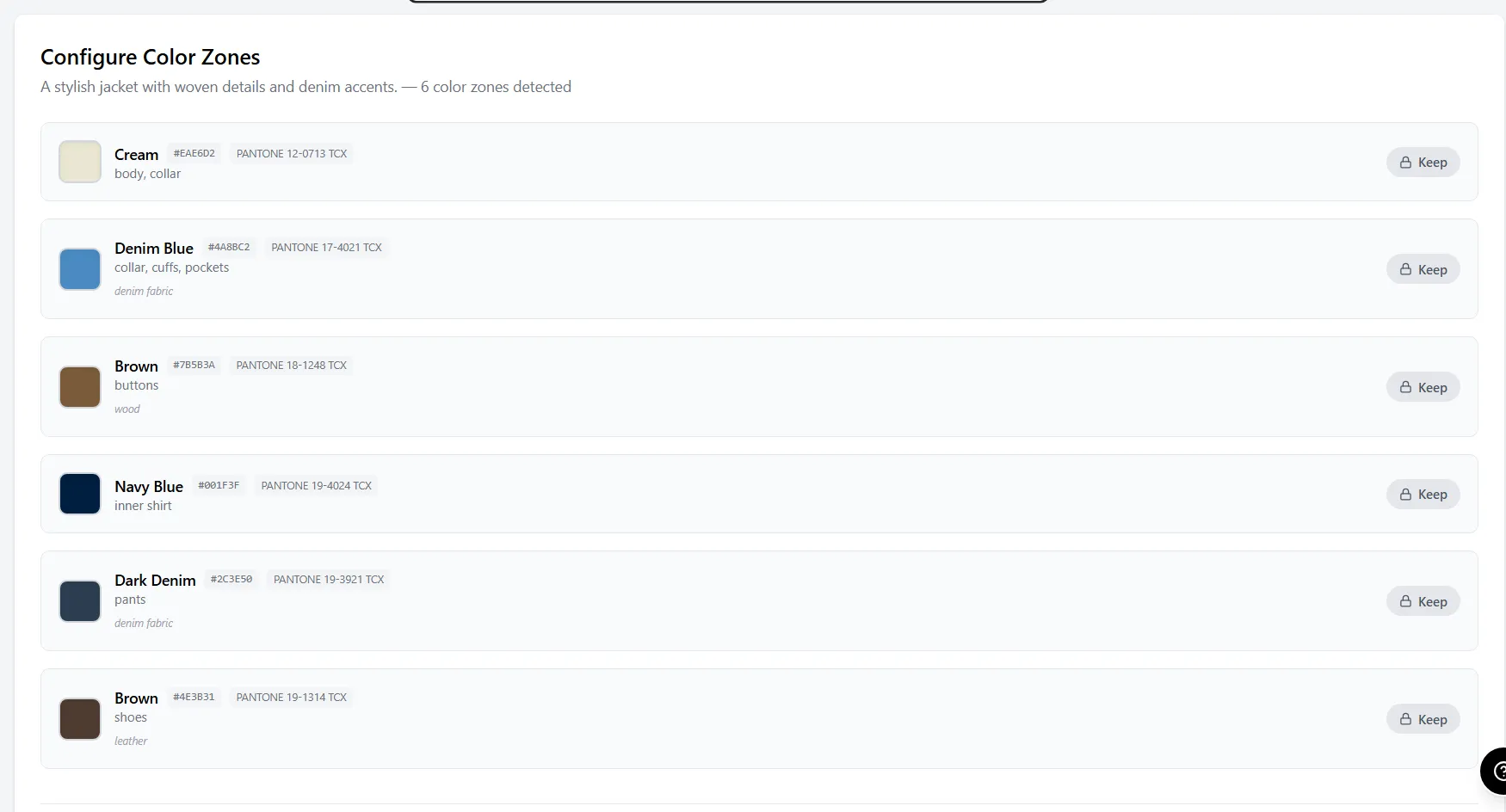 AI semantic masking detects distinct color zones — body fabric, collar, buttons, inner shirt, pants, and shoes — giving you independent control over each component.
Zone-based recoloring solves this by treating each component as an independent color channel. Adstronaut AI's Color Changer detects up to 8 distinct zones per product using AI semantic masking, and lets you change any combination of zones while leaving others untouched.
| Capability | Whole-Garment Tools | Zone-Based (Adstronaut AI) |
|---|---|---|
| Single-color products | Works well | Works well |
| Multi-color products | Poor results | Excellent results |
| Contrasting trim/hardware | Cannot control | Independent control |
| Component combinations | One option | Thousands of combinations |
| Zones detected | 1 (whole image) | Up to 8 per product |
| Product types supported | Solid garments only | Garments, bags, shoes, accessories |
According to research by the Color Association of the United States (CAUS), 83% of fashion products at retail contain 2 or more distinct color components, making zone-based recoloring essential for realistic colorway exploration.
Pantone Integration: Industry-Standard Color Matching
Creating visually appealing digital colorways is only half the challenge. The other half is ensuring your digital colors translate accurately to physical production. This requires mapping digital colors to industry-standard Pantone references.
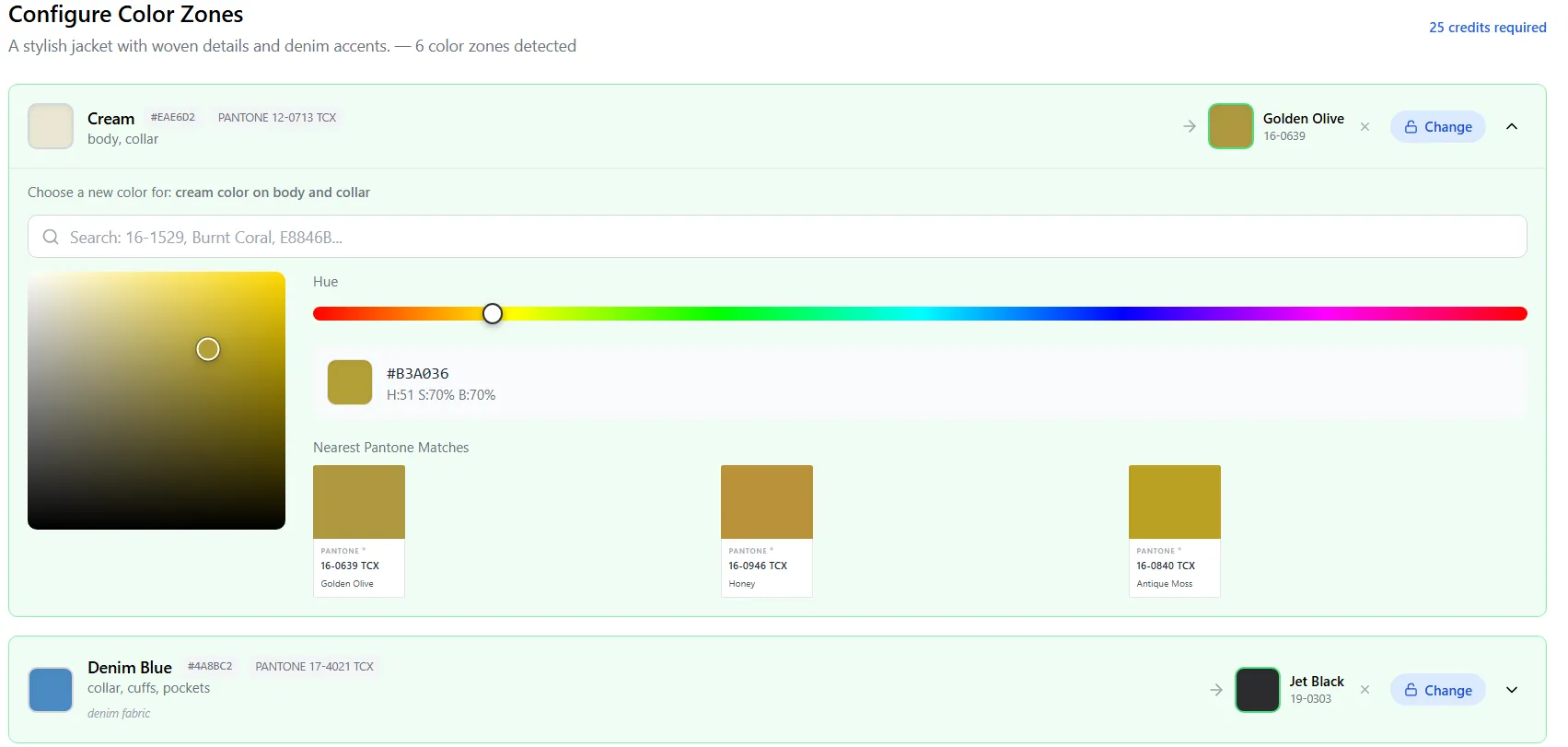 Adstronaut AI's color picker includes 2,400+ Pantone TCX codes, so every digital colorway maps directly to a factory-reproducible color standard.
Pantone's Fashion, Home + Interiors (FHI) system uses TCX (textile cotton) and TPX (textile paper) codes as the universal language between designers and manufacturers. When you specify "Pantone 16-0639 TCX Golden Olive" on your tech pack, any factory in the world can match that color within tolerance.
Adstronaut AI's Color Changer integrates 2,400+ Pantone TCX codes directly into the color picker. When you select a color for any zone, you can browse by Pantone code, search by name, or use the visual picker and see the nearest Pantone match. This means every digital colorway you create is immediately factory-ready — no color conversion guesswork.
Why this matters for production:
- Factories receive exact Pantone codes, not hex values or RGB approximations
- Lab dip approvals are faster because the starting target is industry-standard
- Color consistency across multiple factories and production runs is maintained
- Buyer presentations include production-accurate color references
A 2024 study by the American Association of Textile Chemists and Colorists (AATCC) found that providing Pantone references at the initial colorway stage reduced lab dip revision rounds from an average of 3.2 to 1.4, saving 2–4 weeks per style in the color approval process.
Step-by-Step Workflow: Creating Colorways with Adstronaut AI {#step-by-step-workflow}
Here is the complete workflow for creating photorealistic product colorways using Adstronaut AI's Color Changer, demonstrated with two real product examples.
Step 1: Upload Your Product Image
Start by uploading a high-quality photograph of your product. The tool accepts garments, bags, shoes, and accessories. You can upload up to 4 images at once for batch processing.
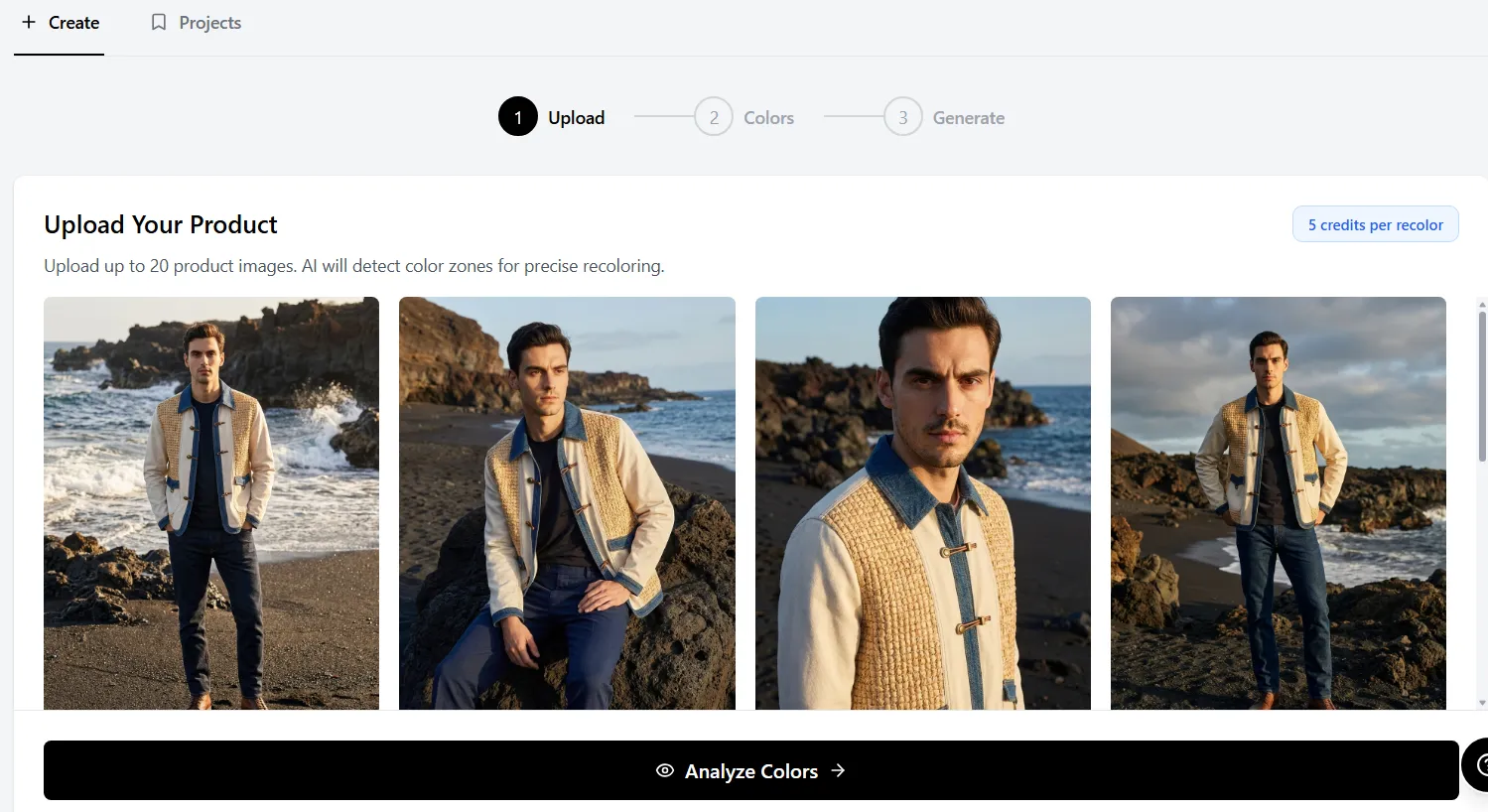 Upload your product photos — the Color Changer accepts any fashion product including garments, bags, shoes, and accessories.
For best results, use photographs with:
- Clean, uncluttered backgrounds (white or light gray preferred)
- Even lighting without harsh shadows
- Full product visibility (no cropping of edges)
- Resolution of 1000px or higher on the longest edge
Step 2: AI Detects Color Zones
Once uploaded, the AI analyzes your product using semantic segmentation to identify distinct color regions. This happens automatically in 5–10 seconds. The AI understands product structure — it distinguishes between body fabric, trim, hardware, embroidery, buttons, and other components.
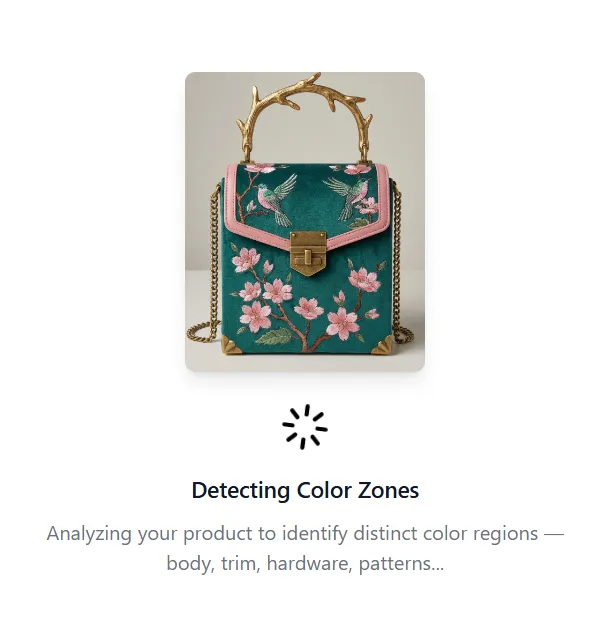 The AI analyzes product structure to identify distinct color zones — here detecting body fabric, trim, hardware, embroidery, and stitching on an embroidered handbag.
The AI typically detects 4–8 zones depending on product complexity. A simple t-shirt might have 2–3 zones (body, collar/neck binding, print). A detailed jacket might have 6–8 zones (body, collar, cuffs, buttons, zipper, lining, contrast stitching, pocket flaps).
Step 3: Configure Color Changes Per Zone
With zones detected, you select which ones to change and which to leave as-is. Each zone has its own color picker with full HSV control and Pantone TCX code matching.
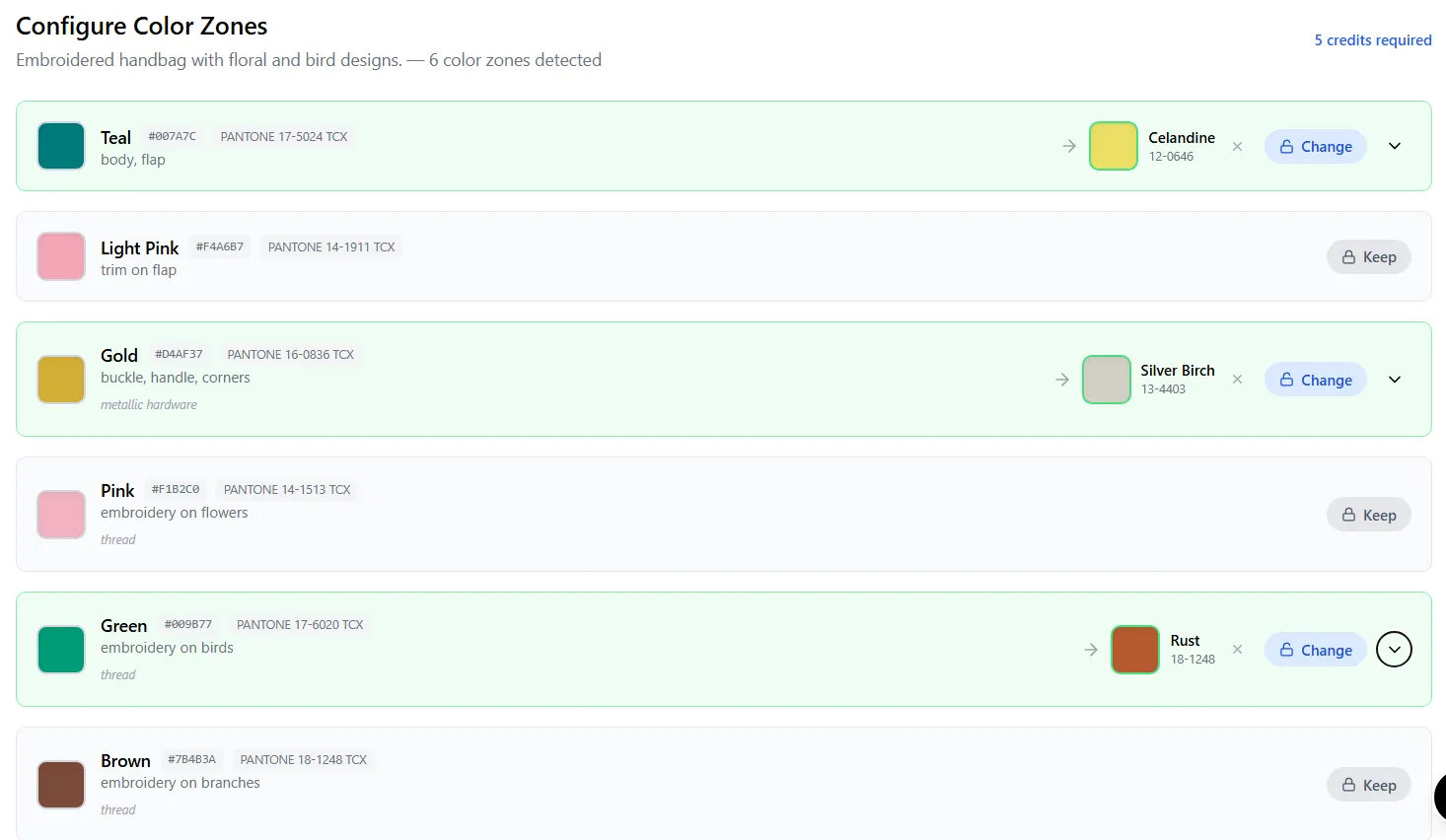 Configure each zone independently — change the body from teal to celandine yellow, swap gold hardware to silver birch, and shift green embroidery birds to rust, all while keeping other elements untouched.
This is where zone-based control shows its power. You can:
- Change the body color while keeping trim the same
- Swap hardware from gold to silver or gunmetal
- Test contrasting vs tonal color combinations
- Keep signature brand elements (like a specific embroidery color) unchanged
- Create completely new colorways that would require separate samples traditionally
Step 4: Generate and Review Results
Hit generate and receive your photorealistic recolored product in 15–30 seconds. The AI renders new colors with accurate texture behavior — a golden olive fabric shows different shadow and highlight characteristics than the original cream, and the AI captures this correctly.
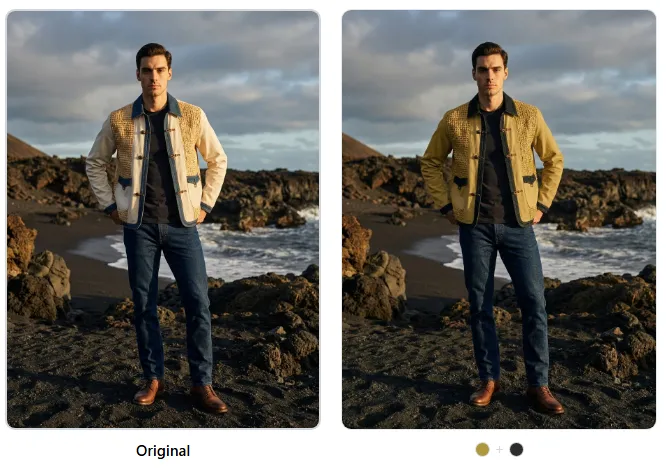 Before and after: the original cream and denim jacket transformed to a golden olive body with jet black denim collar. Notice how fabric texture, shadows, buttons, and stitching details are preserved with photorealistic accuracy.
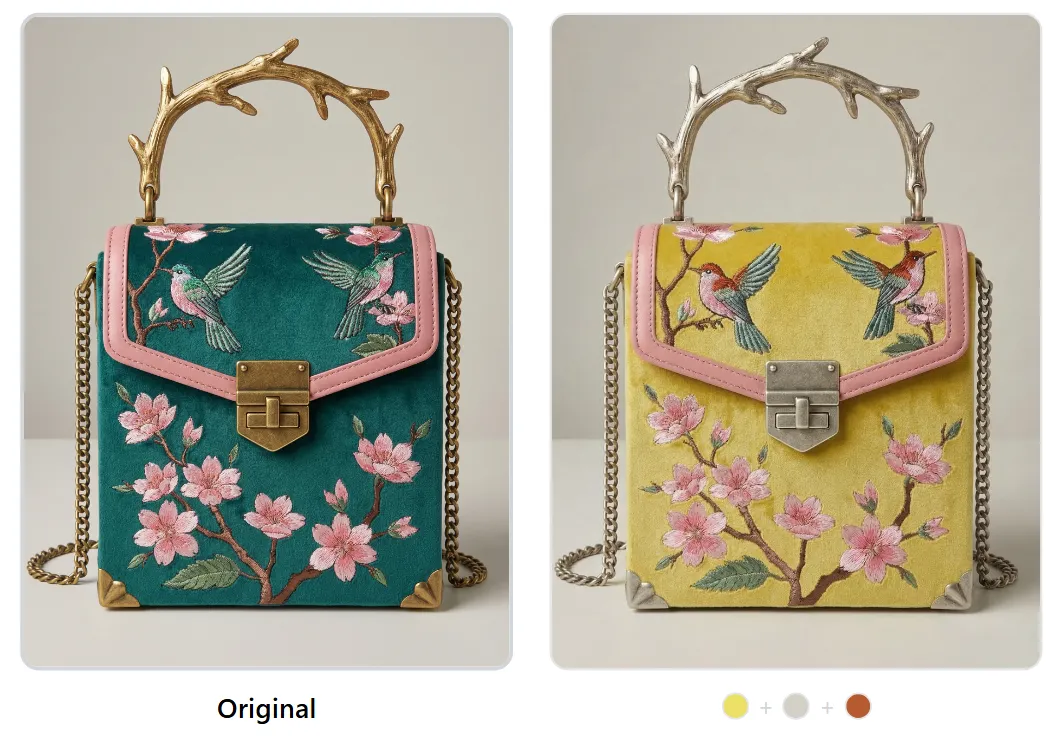 The embroidered handbag recolored from teal to celandine yellow with silver birch hardware and rust embroidery. Texture detail, leather grain, and embroidery stitching quality are maintained throughout.
Each result is a production-ready image you can use for:
- Internal design reviews and colorway selection
- Buyer presentations and line sheets
- Pre-sale e-commerce listings
- Social media content and lookbooks
- Tech pack color reference pages
Try the AI Color Changer free with your own products
Cost Comparison: All Methods Side by Side
Here is the complete comparison across all four colorway creation methods for a realistic scenario: creating 5 colorways for a single jacket style.
| Factor | Physical Samples | Photoshop Manual | CLO 3D / Browzwear | Adstronaut AI |
|---|---|---|---|---|
| Cost per colorway | $500–$1,500 | $280–$900 | $50–$150* | $0.50–$2 |
| Time per colorway | 2–4 weeks | 8–12 hours | 15 min (if model exists) | Under 60 seconds |
| 5 colorways total cost | $2,500–$7,500 | $1,400–$4,500 | $1,250–$4,750** | $2.50–$10 |
| 5 colorways total time | 3–6 weeks | 40–60 hours | 1–2 hours | 5 minutes |
| Skill required | None (outsourced) | Advanced Photoshop | 3D modeling expertise | None |
| Output quality | Real (gold standard) | Acceptable to poor | Excellent (3D render) | Photorealistic |
| Pantone accuracy | Exact (physical dye) | Manual approximation | Accurate (digital) | 2,400+ TCX codes |
| Zone-level control | Full (physical) | Manual masking | Full (material slots) | Auto-detected zones |
| Works on accessories | Yes | Yes (more labor) | Requires 3D model | Yes |
| Waste generated | 5 physical samples | None | None | None |
*CLO 3D cost assumes existing 3D model; color change only. **Includes $1,000–$4,000 for initial 3D model creation if not already built.
For a 30-style collection with 4 colorways each (120 total colorways):
| Method | Total Cost | Total Time |
|---|---|---|
| Physical samples | $60,000–$180,000 | 3–8 weeks (batched) |
| Photoshop manual | $33,600–$108,000 | 960–1,440 hours |
| CLO 3D (from scratch) | $36,000–$148,500 | 120–360 hours + setup |
| Adstronaut AI | $60–$240 | 2–3 hours |
The difference is not marginal — it is orders of magnitude. Digital colorway creation with AI does not merely reduce the cost of color exploration. It fundamentally changes how many creative options a brand can evaluate before committing to production.
Start creating colorways in seconds — try the Color Changer free
Frequently Asked Questions
How realistic are AI-generated colorways compared to physical samples?
Modern AI recoloring produces results that are 90–95% visually indistinguishable from real photographs in blind testing. The AI generates new pixel data (it does not just shift hue values), so fabric texture, weave pattern, shadow depth, and highlight behavior are all recalculated for the target color. The main limitation is extreme color shifts on highly textured fabrics — for example, changing a dark charcoal bouclé to pastel pink may show slight texture flattening. For most production colorway decisions, AI results are more than sufficient.
Can I use AI-generated colorways for e-commerce product listings?
Yes. AI-generated colorways are used by brands for pre-sale listings, buyer presentations, line sheets, social media content, and internal design reviews. For final production e-commerce imagery, many brands shoot the 1–2 winning colorways that were selected through AI exploration. This means you photograph only what you are actually producing, rather than sampling 5 options to pick 2.
How does Pantone matching work in AI color tools?
Adstronaut AI's Color Changer includes a library of 2,400+ Pantone TCX codes integrated directly into the color picker. You can search by Pantone number (e.g., 16-0639 TCX), browse by color family, or use the visual color picker and see the nearest Pantone match. When you generate a colorway, the Pantone reference is attached to each zone, so your tech pack and factory communication include exact color standards — not RGB approximations.
What types of products work with AI colorway creation?
AI zone-based recoloring works on any fashion product that can be photographed: garments (jackets, dresses, t-shirts, pants, knitwear), bags (handbags, backpacks, totes), shoes (sneakers, heels, boots), and accessories (belts, hats, scarves). The AI detects zones based on visual structure, so products with distinct components (different fabrics, hardware, trim) produce the best results. Solid single-color items work too, but zone-based control is most valuable on multi-component products.
How many color zones can the AI detect per product?
Adstronaut AI detects up to 8 distinct color zones per product. The number depends on product complexity: a basic t-shirt typically shows 2–3 zones (body, neckline, print), while a detailed jacket shows 6–8 zones (body, collar, cuffs, buttons, zipper tape, lining, pocket flaps, contrast stitching). You have full control over which zones to change and which to leave as-is.
Does AI recoloring preserve fabric texture and shadows?
Yes — this is the primary advantage of AI recoloring over Photoshop hue-shifting. The AI understands material properties and generates new color data that accounts for how a specific color interacts with the existing fabric texture. A golden olive cotton canvas shows different shadow tones than a jet black denim, and the AI renders these differences correctly. Weave patterns, grain direction, button reflections, and stitching details are all preserved.
Can I use AI colorways in buyer presentations and line sheets?
Absolutely. AI-generated colorways are being used by brands globally for wholesale buyer presentations, trade show materials, and line sheets. The photorealistic quality is sufficient for buyer decision-making, and many brands report that presenting 6–8 colorway options (instead of the traditional 2–3) has increased buyer order depth. You can include the Pantone references directly on the line sheet so buyers know exactly what production color to expect.
How does AI colorway creation compare to Photoshop for complex products?
For simple, single-color products (solid t-shirts, basic pants), Photoshop and AI produce comparable results — though AI is dramatically faster. The gap widens significantly on complex products. A multi-zone jacket that takes a Photoshop artist 10–15 hours to recolor convincingly takes under 60 seconds with AI zone-based recoloring. More importantly, the AI result is typically more photorealistic because it generates new color data rather than mathematically shifting existing pixel values, which degrades texture and creates unrealistic shadow behavior.
What resolution do I need for my product photos?
For best results, upload images that are at least 1000px on the longest edge. Higher resolution (2000–4000px) produces better results for zoomed-in detail views. The image should show the full product with clean, even lighting and a simple background. Studio product photography or professional flat-lay images work best, but well-lit smartphone photos also produce usable results.
Is AI recoloring accurate enough for factory production decisions?
AI recoloring combined with Pantone code matching gives you two layers of accuracy: the visual representation shows how the product will look in the target color, and the Pantone reference provides the exact production specification. Factories use the Pantone code — not the digital image — to match dye lots, so the accuracy of the visual is relevant for design decisions while the Pantone code drives production accuracy. This combination eliminates the need for physical color samples in the exploration phase, while maintaining production precision.
Sources
- McKinsey: State of Fashion 2025 — digital color sampling cited as reducing pre-production timelines by 40–60% and color-sampling costs by up to 85%.
- Pantone Fashion, Home + Interiors Color System — reference for TCX/TPX codes used in the Pantone integration workflow above.
- Ellen MacArthur Foundation: A New Textiles Economy — data on the 92 million tons of textile waste generated annually and pre-production sampling's contribution.
- Baymard Institute: E-commerce Product Page UX Research — 78% shopper preference for real photographs over 3D renders when comparing colorway imagery.
- AATCC Standards and Testing — test methods underpinning the lab-dip revision and color-matching discussion.
Ready to explore unlimited colorways without physical samples? Try Adstronaut AI's Color Changer free — upload any product photo and create your first colorway in under 60 seconds.