Is an AI Tech Pack Factory-Ready? 7 Practical Checks
An Adstronaut tech pack comes out of the generator with technical drawings, a graded measurement table, materials with swatches, a bill of materials, sewing callouts and a construction guide, in one document you can edit before you export. The question a technical designer asks next is the right one: what do I still have to check? We put three real packs through the seven checks below and documented every line we would change. Three packs, three corrections, none of them structural.
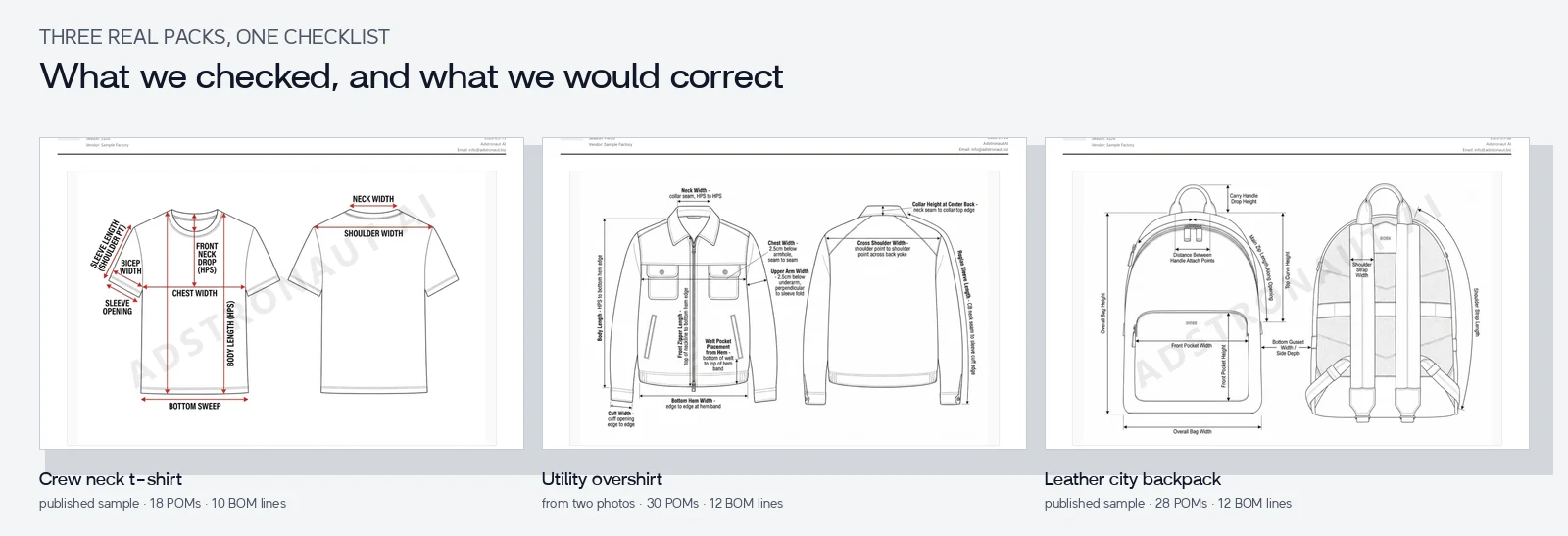
A published sample t-shirt, an overshirt generated from two photos, and a published sample backpack. Every page in this review is from the actual exports; nothing was retouched. Click any image to open it full size.
Open the overshirt PDF · T-shirt sample · Backpack sample
Generate a pack for your own garment and review it the same way →
In this review
- The seven checks
- What we would correct
- What needed no change
- Record corrections and open questions
- What still needs a person or a physical sample
- Frequently asked questions
The seven checks
| Pass | Check | Evidence you need |
|---|---|---|
| 1. Visible design | Silhouette, neckline, sleeves, pockets and closure match the reference | The source photos and your design brief |
| 2. Unseen details | Back, interior and hidden components are confirmed or marked proposed | Back and interior references, or a decision |
| 3. Measurements | Unit, endpoints, base size and source are explicit in every row | A measured sample or reviewed design targets |
| 4. Size rules | Grade steps and tolerances are separate and consistent row by row | Product-specific grading and tolerance decisions |
| 5. Materials | Composition, weight, placement, quantity and supplier state are credible | Approved material information; consumption review |
| 6. Construction | Callouts, construction guide and BOM describe the same garment | A technical read, then factory confirmation |
| 7. Export | Corrected values and images are in the revision you send | The exported PDF or workbook itself |
Start with anything that would change the product, the quote or the sample. One resolved ambiguity is worth more than ten cosmetic edits.
What we would correct
Across three packs, the review produced one correction each. All three are the kind a technical designer catches in a minute and fixes in the editor by clicking the value.
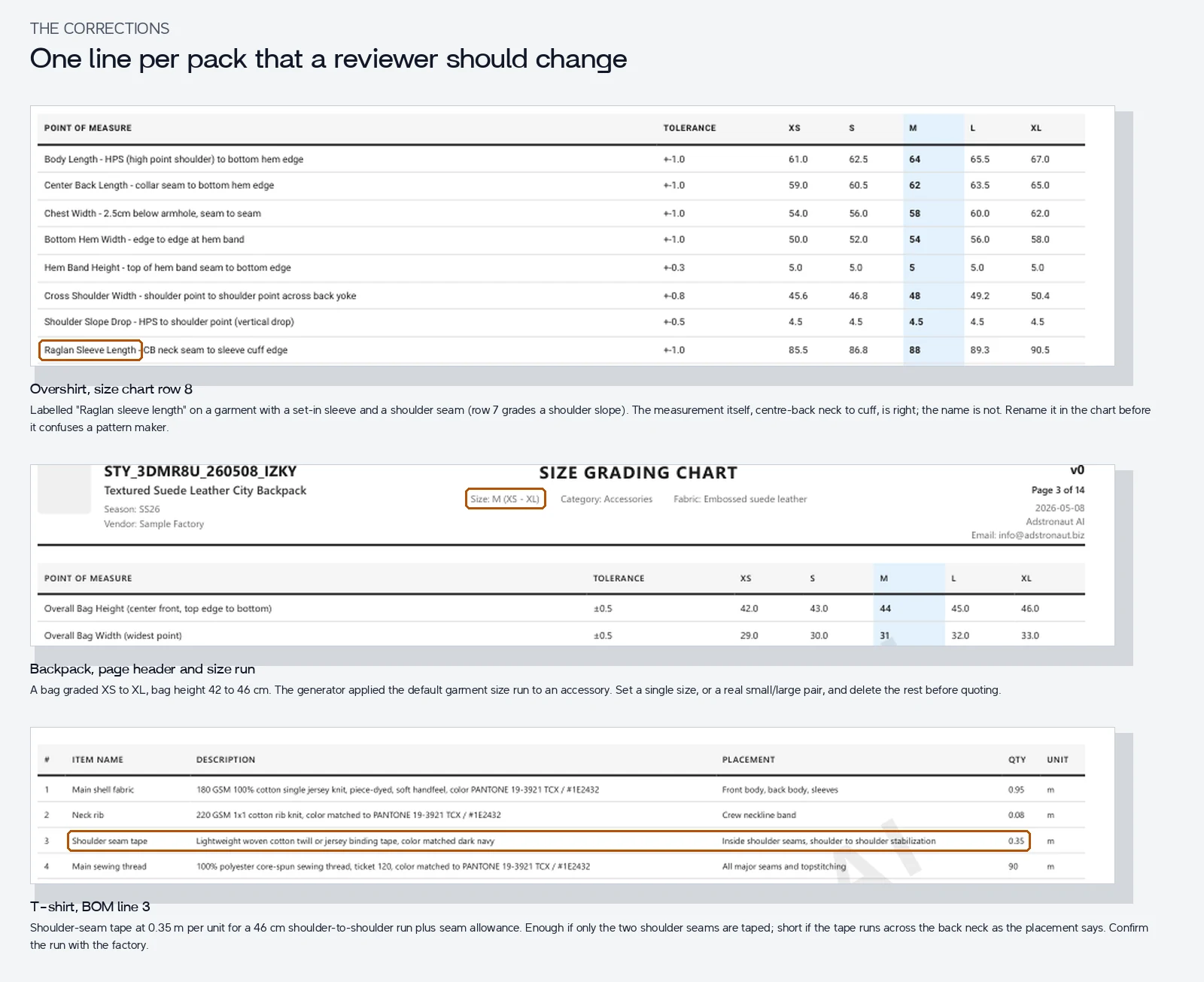
Overshirt, measurement row 8 (check 3). The row is labelled "Raglan sleeve length" on a garment that has a set-in sleeve and a shoulder seam; row 7 even grades the shoulder slope. The measurement itself, centre-back neck to cuff edge, is correct and useful. The name is wrong. Rename it before a pattern maker reads it.
Backpack, size run (check 4). The pack grades the bag from XS to XL, with the height moving from 42 to 46 cm. The generator applied a garment size run to an accessory. Set one size, or a real small and large, and delete the rest. Everything else in that chart, the gusset depth, handle drop and pocket placement, is specific to bags and measured sensibly.
T-shirt, BOM line 3 (check 5). Shoulder-seam tape at 0.35 m per unit. That covers two shoulder seams with allowance; it is short if the tape also runs across the back neck, which is what the placement text implies. Confirm the run with the factory and set the quantity to match. The other consumptions read as plausible estimates: 0.95 m of 180 GSM jersey for a size M, 90 m of thread.
Two more things the packs flagged themselves, which is the behaviour you want: the backpack BOM says the lining is "likely black or dark charcoal", and the overshirt's zipper line says "confirm final length by graded spec". Those are decisions, and the document marks them as decisions.
What needed no change
The parts that take a person longest to write by hand came out consistent.
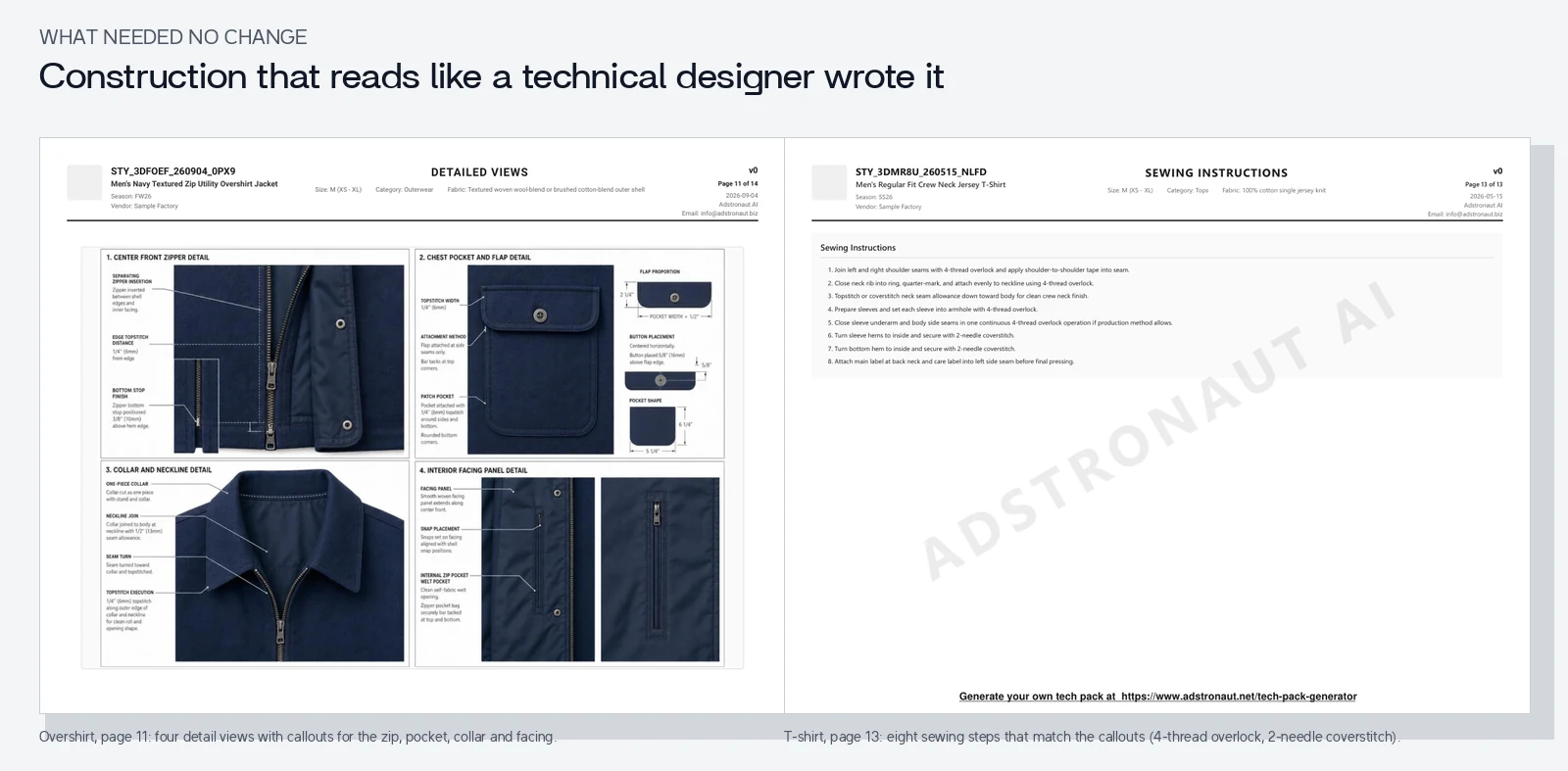
Construction (check 6). The t-shirt's sewing callouts, construction table and eight numbered instructions describe one garment: 4-thread overlock at shoulders with tape, 1×1 rib neckband, 2-needle coverstitch hems. The overshirt's construction guide names the same finishes as its sewing callouts: the separating zip with a topstitched edge, the patch pockets with flaps, the faced interior panel. The backpack's guide matches its BOM: mesh back panel over foam, webbing straps with metal sliders, rolled leather handle.
Measurement methods (check 3). Rows name their endpoints: "Chest width, 2.5 cm below armhole, seam to seam", "Front neck drop from HPS", "Carry handle drop height". Tolerances vary by row rather than being one copied value: ±1.0 on lengths, ±0.3 on the t-shirt neck, ±0.2 on the backpack handle width.
Colour and materials (check 5). Shell colours carry Pantone TCX references. Weights are stated in GSM or leather thickness in millimetres. Labels, hangtags and polybags are on the BOM, which is where hand-built packs usually forget them.
Download the overshirt PDF and check the pages yourself; the grading article walks through its size chart row by row.
Record corrections and open questions
Keep a short issue log while you review. These are the three from this article in that format:
| Pack, location | Observation | Action | State |
|---|---|---|---|
| Overshirt, size chart row 8 | "Raglan" label on a set-in sleeve measurement | Rename to "Sleeve length, CB neck to cuff" in the editor | Open, one click |
| Backpack, size run | XS to XL applied to a bag | Reduce to one size before quoting | Needs decision |
| T-shirt, BOM line 3 | 0.35 m tape vs a possible back-neck run | Confirm the run with the factory, set quantity | Open |
Keep the observation, the decision, the reviewer and the revision that carries the change. Adstronaut's fit log is the place for it once a sample exists.
What still needs a person or a physical sample
Software can catch inconsistent units, missing fields and conflicting descriptions. It cannot fit the sample, inspect an unseen seam, verify a fibre composition by eye, or accept a factory substitution for you. A technical designer and the manufacturer still decide pattern, grading, construction and material questions, and the sample process depends on the product.
What the software does is produce the document those people argue over, in minutes rather than a day, with the drawings and the tables already agreeing with each other. Review it with the seven checks, export the revision, and send it with the manufacturer handoff. Editable Excel and CSV export is on Pro and above; see plans.
Create a detailed tech pack for your product →
Frequently asked questions
Does "factory-ready" mean the output needs no review?
No pack, generated or hand-built, should go to a factory unread. The useful question is whether this document has confirmed instructions sufficient for the request you are making. A quote, a first proto and an approved bulk instruction need different levels of confirmation.
Can I use a generated technical drawing as evidence?
Treat it as the proposal until its labels, endpoints and values are checked, which is what the seven checks do. In the three packs above the drawings needed no change; one label in one table did.
Can you claim fewer sample rounds from this checklist?
Clearer specifications remove avoidable clarification and correction rounds. How many depends on the garment, the factory and the starting brief, so this article does not attach a percentage to the checklist.
What should accompany the reviewed pack?
The request stage, the quantity breakdown, the revision and your open questions. The manufacturer handoff kit has the brief and the email template, filled in for the same overshirt.