From Moodboard to Model: A Complete Guide to AI-Powered Design
The average fashion designer spends 2-3 weeks moving from an initial moodboard to a finalized design concept, according to a 2023 Statista survey of apparel industry professionals. AI concept-generation tools now compress that timeline to under 10 minutes, producing three detailed design directions from a single moodboard and text prompt. Here is a step-by-step guide to making that workflow real.
How do you translate the feeling of a moodboard into the concrete lines of a garment? How do you quickly explore different conceptual directions without spending days on sketches that might lead nowhere?
For independent designers, this early ideation phase is both critical and time-consuming. You're not just designing; you're trying to invent the future of your brand, one concept at a time. The pressure is immense, and creative fatigue is real.
What if you had an assistant who could understand your inspiration and instantly brainstorm concrete, detailed design concepts for you? What if you could see your moodboard transformed into a fully-realized, on-model design in minutes?
Welcome to the AI Designer by Adstronaut AI. This powerful tool acts as your creative partner, bridging the gap between abstract inspiration and a concrete design direction. This guide will walk you through the simple, four-step process of using the AI Designer to overcome creative blocks, accelerate your design process, and bring your vision to life faster than ever before.
Table of Contents
- What is an AI Designer? (Your New Brainstorming Partner)
- Step 1: Setting Your Vision - The Perfect Input
- Step 2: AI Brainstorming - Three Concepts, Zero Effort
- Step 3: The Final Reveal - Your Design, Visualized
- Deconstructing the Output: More Than Just a Pretty Picture
- What's Next? From Concept to Collection
What is an AI Designer? (Your New Brainstorming Partner)
Think of the Adstronaut AI Designer — similar in spirit to concept tools from CLO 3D, Browzwear, or Vizoo — not as a machine that designs for you, but as a tireless assistant that brainstorms with you. It's a conceptual tool that excels at synthesizing visual and textual ideas into structured, actionable design proposals.
The traditional design process is often linear and slow. The AI-assisted process is fast, iterative, and expansive.
| Traditional Design Process | AI-Assisted Design Process |
|---|---|
| 1. Gather inspiration (hours/days) | 1. Upload inspiration & write prompt (2 mins) |
| 2. Manually sketch dozens of rough ideas | 2. AI generates 3 detailed concepts (1 min) |
| 3. Refine a few promising sketches | 3. You select the best concept (30 secs) |
| 4. Create a final, detailed illustration | 4. AI generates a final, on-model design (2 mins) |
| Total Time: Days to a week | Total Time: ~5 Minutes |
This acceleration doesn't replace your creative judgment; it enhances it. By handling the initial brainstorming, the AI frees you to act as a creative director, curating the best ideas and refining them into a final product.
Step 1: Setting Your Vision - The Perfect Input {#step-1-setting-your-vision-the-perfect-input}
The quality of your AI-generated design is directly related to the quality of your input. The AI Designer works with two types of inspiration:
- A Text Prompt: A simple description of what you want to create (e.g., "A streetwear-inspired oversized hoodie").
- Inspiration Images: Up to five images that form your moodboard.
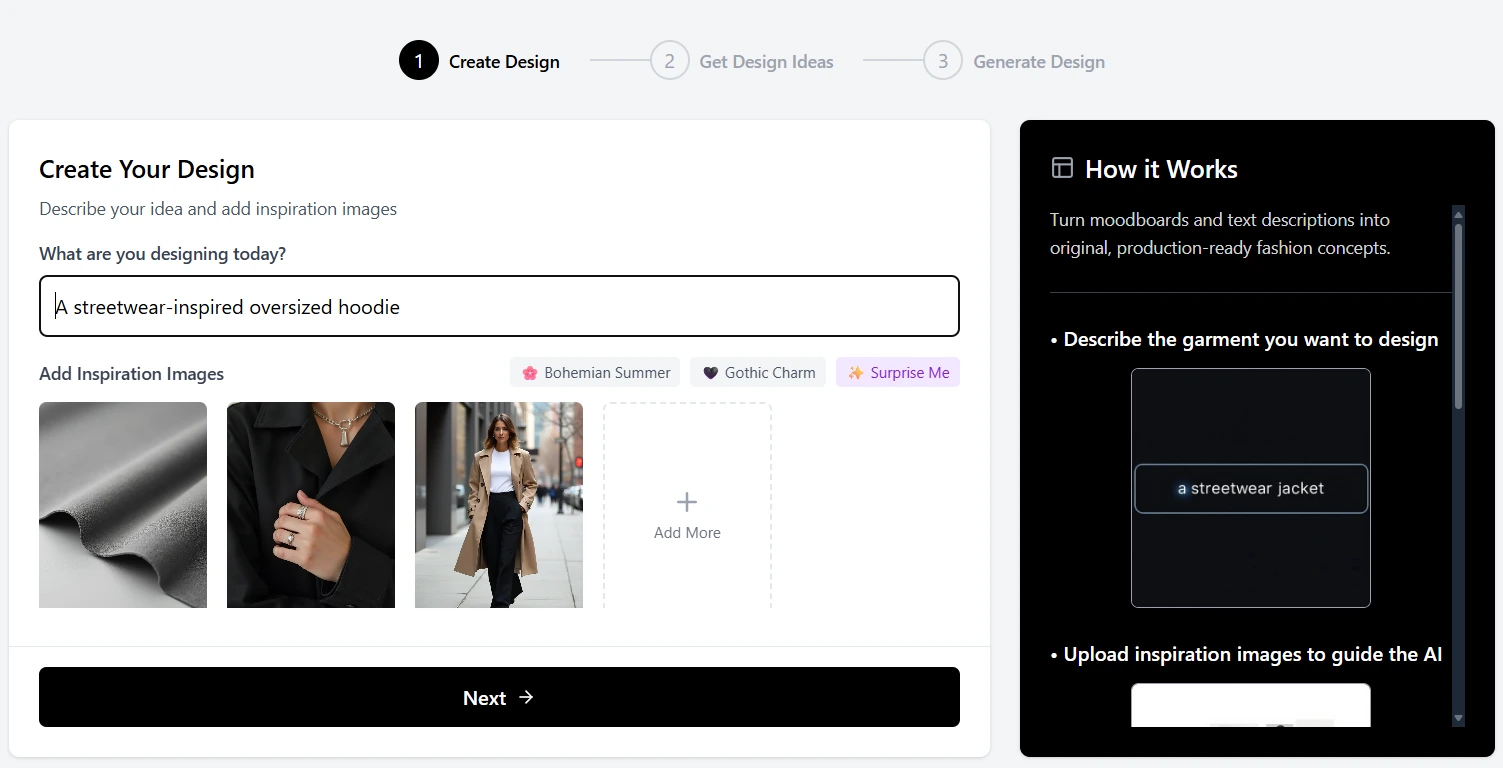 The first step is to feed the AI your vision with a text prompt and up to five inspiration images.
Tips for a Great Input:
- Be Specific in Your Prompt: Instead of "a nice dress," try "a romantic floral print midi dress for a summer wedding."
- Curate Your Moodboard: Your images should have a cohesive theme. They can be photos of existing garments, textures, color palettes, or even architectural details. The AI is brilliant at finding the common thread.
- Combine Both: The most powerful results come from using both a text prompt and inspiration images. The text provides the direction, and the images provide the aesthetic.
Step 2: AI Brainstorming - Three Concepts, Zero Effort {#step-2-ai-brainstorming-three-concepts-zero-effort}
Once you've provided your input and clicked "Next," the AI gets to work. It analyzes your images and text, synthesizes the core themes, and generates three distinct, text-based design concepts.
This is not just a simple description. Each concept is a mini-brief, complete with:
- A Creative Title: To capture the essence of the design (e.g., "The Urban Botanist Trench").
- A Detailed Description: A short paragraph explaining the silhouette, materials, and overall vibe.
- Key Features: A bulleted list of specific, defining details (e.g., "Asymmetrical closure," "Exaggerated lapels," "Integrated belt").
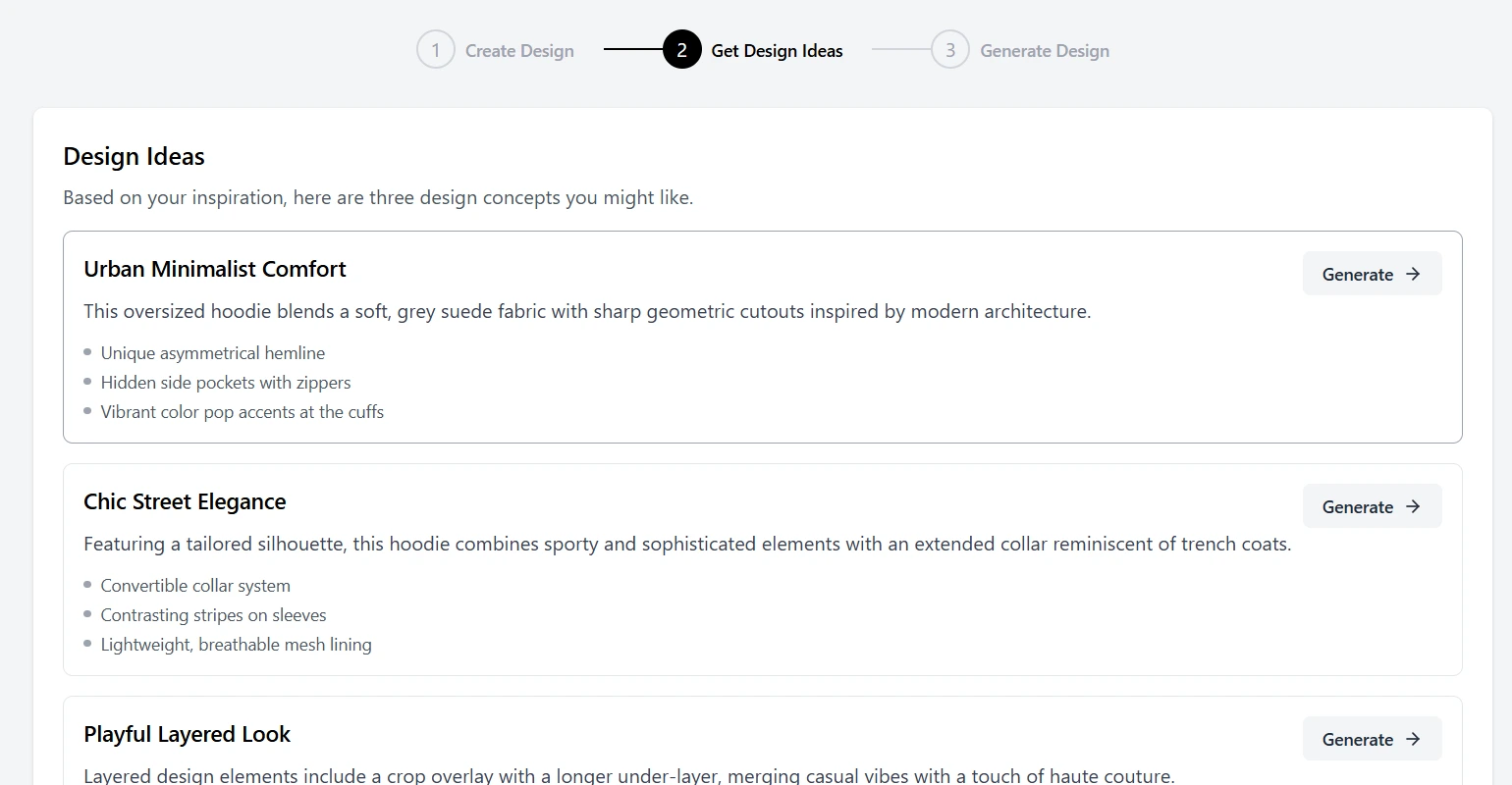 The AI Designer acts as your creative partner, brainstorming three unique, detailed concepts based on your inspiration.
This step alone is a massive accelerator for overcoming creative blocks. Instead of staring at a blank page, you are presented with three well-defined starting points, allowing you to quickly identify which direction feels most aligned with your vision.
Step 3: The Final Reveal - Your Design, Visualized {#step-3-the-final-reveal-your-design-visualized}
After reviewing the three concepts, you select the one that resonates most. This is where your creative direction comes in. You choose the path, and the AI brings it to life.
With a single click on "Generate," Adstronaut AI's image generation model takes the selected concept and creates a high-resolution, photorealistic, on-model image of your final design. In about two minutes, your abstract idea becomes a tangible, visual asset.
Turn your moodboard into a photoshoot →
Deconstructing the Output: More Than Just a Pretty Picture
The on-model image is the star of the show, but the AI Designer delivers a complete "concept kit" to help you move forward.
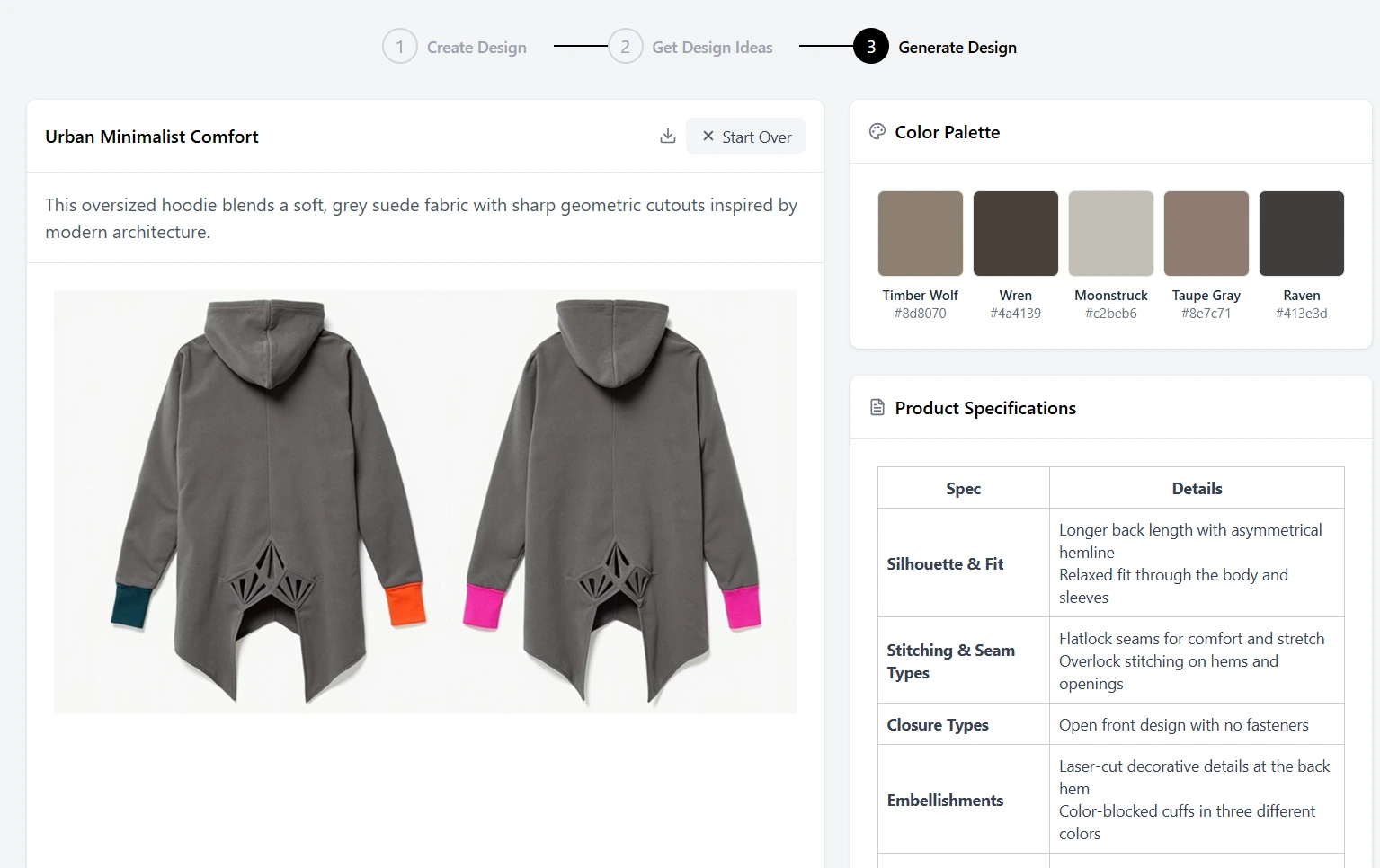 The AI Designer delivers more than an image; it provides a full concept kit including a color palette and starter tech pack specs.
Alongside your final design, you also receive:
- A Curated Color Palette: The AI extracts the five most dominant and harmonious colors from your final design and provides their Pantone Matching System (PMS) hex codes and names. This is the perfect starting point for your collection's color story.
- Product Specifications: A preliminary, AI-generated tech pack — structured similarly to what you would build in tools like Techpacker or Adobe Illustrator. You get a list of suggested materials, construction details, stitching types, and hardware. This data flows seamlessly into our Tech Pack Generator for further refinement.
This comprehensive output means you don't just have a picture; you have an actionable plan for turning that picture into a real product. This design-to-production workflow shows how AI can unify your entire fashion toolkit.
What's Next? From Concept to Collection
The design generated by the AI Designer is not an endpoint; it's the beginning of your streamlined production workflow within Adstronaut AI.
- Refine and Detail: Take the generated product specifications and open them in the Tech Pack Generator to add your specific measurements and finalize the manufacturing details.
- Explore Variations: Love the concept but want to see other options? Take your new design into the Variation Generator to instantly explore different patterns and styles.
- Visualize Colorways: Use the Color Changer to see your new design in different colors for the upcoming season.
- Create Your Campaign: Once you have a sample, use the AI Photoshoots tool to create an entire marketing campaign around your new design.
This seamless integration is the power of a unified platform. Every tool works together to move your idea from concept to customer with unprecedented speed. Experience this transformation in a day in the life of a designer using AI tools.
Bring your first AI-powered design to life →
Frequently Asked Questions
What kind of images work best as moodboard inputs for the AI Designer?
The AI performs best with curated, cohesive images — fabric textures, color palettes, garment silhouettes, or even architectural and nature references. Aim for 3-5 images that share a clear aesthetic thread. Avoid cluttered collages or low-resolution screenshots.
How specific should my text prompt be?
The more specific, the better. Instead of "a nice jacket," try "an oversized cropped bomber jacket in washed denim with contrast stitching for a streetwear SS26 collection." Including garment type, material, silhouette, and intended season gives the AI much stronger direction.
Can I use the AI Designer for knitwear or technical garments?
Yes. The AI Designer generates concepts across most garment categories, including knitwear, outerwear, and activewear. For highly technical garments, the text-based concept stage helps you refine construction details before visualization.
How does the AI Designer compare to tools like CLO 3D or Browzwear?
CLO 3D and Browzwear focus on 3D garment simulation for fit and drape analysis. The Adstronaut AI Designer is a concept-generation tool focused on rapid ideation — turning moodboards into design directions in minutes. They serve different stages of the design process and can complement each other.
Can I export the AI Designer output to other tools?
Yes. The generated design images, color palettes, and preliminary tech pack data can be downloaded and used as inputs for other tools, including Adobe Illustrator, Techpacker, or your own internal systems.
Sources and further reading:
- Statista — Fashion Industry Design Process Statistics — Survey data on design timelines and workflow bottlenecks
- McKinsey & Company — Generative AI and the Future of Fashion — Analysis of AI adoption in fashion concept development
- Business of Fashion — Technology in Fashion — Coverage of digital design tools and their impact on independent brands