Instantly Recolor Your Collection with the AI Color Changer
Pantone reports that color influences up to 85% of consumer purchase decisions, and the Pantone Color of the Year announcement consistently drives measurable spikes in fashion search traffic. Yet testing a single new colorway through traditional sampling costs $250+ and takes 3-4 weeks. AI recoloring tools now produce photorealistic colorway visualizations in under two minutes, letting brands test unlimited palettes before committing a dollar to production.
Traditionally, if you wanted to see how your bestselling blouse would look in Pantone's "Color of the Year," your options were limited:
- Digital Mockups: Spend hours in Photoshop painstakingly trying to recolor your product photos, often with unrealistic and flat-looking results.
- Physical Samples: Commit hundreds of dollars and wait several weeks for your manufacturer to produce a new sample in the desired color, a process you have to repeat for every single colorway you want to test.
This friction between creative curiosity and physical limitations means that countless promising color ideas are left on the cutting room floor. Brands are forced to make conservative bets, sticking to proven colors and missing out on opportunities to surprise and delight their customers.
What if you could break free from this cycle? What if you could visualize your entire collection in an unlimited number of colorways, instantly, with photorealistic results?
Introducing the AI Color Changer by Adstronaut AI. This powerful tool uses sophisticated AI to intelligently recolor your product photos, providing you with a complete, visually accurate representation of new colorways in minutes. It's a game-changer for seasonal planning, market testing, and unlocking the full commercial potential of your designs.
Just as the Variation Generator helps you explore new design patterns, the Color Changer lets you test unlimited color options without physical samples.
Table of Contents
- The High Cost of Color Exploration
- How AI Intelligently Recolors Your Garments
- A Simple Workflow for Instant Color Visualization
- Strategic Uses: From Trend-Spotting to Pre-Sales
- Maintaining Realism: AI vs. Simple Filters
- Design Your Next Season's Palette Today
The High Cost of Color Exploration
The traditional process of testing new colorways is a major financial and logistical drain for independent brands. Let's break down the real cost of exploring just three new colors for a single product.
| Step | Traditional Process | Associated Costs & Time |
|---|---|---|
| 1. Digital Mockups | A designer spends time in Photoshop. | |
| 2. Fabric Sourcing | Find and order lab dips for new colors. | Weeks of waiting for fabric swatches to arrive. |
| 3. Physical Sampling | Order 3 new samples from the factory. | ~$750 (3 samples @ $250/ea) + 3-4 weeks of production and shipping time. |
| 4. Photoshoot | Reshoot the new samples. | Potentially another photoshoot session, costing thousands. |
| Total Investment | ~$850+ and 5-8 weeks of time to simply see three new colors. |
This prohibitive cost and timeline mean that for most small brands, extensive colorway testing is an impossible luxury.
How AI Intelligently Recolors Your Garments
The Adstronaut AI Color Changer is not a simple color filter. A basic filter just overlays a color, destroying textures, shadows, and highlights, resulting in a flat, cartoonish image.
Our AI uses a much more sophisticated approach. It deconstructs your product photo, identifying:
- The exact boundaries of the garment.
- The material texture (e.g., the ribbing on a knit, the sheen of silk).
- The natural lighting, shadows, and highlights.
It then intelligently applies the new color within these parameters, preserving all the critical details that make the image look photorealistic.
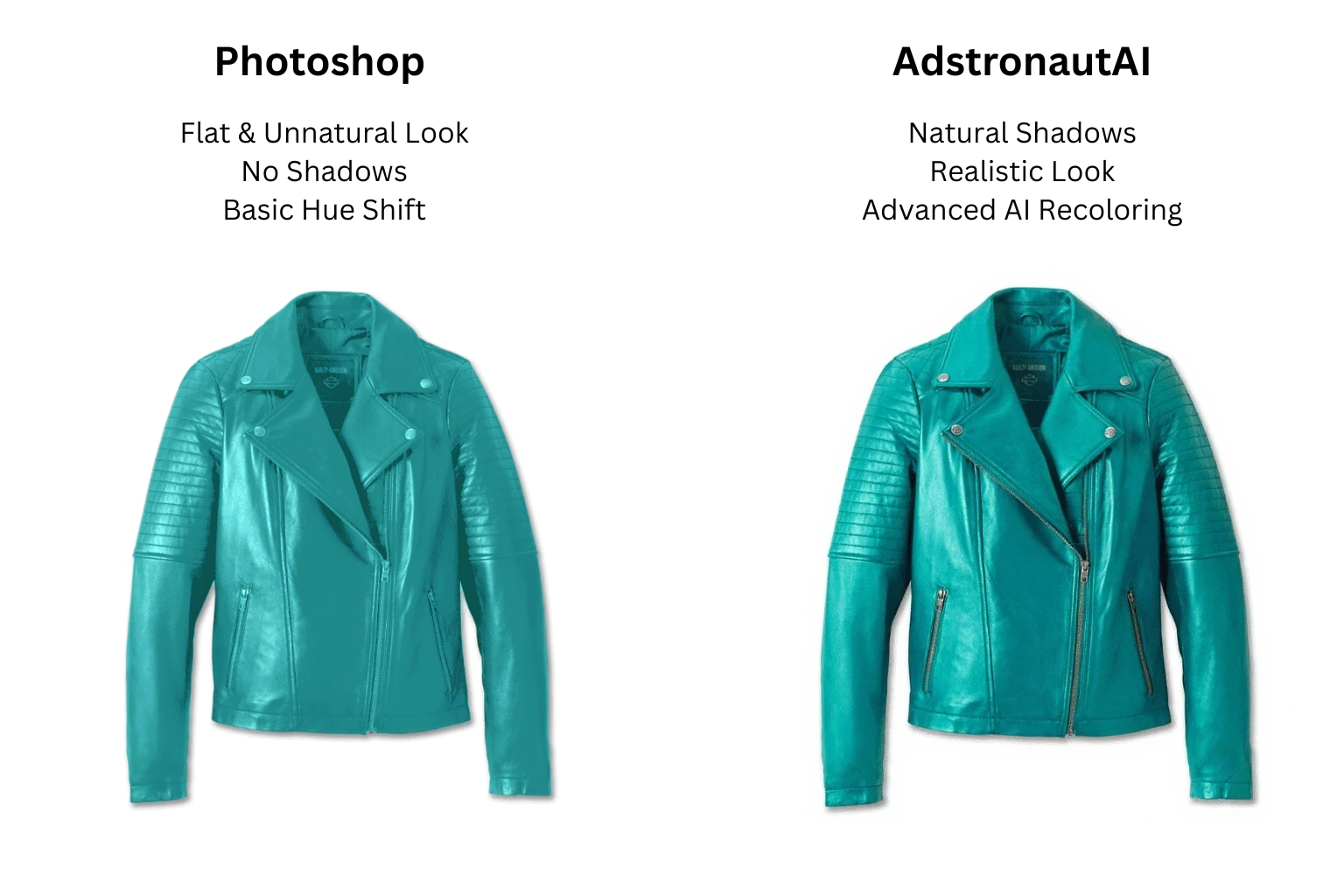 Unlike a simple filter, Adstronaut AI intelligently preserves texture and lighting for a photorealistic result.
The AI understands that a shadow on a red dress should be a darker red, not gray. It knows that a highlight on a blue sweater should be a lighter blue, not white. This intelligent application is what creates a result you can trust.
Recolor your designs in seconds — try it free →
A Simple Workflow for Instant Color Visualization
We've turned the multi-week process of color sampling into a task that takes less than five minutes.
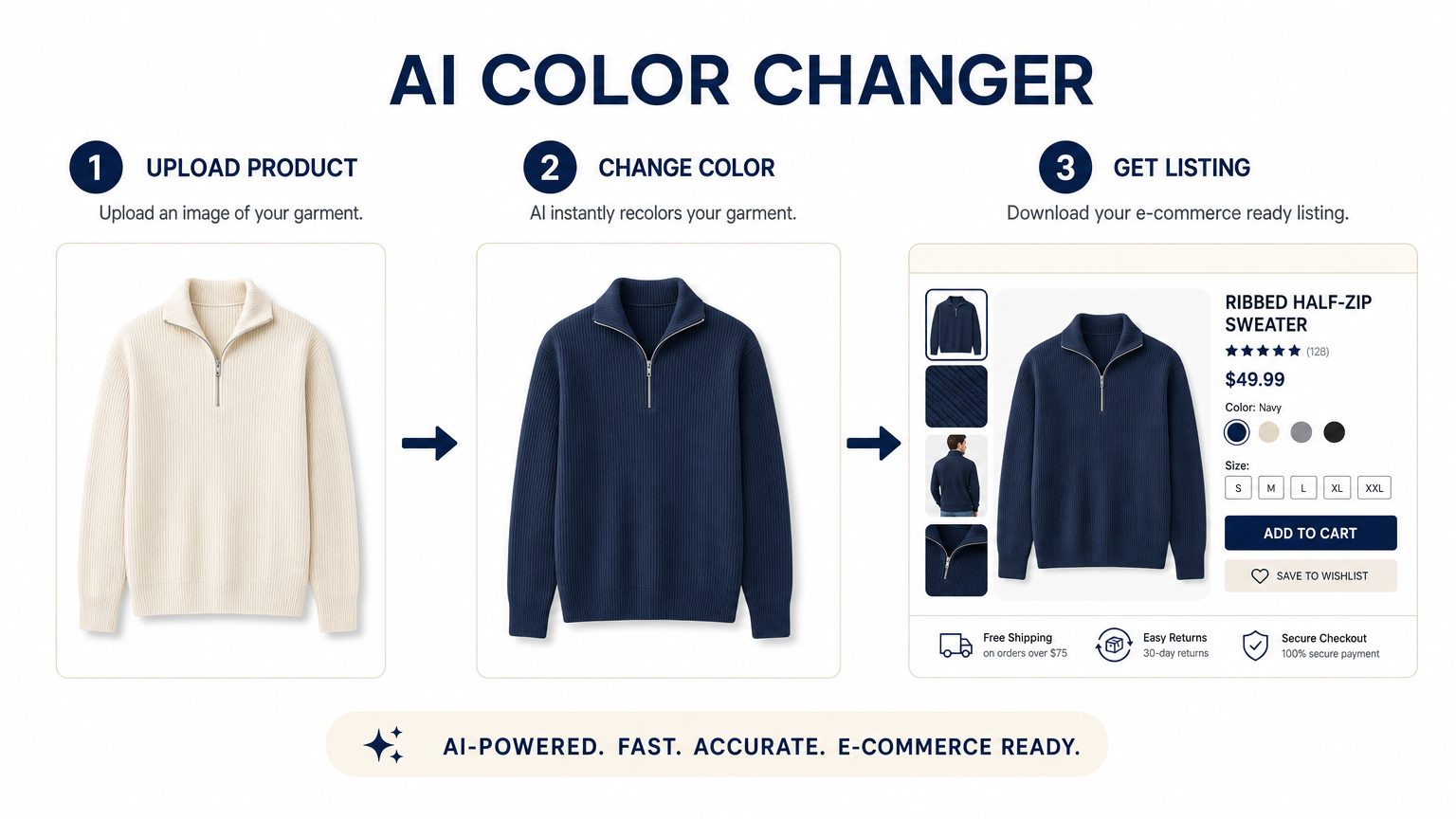
- Upload Your Product Photo: Start with a clear photo of your garment. The tool works best with images on a clean background or on a model.
- Select Your New Colors: Choose from our comprehensive Pantone Matching System (PMS) color library or use the color picker to select any custom shade you can imagine. You can select multiple colors to generate all your variations at once.
- Generate & Review: Click "Generate." In minutes, the AI will produce a high-resolution version of your product in every color you selected, all while preserving the original lighting and texture.
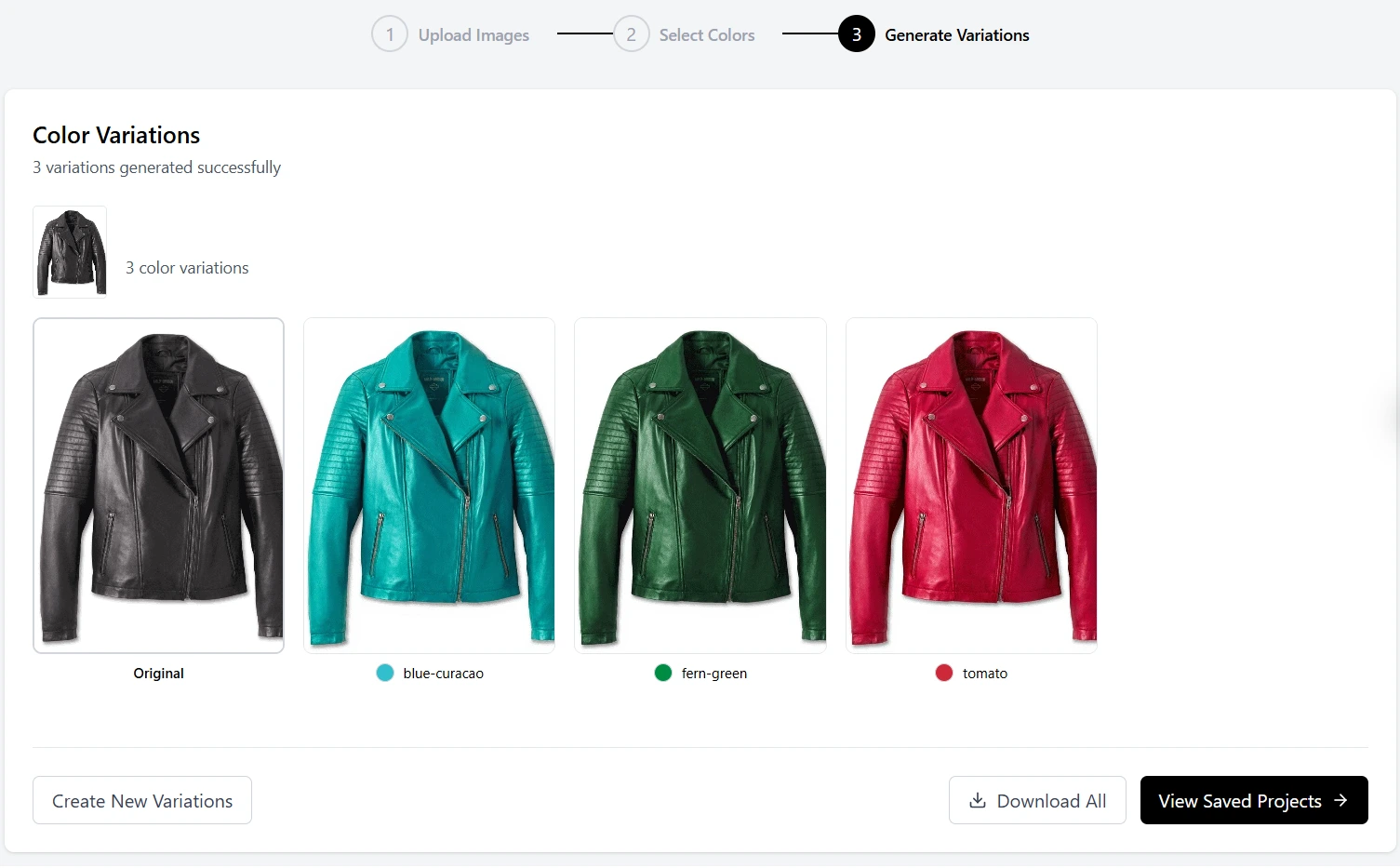 Instantly visualize your bestselling designs in a full spectrum of new color options for seasonal planning or market testing.
Strategic Uses: From Trend-Spotting to Pre-Sales
The ability to instantly visualize new colorways opens up a range of powerful strategic opportunities for your brand.
Test Seasonal and Trend Palettes Instantly
Heard that Pantone's "Mocha Mousse" (17-1230) is the 2025 Color of the Year, or that WGSN is forecasting "Digital Lavender" for next season? Don't guess — visualize. You can test your entire collection against next season's trending color palettes in an afternoon, allowing you to make data-informed decisions for your production runs.
Validate New Colors with Your Audience
Before committing thousands of dollars to a new colorway, run a simple test. Share the AI-generated images on social media and ask your audience which one they'd buy. This is a powerful, zero-risk way to gather direct market feedback.
Create "Coming Soon" Buzz and Pre-Orders
Use the hyper-realistic, AI-generated images to announce new colorways on your website and social media. You can even start taking pre-orders based on these visuals, securing sales and gauging demand before you've even placed the production order. Combine these recolored images with AI photoshoots to create full campaigns for each colorway.
Enhance Your E-commerce Experience
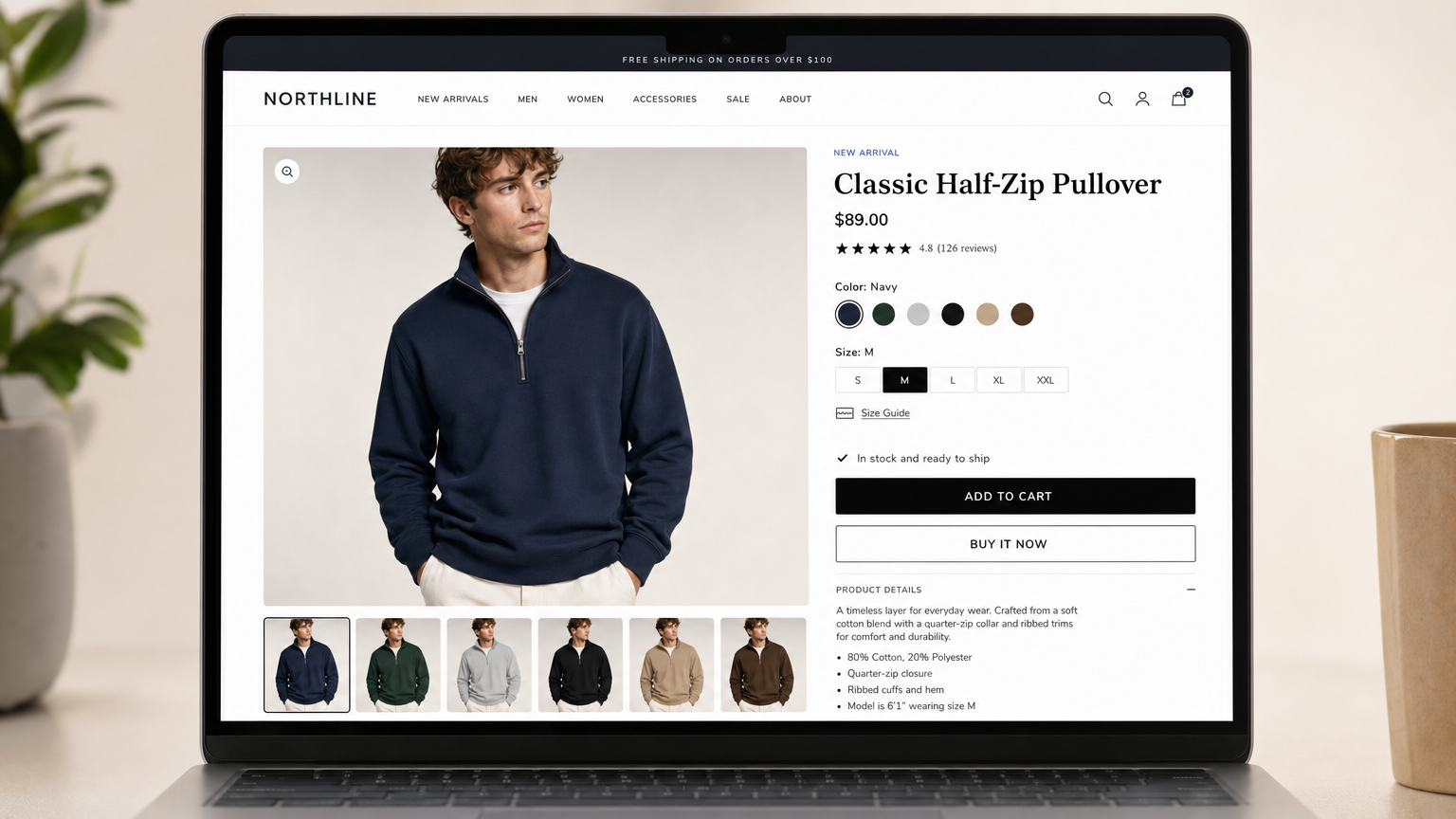
Instead of just showing color swatches on your product page, you can now show the actual product in every available color. This gives customers a much better understanding of what they're buying, leading to higher conversion rates and lower returns. These colorway images integrate perfectly with your product tagging workflow and complete e-commerce listings.
Maintaining Realism: AI vs. Simple Filters
It's important to reiterate that the quality of the output is what makes this tool strategic. A bad Photoshop Hue/Saturation adjustment — the method most designers default to in Adobe Photoshop or Affinity Photo — can make your product look cheap and untrustworthy. An AI-powered recoloring maintains the integrity of the original photo.
| Feature | Simple Color Filter (e.g., Photoshop Hue/Saturation) | Adstronaut AI Color Changer |
|---|---|---|
| Texture & Detail | Flattens and obscures fabric texture. | Preserves original fabric texture and details. |
| Shadows & Highlights | Colors shadows and highlights incorrectly, making them look unnatural. | Intelligently reapplies shadows and highlights in the new color. |
| Realism | Looks artificial and "photoshopped." | Creates a photorealistic and believable result. |
| Speed | Slow and manual process for each color. | Generates multiple colorways at once in minutes. |
Design Your Next Season's Palette Today
Color is one of the most powerful tools in a designer's arsenal, but it has always been constrained by the physical limitations of sampling. The AI Color Changer removes those constraints, giving you the creative freedom to explore, test, and validate your color ideas at the speed of thought.
Stop letting the cost of sampling dictate your brand's color story. Start visualizing your future collections today.
The Color Changer is just one part of a unified AI toolkit that can transform your design process. Calculate the full ROI of eliminating physical color samples and see how it impacts your bottom line.
Visualize your collection in new colors free →
Frequently Asked Questions
How accurate are the AI-generated colorway images compared to physical samples?
The AI preserves original fabric texture, shadows, and highlights, producing photorealistic results suitable for e-commerce listings, social media, and internal review. For final production decisions, brands typically confirm the selected colorway with a single physical lab dip.
Can I use specific Pantone codes with the Color Changer?
Yes. The tool includes a comprehensive Pantone Matching System (PMS) library, and you can also use a custom color picker to input any hex code or RGB value. This ensures your recolored images match your seasonal palette specifications.
How many colorways can I generate at once?
You can select multiple colors in a single session and generate all colorway variants simultaneously. There is no practical limit — many users test 8-12 colorways per product in a single sitting.
Does the AI Color Changer work with patterned fabrics?
Yes. The AI identifies and preserves pattern structures (stripes, florals, plaids) while shifting the underlying color palette. The pattern integrity is maintained, though results are strongest with solid or simply patterned fabrics.
Can I use the recolored images for pre-orders on Shopify?
Absolutely. The AI-generated images are high-resolution and photorealistic enough for product pages. Many brands use them for "Coming Soon" pages or pre-order listings to validate demand before committing to production.
Sources and further reading:
- Pantone — Color Intelligence — Research on color's role in consumer purchase decisions and trend forecasting
- Shopify — The Future of Commerce 2024 — Data on product imagery impact on e-commerce conversion rates
- WGSN — Color Forecasting Methodology — Industry-standard color trend forecasting used by major fashion brands