T-Shirt Tech Pack: Free Template, Measurements & Example (2026)
A t-shirt tech pack is a 6–8 page technical document that specifies fabric type and weight (typically 160–300 GSM cotton jersey), neck construction method (self-fabric binding vs ribbed neckband), measurement grading rules across all sizes, construction details (coverstitch hems, side-seam vs tubular body), and label placement. Despite the t-shirt's apparent simplicity, it is one of the most error-prone garments to manufacture — a half-inch grading mistake or wrong neck ribbing specification will be immediately visible because there are no design elements to hide flaws.
Generate a factory-ready tech pack free — 25 credits on signup, no card required →
This guide covers the five essential components of a factory-ready t-shirt tech pack, common mistakes that ruin first samples, and how to create one in minutes. Start from the free t-shirt tech pack template if you want a ready-made structure. New to tech packs? Start with our complete guide to fashion tech packs.
Table of Contents
- What is a T-Shirt Tech Pack?
- Key Components of a T-Shirt Tech Pack
- 1. The Flat Sketch (Front & Back)
- 2. T-Shirt Measurements & Grading
- 3. Bill of Materials (BOM): Body vs. Rib
- 4. Construction Details: Necks & Hems
- 5. Label Placement & Packaging
- Common T-Shirt Tech Pack Mistakes
- Create Your T-Shirt Tech Pack in Minutes
- Frequently Asked Questions
What is a T-Shirt Tech Pack?
A T-Shirt Tech Pack is a technical document that instructs a manufacturer how to construct your specific shirt. It acts as a contract between you and the factory.
It moves beyond the visual design (colors/graphics) and focuses on the technical execution:
- Fabrication: Is it 100% Cotton, Tri-blend, or Poly? What is the weight (GSM)?
- Fit: What is the exact chest width? The sleeve length? The neck drop?
- Finish: How are the hems sewn? Is there neck tape?
Without this document, you are guaranteed to receive a sample that doesn't fit your brand's vision.
Turn a t-shirt photo into a graded, factory-ready tech pack →
Key Components of a T-Shirt Tech Pack
When using Adstronaut AI, the tool automatically structures your project into the 12 tabs required for a complete pack. Here is how that structure applies specifically to T-shirts.
1. The Flat Sketch (Front & Back)
A T-shirt is a 3D object, but the factory cuts it from 2D fabric. They need a Technical Flat Sketch—a black and white line drawing that shows the garment laying perfectly flat.
Why it matters for Tees: You must show the Back View. Why? Because the back view dictates how the collar is attached (is there a moon patch? Is there neck tape?) and the shape of the armhole curve.
Adstronaut AI Feature: When you upload your T-shirt photo, our AI converts it into a clean line drawing. It captures the silhouette, the sleeve angle, and the hemline, giving you a professional base sketch without opening Illustrator.
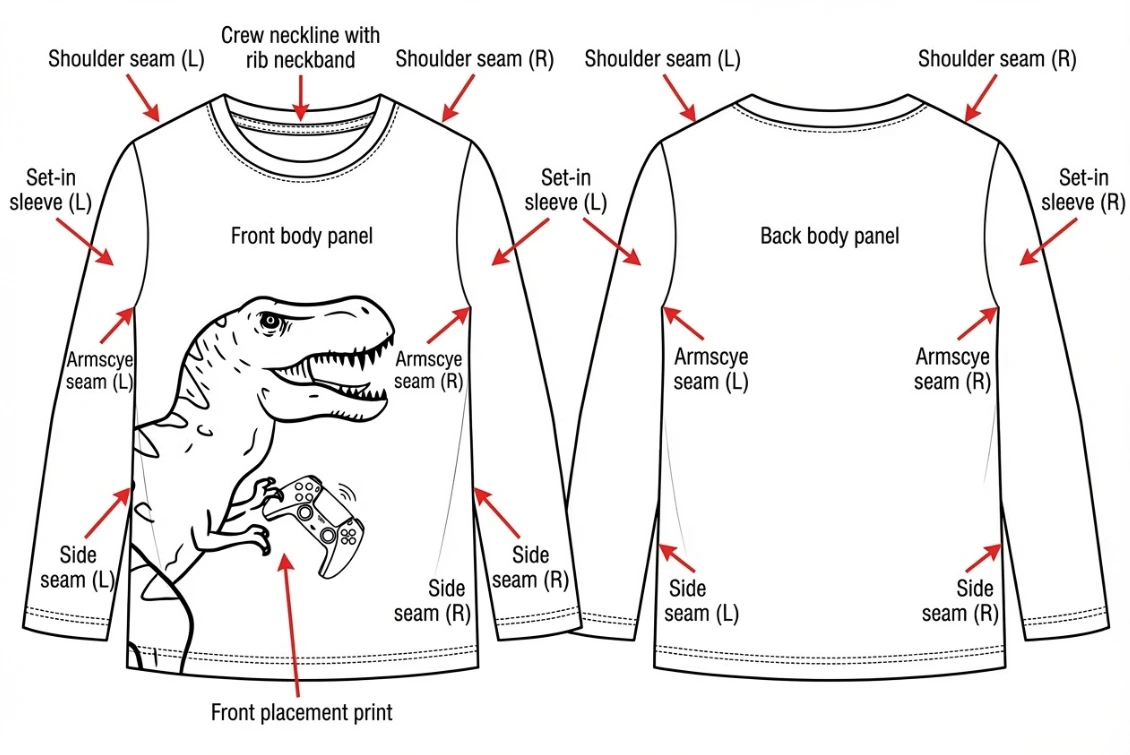 Technical flat sketch showing front and back views on a blueprint grid.
2. T-Shirt Measurements & Grading
This is where brands fail most often. For a T-shirt, the "Fit" is determined by the relationship between the Chest Width, Body Length, and Shoulder Width.
The Grade Rule: You create a sample in Size M. But how do you get Size XL? You apply a Grade Rule.
- Example: Chest width increases by 1" per size.
- Example: Length increases by 1" per size.
Adstronaut AI Feature: In the Size Table tab, you input your sample measurements. The system then automates the math for the rest of the size run. You don't need to calculate what an XS chest width should be; the tool follows your rule and fills in the columns.
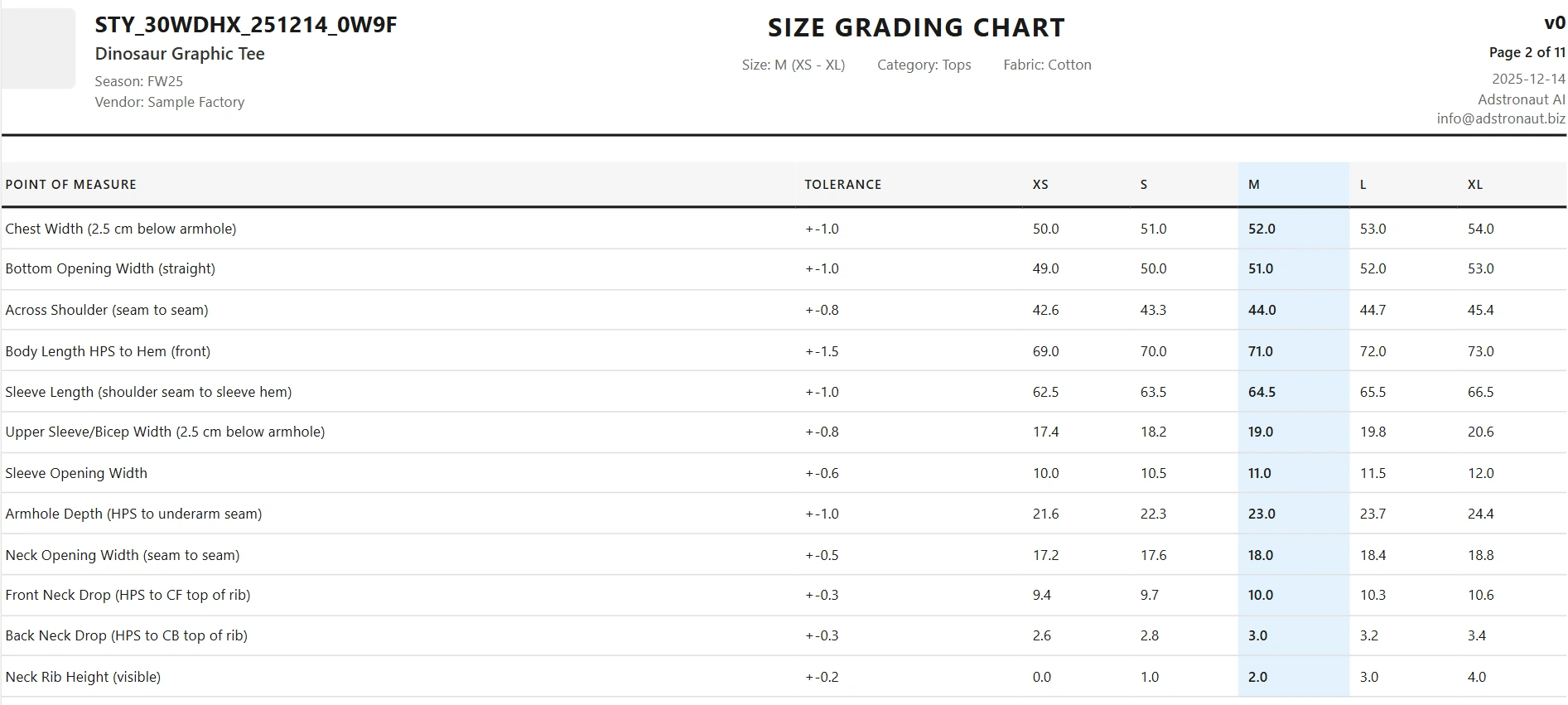 Size Table showing graded measurements across S, M, L, XL.
Standard Unisex T-Shirt POM Reference (inches, finished garment):
| Point of Measure | XS | S | M | L | XL |
|---|---|---|---|---|---|
| Chest Width (1" below armhole) | 18 | 19 | 20 | 21 | 22 |
| Body Length (HPS to hem) | 26.5 | 27.5 | 28.5 | 29.5 | 30.5 |
| Shoulder Width | 16.5 | 17 | 17.75 | 18.5 | 19.25 |
| Sleeve Length (shoulder point) | 8 | 8.25 | 8.5 | 8.75 | 9 |
| Armhole (straight) | 8.25 | 8.75 | 9.25 | 9.75 | 10.25 |
| Neck Width | 6.5 | 6.75 | 7 | 7.25 | 7.5 |
| Neck Drop (front) | 2.75 | 3 | 3.25 | 3.5 | 3.75 |
| Neck Rib Width | 0.75 | 0.75 | 0.75 | 0.75 | 0.75 |
These are a common indie-brand baseline — fashion fits, boxy/crop fits, and longline fits will shift length and chest values from here. State your grade rule explicitly (e.g., chest +1" per size) in the Size Table so the pattern maker does not interpolate their own.
3. Bill of Materials (BOM): Body vs. Rib
A common mistake is assuming a T-shirt is made of one fabric. It is usually made of two.
- Self Fabric: The main body (e.g., Jersey).
- Ribbing: The stretchy fabric at the neckband.
If you try to make a neckband out of the body fabric, it won't stretch over the head, or it will sag immediately.
Adstronaut AI Feature: The BOM tab provides the structure to separate these items. You can create a row for "Main Body - 180GSM Jersey" and a separate row for "Neck Trim - 1x1 Rib." The AI even generates visual swatches for these entries so the factory sees the texture difference.
 BOM tab clearly separating main fabric from neck ribbing.
4. Construction Details: Necks & Hems
How is the t-shirt put together? This dictates the price and durability.
Critical T-Shirt Specs:
- Neck Tape: A strip of fabric sewn over the back neck seam. It looks premium and prevents the neck from stretching out.
- Coverstitch: The standard double-needle stitch used on hems (sleeves and bottom) to allow for stretch.
- Side Seams vs. Tubular: Are you cutting panels (Side Seam) or using a continuous tube of fabric (Tubular)?
Adstronaut AI Feature: Use the Construction Guide tab to input these notes. The Garment Callouts feature allows you to drag a numbered marker to the back of the neck sketch and note: "Self-fabric neck tape required, shoulder to shoulder."
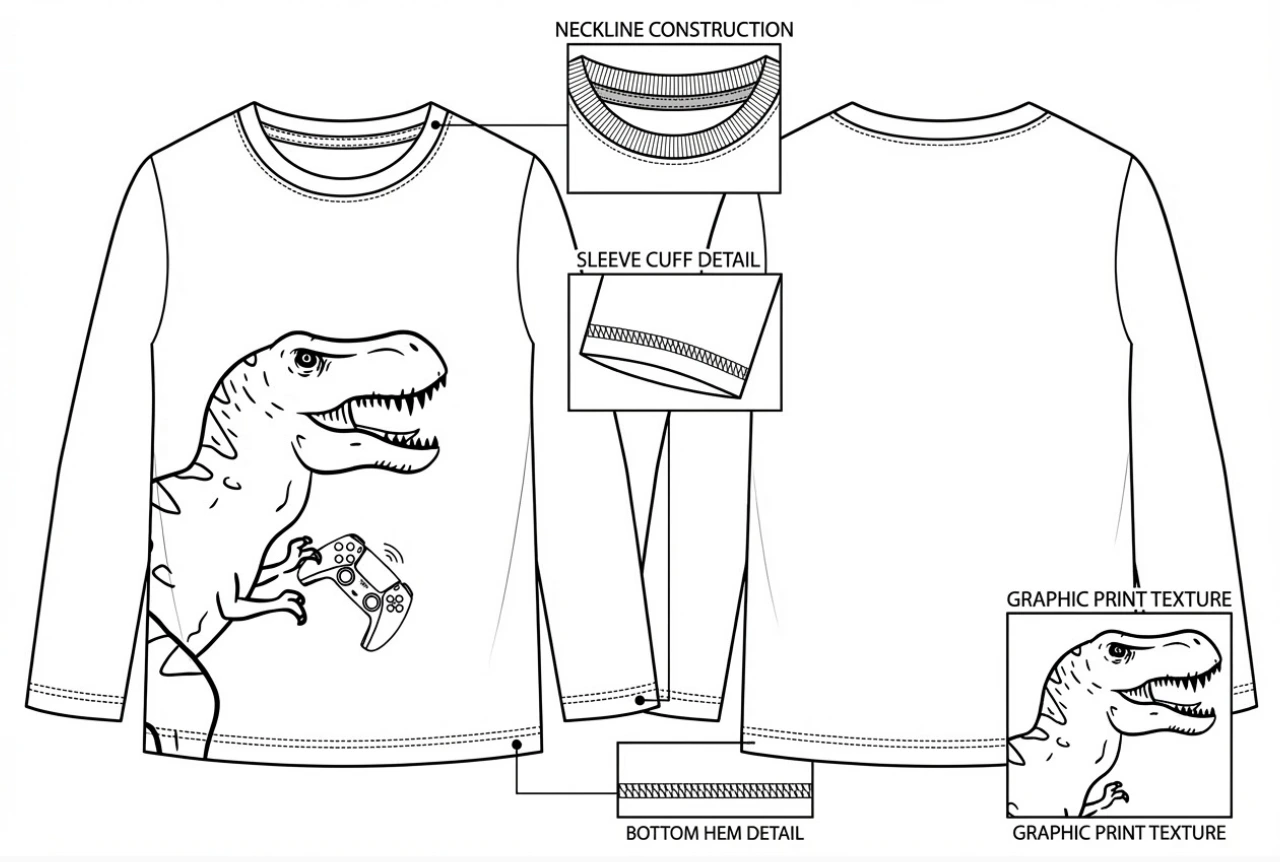 Close-up showing ribbed collar and neck tape reinforcement.
5. Label Placement & Packaging
Where does the size tag go? Is it a printed neck label (heat transfer) or a woven tag? Your care label also has legal requirements: it must carry the correct wash, bleach, dry and iron symbols for your fabric — our laundry symbols guide decodes every icon if you need to build one.
Adstronaut AI Feature: The Artwork & Annotation tabs let you upload your logo file and place it on the sketch. You can specify the exact distance from the High Point Shoulder (HPS) to the center of your logo print, ensuring it doesn't end up on the stomach.
Build your t-shirt tech pack from a single photo →
Common T-Shirt Tech Pack Mistakes
Even seasoned designers slip up on tees. Avoid these three errors:
- Forgetting Shrinkage: Cotton shrinks. Your tech pack should specify a "Tolerance" or request "Pre-shrunk" fabric.
- Ignoring the Rib: As mentioned, failing to specify a spandex-blend rib for the collar results in a "bacon neck" (wavy collar) after one wash.
- Vague Colors: Don't say "Navy Blue." Say "Pantone 19-3923 TCX." The Colorways tab in Adstronaut helps you organize these codes.
Create Your T-Shirt Tech Pack in Minutes
You don't need to spend hours in Illustrator drawing grading lines. Adstronaut's AI tech pack generator provides the structural framework a factory needs for T-shirt production — and you can inspect a finished crewneck t-shirt sample pack before you generate your own.
- Upload your T-shirt photo.
- Annotate the measurements on the AI-generated sketch.
- Fill the pre-formatted BOM with your fabric choices.
- Export a professional PDF.
Get your basics right, and the rest of the collection will follow. Want to learn how to create a tech pack step-by-step? Or see more tech pack examples across different garment types? If your next style is fleece, the hoodie tech pack guide covers hardware and heavyweight fabrics — and every garment here has a free tech pack template you can download.
Generate your t-shirt tech pack for free →
Frequently Asked Questions
How much does a T-Shirt tech pack cost?
If you hire a freelancer, a single T-shirt tech pack typically costs between $40 and $150. With Adstronaut AI, you can generate one in minutes as part of your subscription, costing pennies per pack. Calculate your potential savings with our ROI calculator.
What is the standard fabric weight for a T-shirt?
Standard "mid-weight" tees are usually 160-180 GSM (Grams per Square Meter). Heavyweight streetwear tees are 220-300 GSM. You should specify this number in your BOM.
Do I need a tech pack for blank t-shirts?
If you are buying pre-made blanks (like Gildan or Bella+Canvas) and just printing on them, you don't need a manufacturing tech pack. You only need a "Print Placement" sheet. However, if you are manufacturing a custom fit (Cut & Sew), a tech pack is mandatory.
What is the difference between side-seam and tubular t-shirt construction?
Side-seam construction uses separate front and back panels sewn together at the sides, allowing for a more tailored fit and precise width control. Tubular construction uses a continuous tube of knitted fabric with no side seams, which is cheaper to produce but limits fit options and can twist after washing. Most premium and custom t-shirt brands use side-seam construction. Your tech pack should specify which method you want.
What shrinkage tolerance should I include in my t-shirt tech pack?
Cotton jersey typically shrinks 3–5% in length and 1–3% in width after the first wash. Your tech pack should either specify "pre-shrunk" fabric (already treated to minimize shrinkage) or include a shrinkage tolerance of +5% on all length measurements. For example, if your finished body length target is 28 inches, your pre-wash spec should be 29.4 inches. Always note the acceptable shrinkage range in the measurement notes.
What neck construction options should I consider for my t-shirt?
The three main options are: (1) 1x1 rib neckband — the standard choice, stretchy and durable, typically 2–2.5cm wide; (2) self-fabric binding — uses the main body fabric folded over the neck edge, creating a cleaner look but less stretch; (3) raw edge / cut finish — the neck opening is left unfinished for a distressed aesthetic. Your tech pack must specify the neckband width, the number of needle stitching (single or double), and whether the neck seam uses a coverlock or overlock stitch.
Sources and further reading:
- ASTM D6193 — Standard Practice for Stitches and Seams (stitch type standards referenced in t-shirt construction)
- Maker's Row — T-Shirt Manufacturing Guide (fabric weight and construction best practices)
- Adstronaut AI — The Complete Guide to Fashion Tech Packs (comprehensive tech pack overview)