Tech Pack Examples: 15 Sample Packs You Can Download
A useful tech-pack example lets you inspect the actual document: drawings, measurements, materials and construction notes together. This library holds fifteen Adstronaut AI sample packs you can read online and download as PDFs, and one complete export from a real product shown page by page. Choose a product close to yours, see how its sections work, then adapt the structure for your own style.
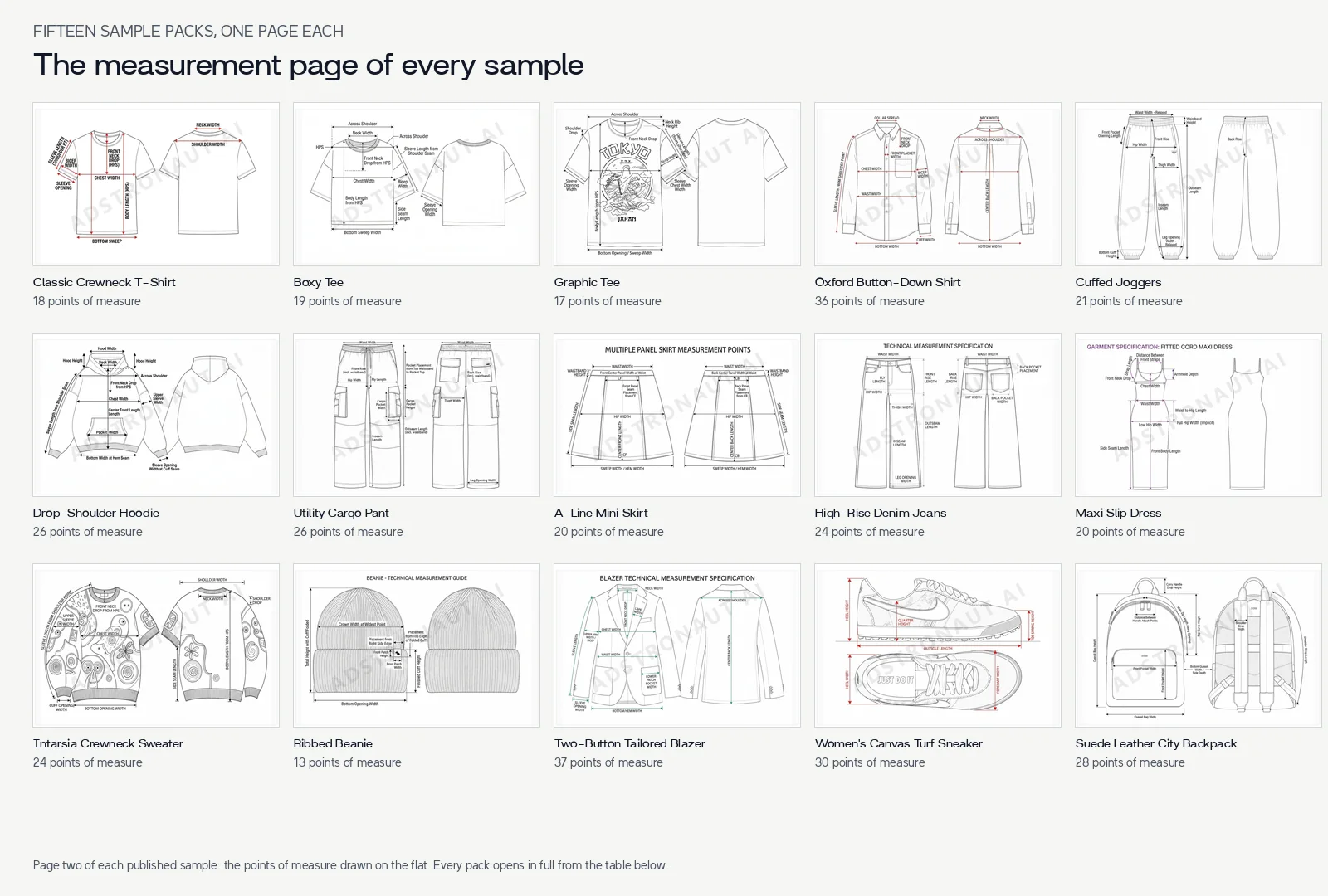
Page two of every sample: the points of measure drawn on the flat. Each one opens in full from the table below.
Create a tech pack for your own product →
Table of Contents
- Browse the sample packs
- One complete example, all fourteen pages
- What changes from one example to the next
- How to read a hoodie tech pack
- Choose the right product class
- Turn an example into your own pack
- Frequently asked questions
Browse the sample packs
The counts describe the published documents. They help you compare the amount of information each one carries; they are not a quality score or a required minimum for every product.
| Example | Measurement rows | Materials | File |
|---|---|---|---|
| Classic Crewneck T-Shirt | 18 | 10 | Download PDF |
| Boxy Tee | 19 | 10 | Download PDF |
| Graphic Tee | 17 | 10 | Download PDF |
| Oxford Button Down Shirt | 36 | 12 | Download PDF |
| Cuffed Joggers | 21 | 12 | Download PDF |
| Heavyweight Drop-Shoulder Hoodie | 26 | 11 | Download PDF |
| Utility Cargo Pant | 26 | 12 | Download PDF |
| A-Line Mini Skirt | 20 | 12 | Download PDF |
| High Rise Denim Jeans | 24 | 12 | Download PDF |
| Maxi Slip Dress | 20 | 12 | Download PDF |
| Intarsia Crewneck Sweater | 24 | 11 | Download PDF |
| Ribbed Beanie | 13 | 10 | Download PDF |
| Textured Two-Button Tailored Blazer | 37 | 12 | Download PDF |
| Women's Canvas Turf Sneaker | 30 | 14 | Download PDF |
| Textured Suede Leather City Backpack | 28 | 12 | Download PDF |
| Men's Navy Utility Overshirt (real product export, shown below) | 30 | 12 | Download PDF |
These are generated examples. Replace the sample values with your own specifications before using the structure for production. For a blank starting file, use the full Excel tech-pack template; if measurements are your immediate task, the free spec-sheet workbook and PDF are a simpler start.
One complete example, all fourteen pages
This is the export for a men's navy utility overshirt, generated from two product photos with the AI tech pack generator and edited in Adstronaut AI, exactly as a factory would receive it.
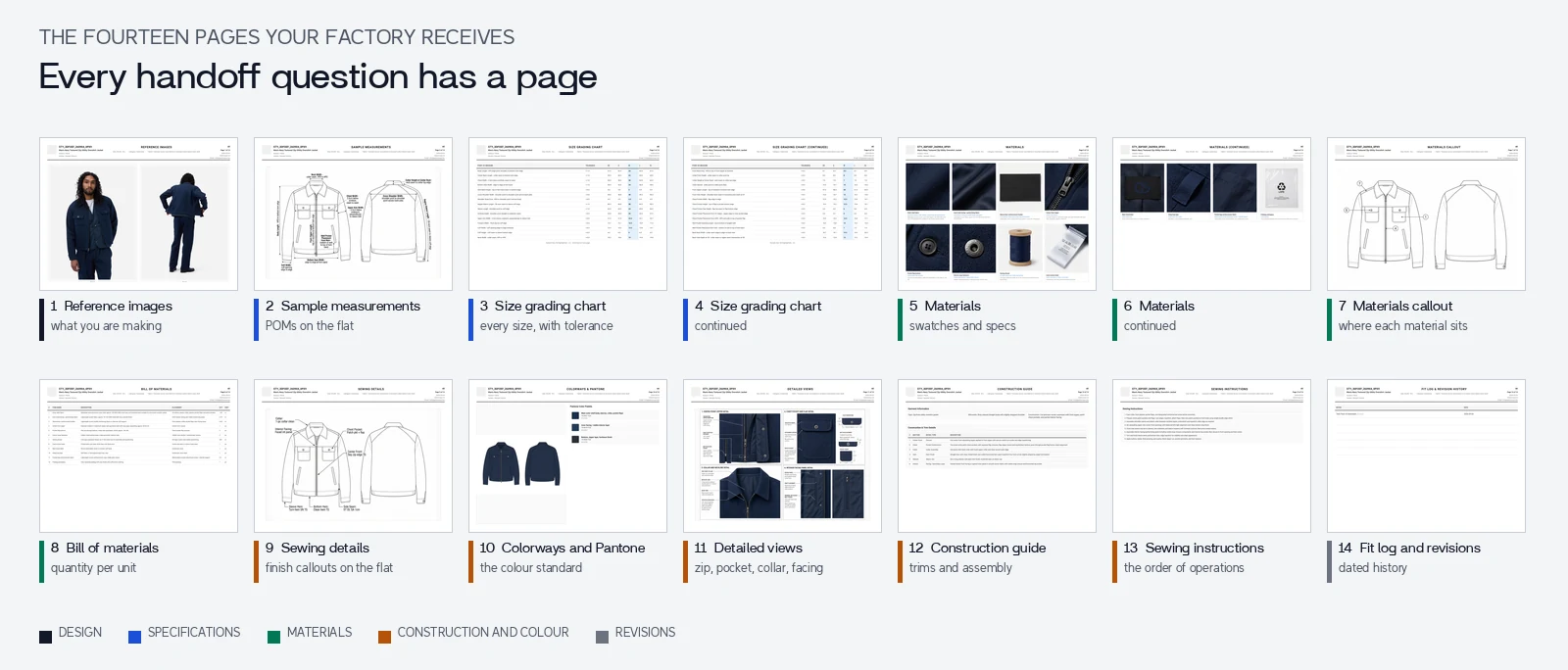
30 points of measure, 12 materials, 14 pages. Open the PDF, then see how it was made, how its sizes were graded and how to send it to a manufacturer.
What changes from one example to the next
The page structure stays the same across the library. What changes is how much each page has to say, and which points of measure belong on the drawing.
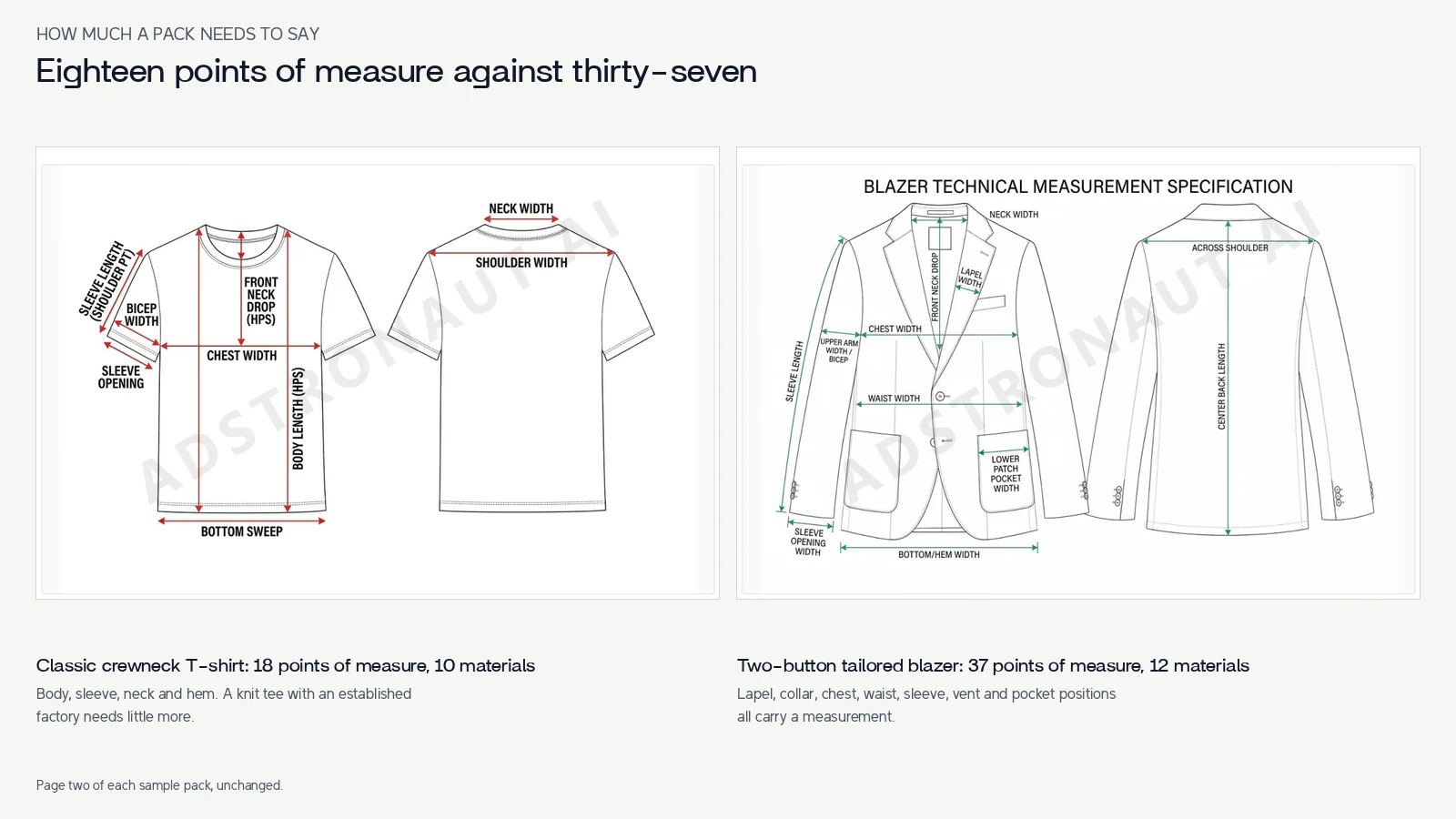
Eighteen points of measure against thirty-seven. The T-shirt names body, sleeve, neck and hem. The blazer adds lapel, collar, chest, waist, sleeve, vent and pocket positions, because each one changes how the garment reads.
A knit tee with an established factory needs little more than its eighteen rows. A tailored jacket with a set-in sleeve, a lapel and welt pockets cannot be sampled correctly from a short table, so its pack doubles the rows and adds construction pages. Pick the example whose complexity matches your product, not the shortest one.
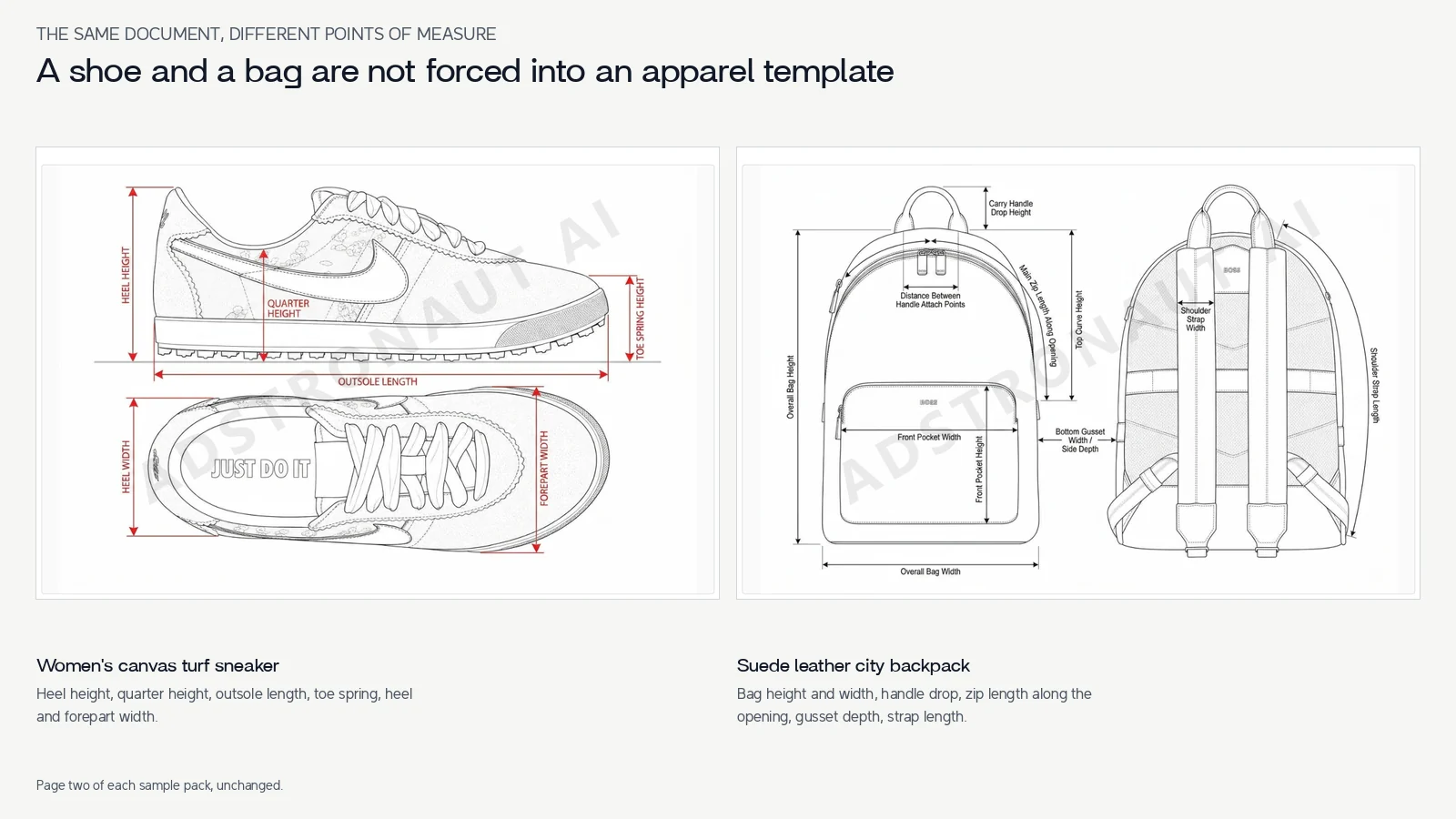
A shoe and a bag are not forced into an apparel template. The sneaker names heel height, quarter height, outsole length and toe spring; the backpack names handle drop, zip length along the opening, gusset depth and strap length.
The footwear tech pack and leather goods tech pack guides explain what those categories add beyond the drawing: sole units, lasts, hardware and lining specifications.
How to read a hoodie tech pack
Start with the drop-shoulder hoodie. Look at the source and the drawing, then connect the body, hood, pocket and rib to their materials and construction notes. Check the unit and base size before reading the size table.
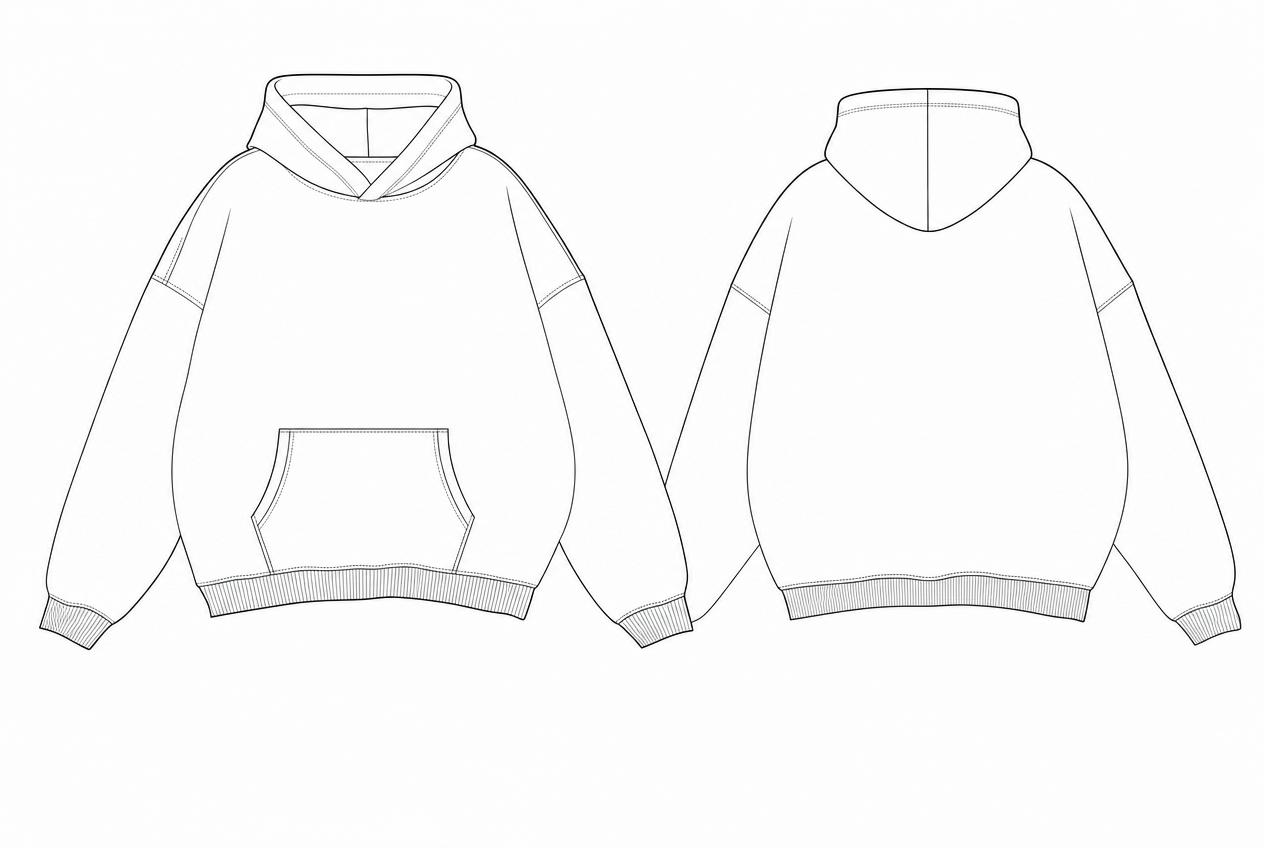
Actual generated drawing from the linked sample document.
Choose one point of measure and ask whether another person could repeat the method. Then compare one component across the drawing, the BOM and the construction notes. That cross-check is a useful habit for any pack, regardless of how it was created. The hoodie template guide adds garment-specific instructions, and the creation tutorial walks through the complete workflow.
Choose the right product class
| Product | Details worth looking for |
|---|---|
| T-shirt or hoodie | Body proportions, neckline, rib and hem, artwork and repeatable POM methods |
| Woven shirt or blazer | Collar and lapel, closure, interfacing and lining, construction details |
| Trousers or denim | Rise, waist, leg shape, pocket construction and hardware |
| Knitwear | Yarn, knit structure, gauge and finishing information relevant to the design |
| Footwear | Upper, sole unit, materials and category-specific sizing information |
| Bags and leather goods | Panel dimensions, hardware, closure, lining and material finishes |
A shoe or bag should not be forced into an apparel document simply because the template is available. Start with the closest class and add the details the next person needs to quote, sample or revise it.
Turn an example into your own pack
- Choose a matching product class and inspect its structure.
- Collect your front and back references and a short written brief.
- Supply the measurements and material choices you already know.
- Prepare a draft, keeping unresolved decisions visible.
- Check the drawing, tables and export as one document.
- Send a dated revision with a clear next step for the manufacturer.
Adstronaut AI automates most of the first-draft preparation from a product photo. A pack uses 25 credits. Signup includes 25 credits for a watermarked preview; Standard unlocks full sections and clean PDF, while Pro adds editable Excel and CSV. See plans for current allowances.
The manufacturer handoff kit includes a free brief and first-email template to use with the finished document.
Generate your first tech-pack preview →
Frequently Asked Questions
Are these sample PDFs free to download?
Yes. The public sample PDFs and the blank workbook are available without signing up. Generating your own product uses Adstronaut AI's separate credit and plan system.
Which example should a beginner start with?
The classic crewneck T-shirt. With eighteen points of measure and ten materials it shows every section of a pack at its simplest, so the structure is easy to follow before you move to a product with more parts.
Were these examples drawn in Illustrator?
No. Every sample was generated by Adstronaut AI from reference images and a brief, then exported. The software comparison shows the same document built the Illustrator way.
Is a completed sample the same as a blank template?
No. The sample shows the structure filled in for a particular product. The blank workbook is for entering your own information. The template hub links both.
Can I copy the measurements into my product?
Use your own measured values or reviewed design targets. A visually similar garment can still have different fit, construction and material requirements.
Why do the packs have different sections?
Different product classes need different information. A footwear upper and sole specification and a knitwear yarn and gauge specification solve different manufacturing questions.
Source
Examples and document counts come from Adstronaut AI's public sample library. Each row links to the inspectable document and its actual PDF, and every page shown on this article is rendered from those files unchanged.