Ghost Mannequin vs Flat Lay: Which Product Photo Do Your Listings Need? (2026)
A ghost mannequin photo shows a garment in its worn, three-dimensional shape with nobody inside it; a flat lay shows it laid flat and shot from above. Ghost mannequin sells fit, flat lay sells the whole piece at a glance. A studio charges about $25 to $80 for a ghost mannequin image and $12 to $75 for a flat lay. Adstronaut AI makes both from one phone photo.
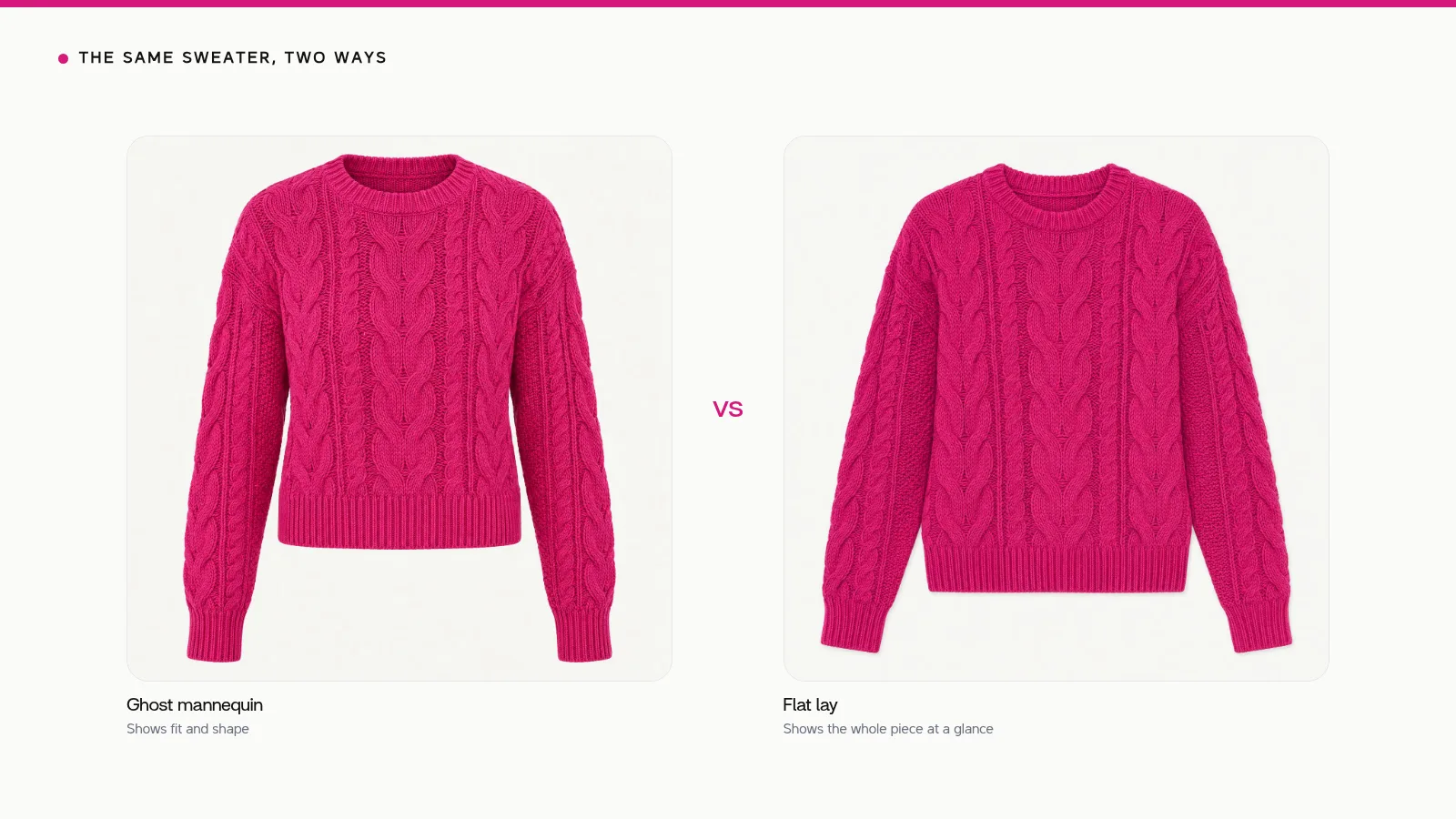
One sweater, two product shots. Both were made by Adstronaut AI's Ghost Mannequin & Flat Lay tool from the same mirror selfie.
In this guide
- What is the difference between a ghost mannequin and a flat lay?
- When should you use a ghost mannequin photo?
- When is a flat lay the better choice?
- How is a ghost mannequin photo made the traditional way?
- How much does each one cost, and how long does it take?
- What do marketplaces ask for?
- How do you get both from one phone photo?
- Which should you choose for your store?
- Frequently Asked Questions
What is the difference between a ghost mannequin and a flat lay?
Both are product-only shots: the product on a plain background, with no model and no scene. They differ in how the product is held when the photo is taken.
A ghost mannequin photo (also called an invisible mannequin or hollow man shot) is taken with the garment on a mannequin. The mannequin is then removed in editing, so the piece keeps the shape of a body: the chest is filled out, the sleeves hang, the collar stands. You can often see into the neck, where the inside back of the garment shows.
A flat lay is taken with the garment laid flat on a table or the floor and photographed from directly above. It shows the whole outline of the piece, with no perspective and no depth. A stylist smooths and shapes it so that it looks deliberate, not dropped.
| Ghost mannequin | Flat lay | |
|---|---|---|
| What it shows | The worn shape: fit, drape, how the piece sits on a body | The whole piece at a glance: outline, length, details |
| Camera | Straight on, at chest height | Directly above |
| Set-up | Mannequin, lights, pins, a second shot of the inside collar | A flat surface, overhead camera, a stylist |
| Editing | Remove the mannequin and join the inside collar (the "neck joint") | Clean up creases, cut out the background |
| Typical studio price | About $25 to $80 an image | About $12 to $75 an image |
| Best for | Jackets, knitwear, dresses, shirts, anything sold on fit | T-shirts, kids' clothes, sets, accessories, social posts |
The price ranges are the ones we set out in our guide to what clothing product photography costs. For the full definitions, see what ghost mannequin photography is and what a flat lay is.
When should you use a ghost mannequin photo?
Use a ghost mannequin when the customer's question is "how will this look on me?". The three-dimensional shape answers it better than a flat outline does.
Tailored and structured pieces need it most. A blazer, a puffer jacket or a coat looks shapeless when laid flat. On a ghost mannequin, the shoulder line, the lapel roll and the quilting all read as they would when worn.
Knitwear and dresses benefit too. A flat lay shows a sweater's pattern, but the ghost mannequin shows how the knit falls and how long the body is. A slip dress laid flat is a puddle of fabric; on a ghost mannequin it has a waist.
Ghost mannequin is also the usual choice for catalogues and marketplaces that ask for consistency. Every piece shot at the same angle and scale makes a category page look like a collection. Zalando's partner guidelines, for example, name "invisible mannequin or flat-lay" as the two accepted styles for its product-only packshots.
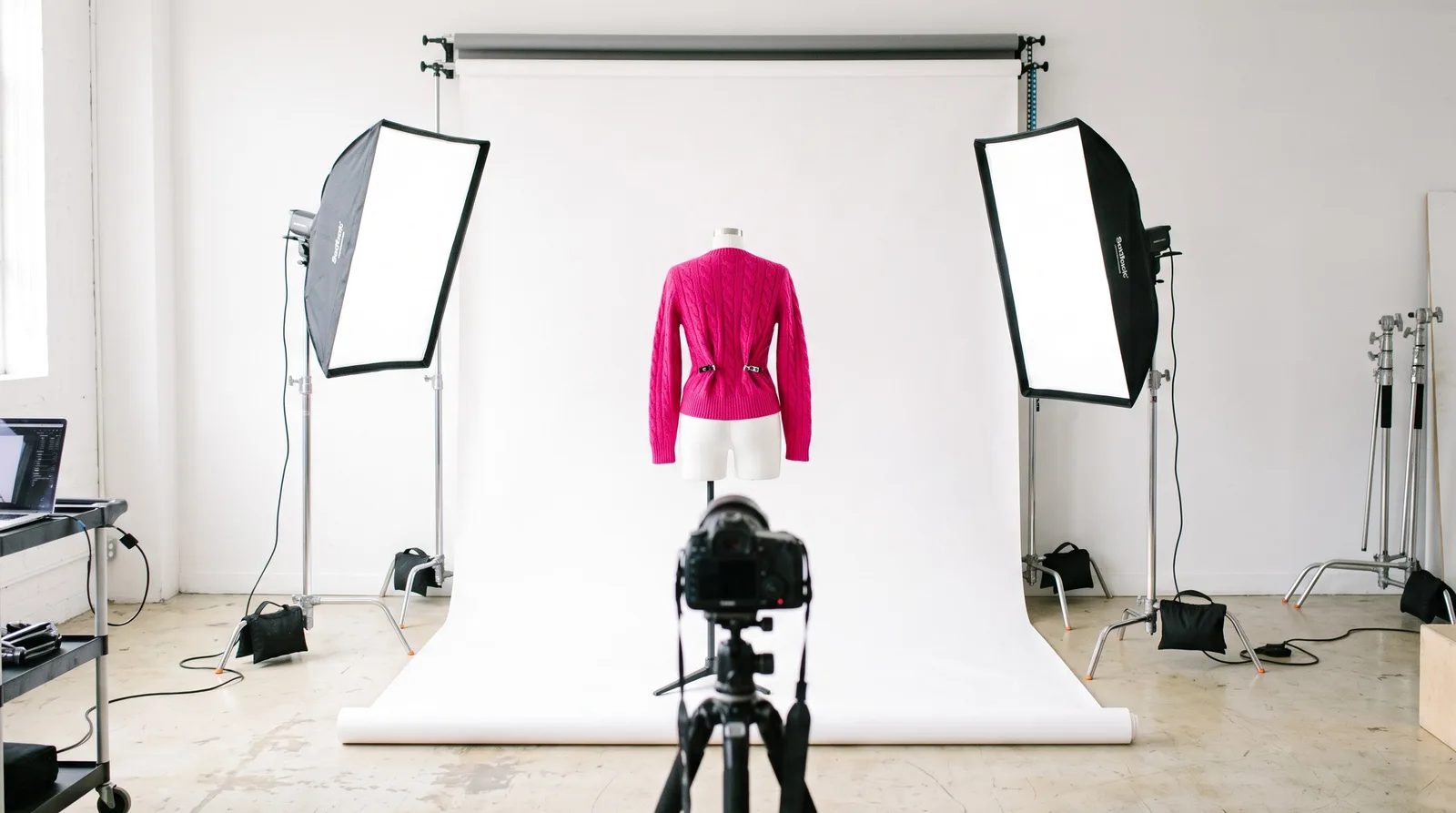
Illustration of the traditional set-up: a mannequin, two softboxes and a camera on a tripod. Generated for this article; not a photo of a real studio.
When is a flat lay the better choice?
Use a flat lay when the customer's question is "what exactly am I getting?". Seen from above, nothing is hidden by perspective.
Simple, flat pieces look natural in it. T-shirts, sweatshirts, swimwear, scarves and children's clothes are all made of pieces that lie flat, and a flat lay shows their print, colour and length with nothing in the way.
Sets and outfits are easier too. A flat lay can show a shirt, a pair of shorts and a cap together as one look, which is hard to do on a single mannequin.
Social and editorial posts lean on flat lays because they leave room around the product for props and text. For a product page, though, keep the background plain and the product centred.
A folded flat lay, with the garment folded into a neat rectangle as it would sit on a shop shelf, is a useful third view for knitwear and shirts. It shows the fabric and the label area at a size the customer can read.
How is a ghost mannequin photo made the traditional way?
The traditional ghost mannequin is two photographs and an edit. It is a craft, and it is slow.
- Dress the mannequin. The garment goes onto a mannequin with removable parts (a detachable neck and chest panel). It is pinned and clipped at the back until it hangs as it would on a person.
- Shoot the front. Lights on both sides, camera at chest height. Most studios also shoot the back and sometimes a side.
- Shoot the inside. The garment is turned inside out, or laid open, and the inside back of the neck is photographed. This is the part that will show through the collar.
- Edit. In Photoshop, the mannequin is masked out and the inside shot is joined into the neck opening. This is the "neck joint". Creases, pins and dust are removed, and the background is made pure white.
The time adds up. Squareshot, a product photography studio, puts it at 15 to 30 minutes to shoot a garment and 20 to 45 minutes to edit it. WearView's Photoshop tutorial gives 15 to 30 minutes per garment for the edit alone, done by someone who knows the steps. The kit is not cheap either: Squareshot lists a ghost mannequin at $200 to $800 and a lighting set at $500 to $2,000.
Many brands split the work. They shoot in-house, then send the files to a retouching service for the neck joint. Path, one such service, lists the edit from $0.89 an image for a simple garment and $1.79 for a complex one, back in as little as six hours. Pixelz lists from $1.45 an image on a $9 monthly plan, or from $0.95 on its $95 plan. Those prices are for the edit only. The shoot is still yours.
A flat lay skips the mannequin and the neck joint but not the styling. Someone still has to iron, shape and pin the garment flat, rig a camera overhead and clean up every image.
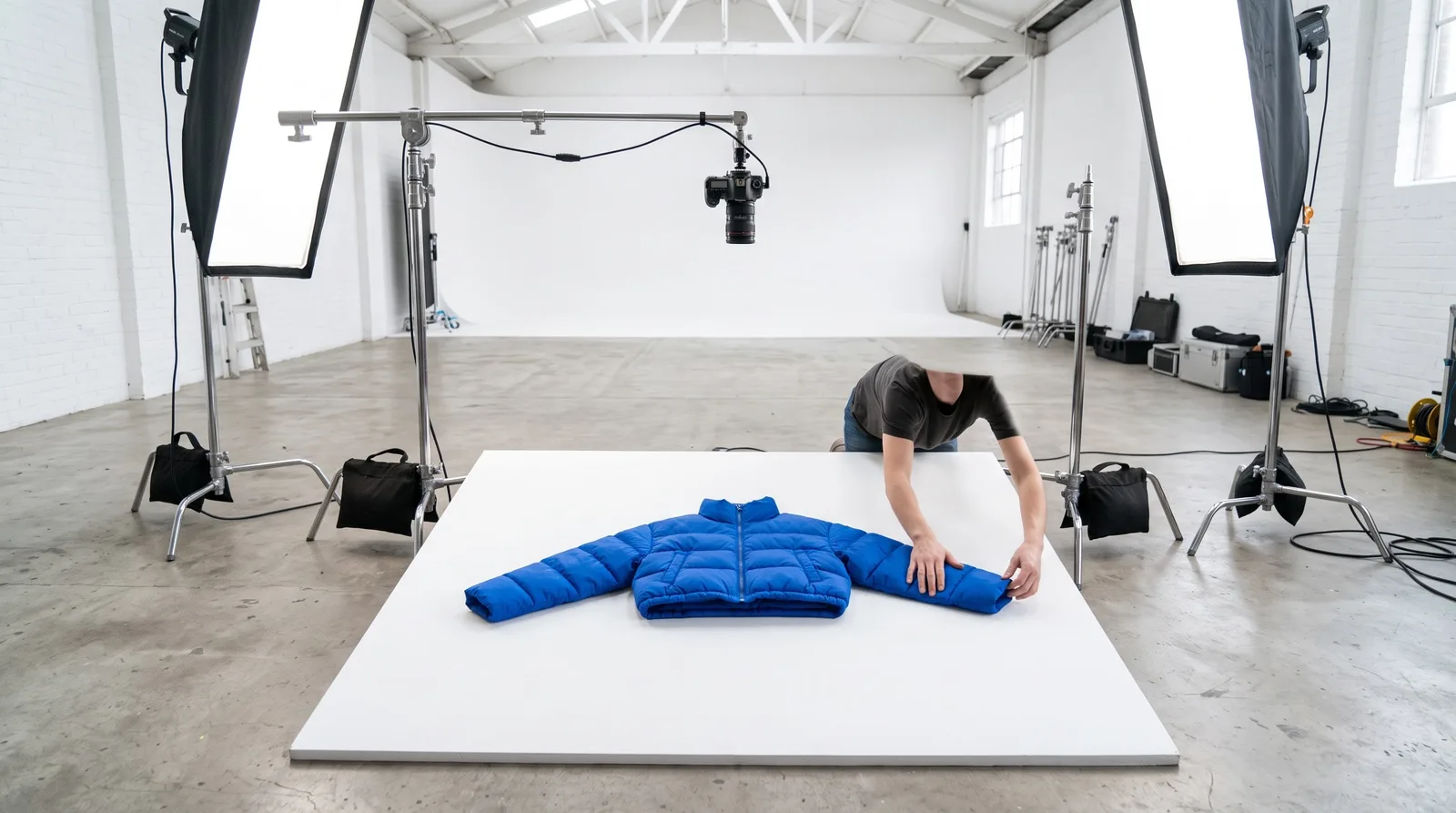
Illustration of a flat lay shoot: an overhead camera, two lights and a stylist shaping the jacket. Generated for this article.
How much does each one cost, and how long does it take?
The answer depends on who does the work. Here are the four routes a small brand really has, for one finished image of one garment.
| Route | What you need | Cost per image | Time per garment |
|---|---|---|---|
| Studio shoot (ghost mannequin) | Send the product to a studio | About $25 to $80 | Days, including shipping both ways |
| Studio shoot (flat lay) | Send the product to a studio | About $12 to $75 | Days, including shipping both ways |
| Shoot yourself, outsource the edit | Mannequin, lights, camera, then a retouching service | $0.89 to $1.79 for the edit, plus your kit and time | 15 to 30 min to shoot, then 6 to 48 hours for the edit |
| Shoot and edit yourself in Photoshop | All of the above, plus masking skill | Your time and a subscription | 15 to 30 min to shoot, 15 to 30 min to edit |
| Adstronaut AI | A phone photo of the product, any way it was taken | 2 credits, about $0.25 to $0.46 on paid plans | Usually under a minute an image |
Studio ranges are from our product photography cost guide; shoot and edit timings from Squareshot and WearView; edit prices from Path and Pixelz (links in the sources below). The Adstronaut AI figure is two credits an image; on paid plans a credit costs about 12 to 23 cents.
The hidden cost is the shoot, not the edit. Retouching is cheap per image because the hard part has already been done: the product was shipped, dressed, pinned and lit. For a brand with 30 new pieces a season, the shoot is a full day or more of someone's time before a single image is edited.
That is also why many small brands end up with no product-only shots at all. They list the product with the photo they have, a jacket on a door or a sweater in a mirror, and the page looks like a resale listing instead of a brand.
What do marketplaces ask for?
Every marketplace sets its own rules, and they change. Check the current guide for your category before you list. These are the published basics as of November 2026.
| Marketplace | Background | Size | Shape | Note |
|---|---|---|---|---|
| Amazon | Pure white, RGB 255, 255, 255 | 500 to 10,000 px on the longest side; over 1,000 px enables zoom | Any; square is common | JPEG preferred. Clothing main images have category-specific rules, so check the clothing style guide |
| Shopify | Your choice | 2,048 × 2,048 px recommended; up to 5,000 × 5,000 px and 20 MB | Square recommended | Zoom needs images over 800 × 800 px |
| Etsy | Your choice | At least 2,000 px wide and tall recommended | Landscape or square for the first photo | The first photo must be at least 635 px |
| Zalando | Plain | Minimum 762 × 1,100 px; best 1,801 × 2,600 px | Portrait, 1:1.44 | Packshots are "invisible mannequin or flat-lay"; visible mannequins are not allowed |
Sources: Amazon's seller blog, Shopify's image size guide, Etsy's help centre and Zalando's partner guidelines (links below). Amazon's clothing main-image rules depend on the category: the clothing guide asks for most main images to be on a model, with exceptions. Read the guide for your category rather than relying on a summary.
Two things are true almost everywhere: a plain, light background and the product filling most of the frame. Ghost mannequin and flat lay both meet those as long as the background is clean.
How do you get both from one phone photo?
Adstronaut AI's Ghost Mannequin & Flat Lay tool starts from the photo you already have. The product can be on a hanger, on a person or lying on a bed. It does not need a mannequin, a second shot of the inside collar or any editing.
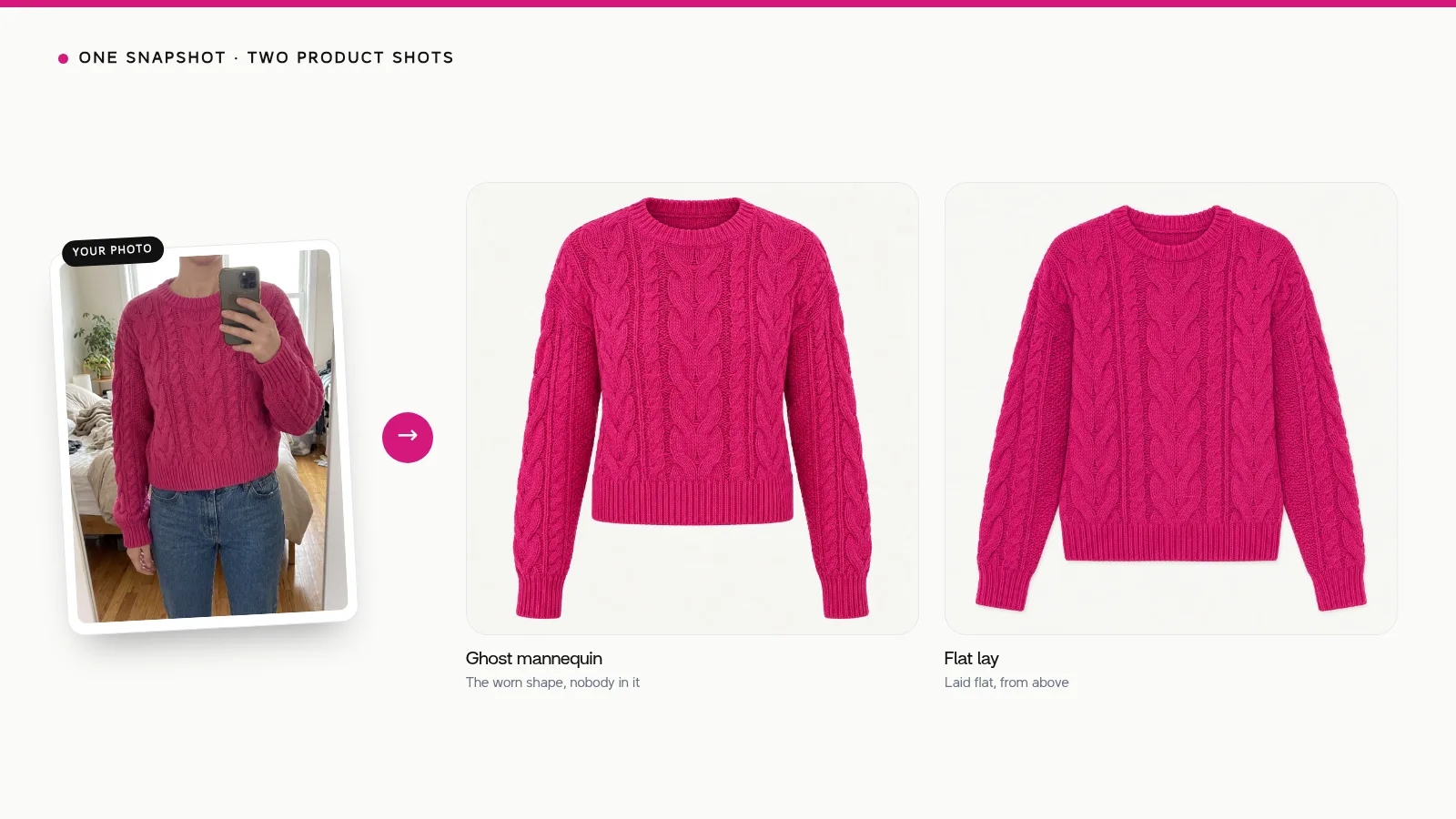
The input was a mirror selfie of the sweater. Both product shots were made from it, one after the other.
The steps are short:
- Upload your photos. Drop in every photo you have, up to 100 at once. Adstronaut AI works out which photos show the same product and groups them, front and back. You can move a photo to another product if it guessed wrong.
- Choose the style. Ghost mannequin or flat lay. Then the views: front, back, angled (ghost mannequin) or folded (flat lay, for clothing).
- Choose a background and a shape. Nine plain backgrounds, from pure white (#FFFFFF) to blush, sage and charcoal, and five shapes: square, 4:5, 3:4, 2:3 and 9:16.
- Generate and download. Every product comes back in the same style and light. Want the other style too? Switch to flat lay and make a second set from the same photos.
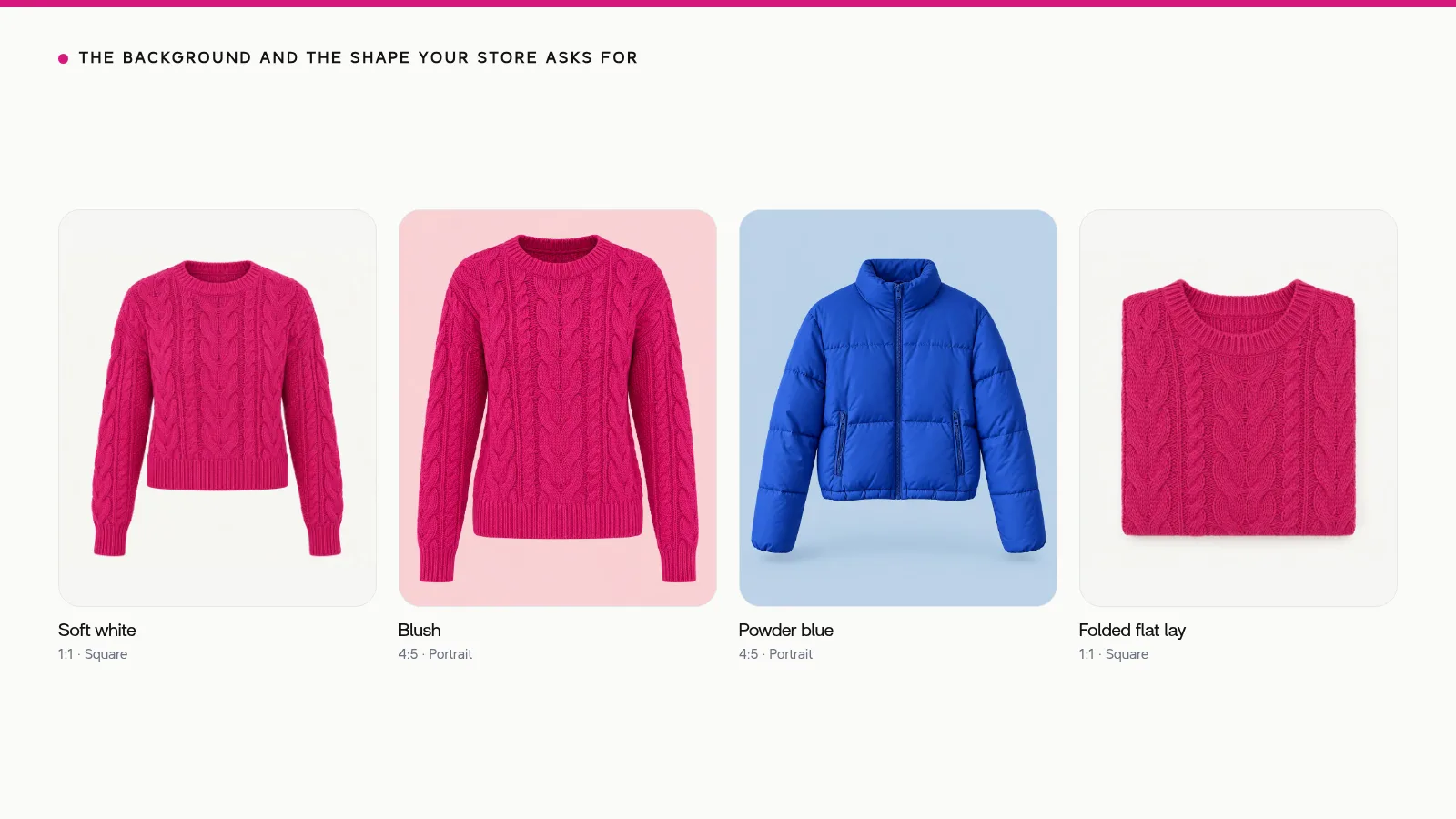
Backgrounds and shapes are chosen per set. These were all made from the same two phone photos.
A back view is only made from a photo of the back. That is deliberate. A back invented from the front is where things go wrong: a seam in the wrong place, a pocket that does not exist. Add a photo of the back and both views come out as a matching pair.
It works beyond clothing. Shoes, bags and accessories come back as clean product-only shots on the background you pick. A shoe is shown from the side.
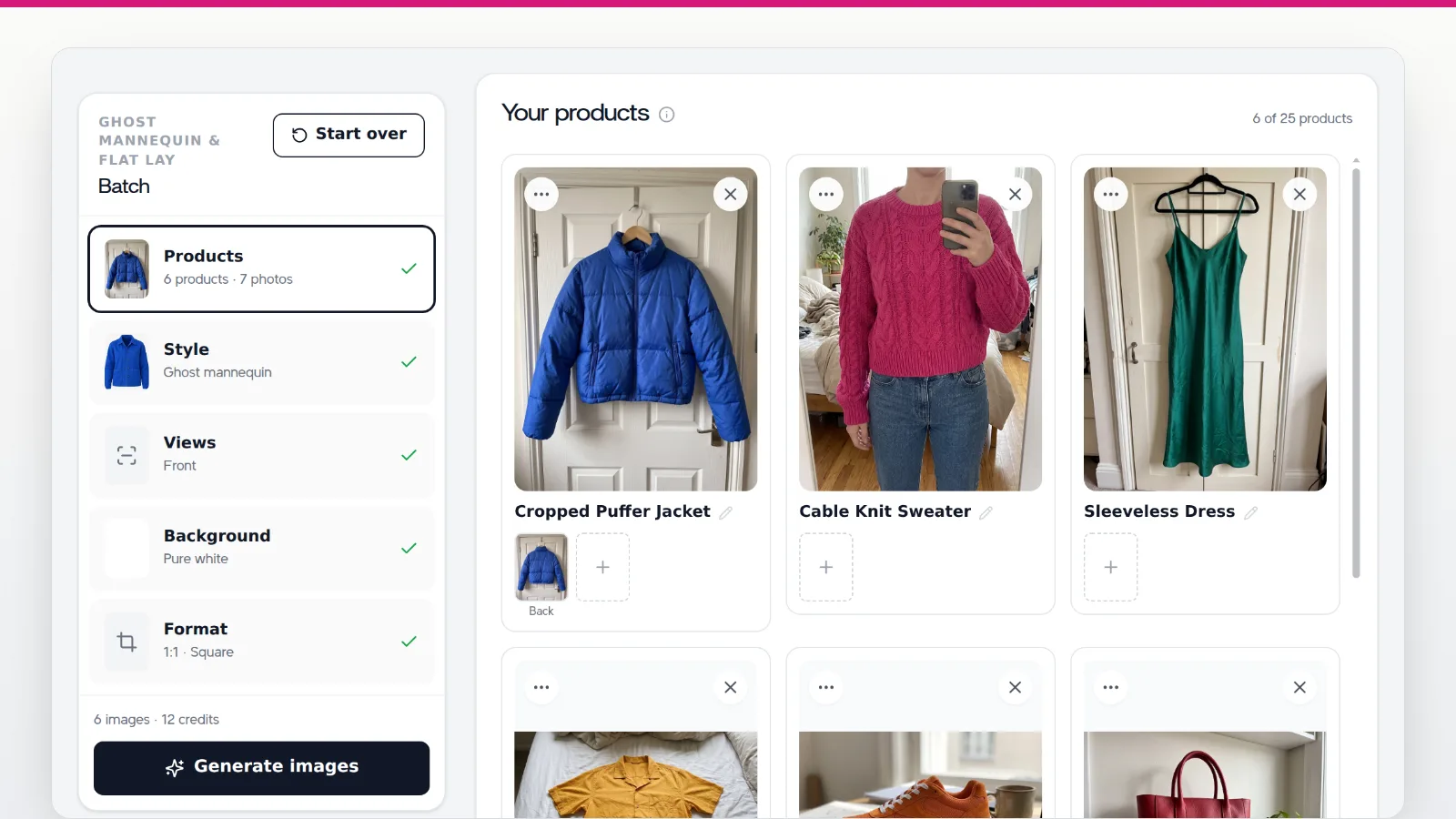
A real screen of the tool: seven photos uploaded together, sorted into six products, each named for you.
Free accounts can try it on one product at a time; free images carry a small Adstronaut AI signature. Paid plans remove the signature and make 10, 25 or 50 products in one run. When you want the same product on a person, send the shot on to AI Photoshoots; for more angles, use the Lookbook Creator.
Which should you choose for your store?
Choose by what the product needs to prove, then stay consistent.
- Ghost mannequin for anything sold on fit or shape: jackets, coats, knitwear, dresses, tailored shirts.
- Flat lay for flat or simple pieces, sets and kids' clothes, and for social posts.
- Both when you can: a ghost mannequin as the main image and a flat lay or folded view further down the page. Two views answer more questions than one.
- The same style across a category. A category page where half the products are ghost mannequins and half are flat lays looks unplanned.
Whichever you choose, the product-only shot is the baseline. On-model and lifestyle photos sit on top of it; they do not replace it. Our guide to the perfect e-commerce listing shows how the images on a product page fit together.
Frequently Asked Questions
What is the difference between a ghost mannequin and a flat lay?
A ghost mannequin photo shows the garment in its worn, three-dimensional shape with the mannequin removed, so it looks as if an invisible person is wearing it. A flat lay shows the garment laid flat and photographed from above. Ghost mannequin shows fit and drape; flat lay shows the whole piece and its details at a glance.
Is ghost mannequin or flat lay better for clothing listings?
For pieces sold on fit, such as jackets, knitwear and dresses, a ghost mannequin usually works better because it shows the shape the garment takes when worn. For flat or simple pieces, sets and children's clothes, a flat lay is clearer. Many stores use a ghost mannequin as the main image and a flat lay further down the page.
How much does a ghost mannequin photo cost per image?
A studio typically charges about $25 to $80 a finished ghost mannequin image, and $12 to $75 for a flat lay. If you shoot yourself, retouching services list the edit alone from about $0.89 to $1.79 an image. With Adstronaut AI, an image costs two credits, about $0.25 to $0.46 on paid plans, and starts from a phone photo.
Can I make a ghost mannequin photo without a mannequin?
Yes. Adstronaut AI makes the ghost mannequin shot from an ordinary photo of the product on a hanger, on a person or lying flat. There is no mannequin to dress, no second shot of the inside collar and no neck joint to edit in Photoshop.
How do you create the ghost mannequin effect in Photoshop?
Photograph the garment on a mannequin, then photograph the inside back of the neck. In Photoshop, mask out the mannequin, place the inside shot into the neck opening, blend the edges and clean the background to white. For someone who knows the steps it takes 15 to 30 minutes a garment.
Will an AI ghost mannequin keep my product accurate?
The image is made from your photo with the request to keep every detail as it is, including colour, fabric, print, labels and trims. Check every result before listing, as you would check a retoucher's work. With Adstronaut AI, back views are made only from a real photo of the back, and an image that fails is not charged.
Can I use ghost mannequin or flat lay photos on Amazon?
Product-only shots on a pure white background (RGB 255, 255, 255) meet Amazon's general image rules, but clothing main images follow a category style guide that asks for most to be shown on a model, with exceptions. Check the current guide for your category in Seller Central before choosing your main image.
Does the ghost mannequin effect work for shoes and bags?
The ghost mannequin technique is a clothing method, but the goal, a clean product-only shot on a plain background, applies to everything. Adstronaut AI makes clean product shots of shoes, bags and accessories from ordinary photos; a shoe is shown from the side and a bag from the front.
Sources and further reading:
- Squareshot: Ghost mannequin clothing photography — shoot and edit time per garment, mannequin and lighting prices
- WearView: Ghost mannequin effect in Photoshop — the two-photo method and 15 to 30 minutes per garment
- Path: Ghost mannequin editing — edit prices per image and turnaround
- Pixelz: Ghost mannequin services — plan-based edit prices
- Amazon: Product photo requirements — background, size and format
- Shopify: Image sizes — recommended product image size and limits
- Etsy: Listing photo sizes — recommended size and first-photo rules
- Zalando: Image guidelines — packshot styles, sizes and the visible-mannequin rule
- How much does clothing product photography cost? — Adstronaut AI's per-image cost guide
- What is ghost mannequin photography? — glossary entry