What is ghost mannequin photography?
Updated June 10, 2026
Ghost mannequin photography — also called invisible mannequin or hollow-man — shoots a garment on a mannequin, then digitally removes the mannequin so the clothing appears to hold its own 3D shape against a clean background. It needs 3–4 shots per garment (front, back, and an interior neck/collar shot) stitched in post. Most retouching runs $1–$5 per image.
What is ghost mannequin photography?
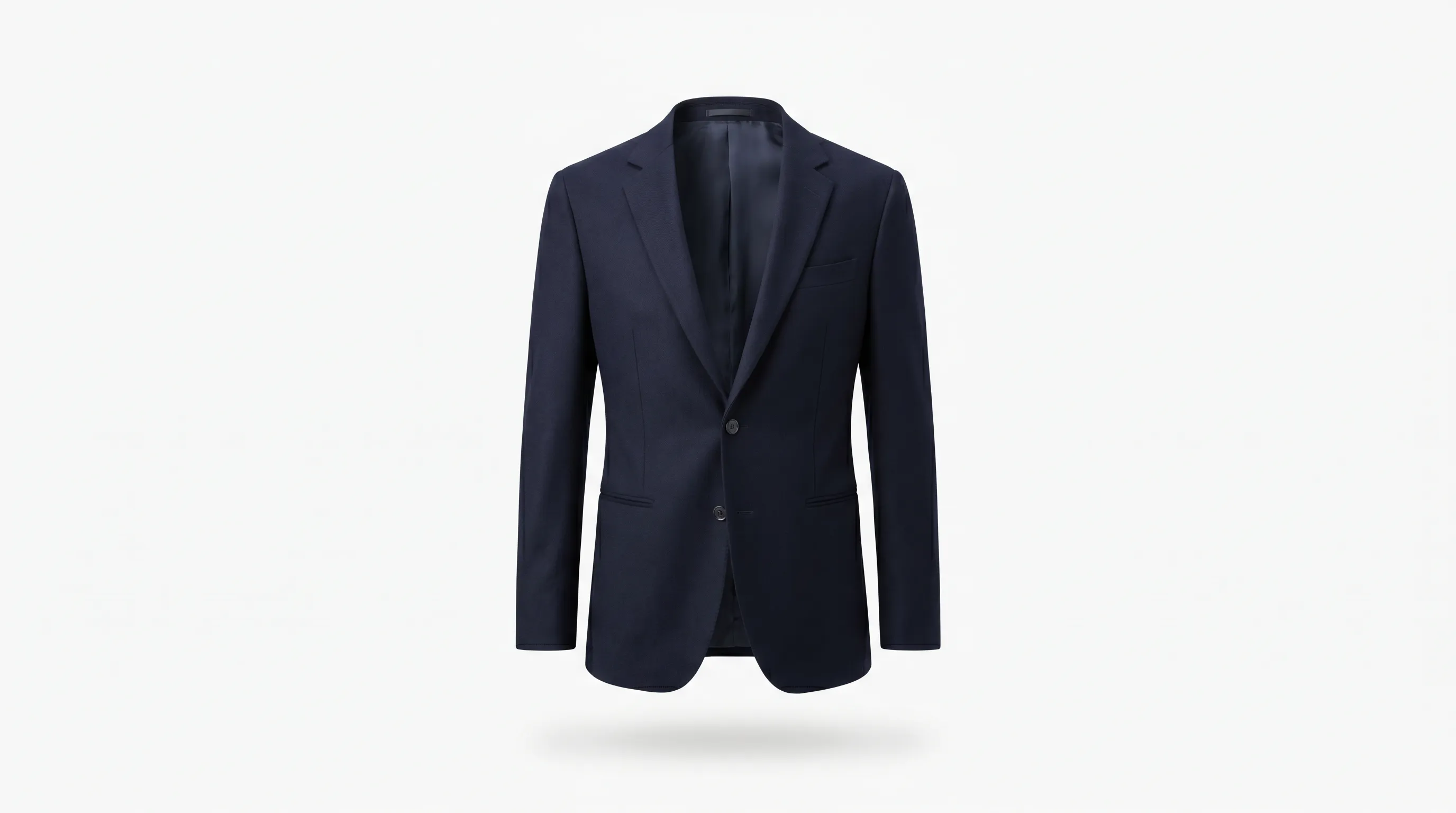
Ghost mannequin photography — also marketed as invisible mannequin or hollow-man photography — is a product-photography technique that shows a garment with its full three-dimensional shape while the mannequin (or model) that gave it that shape is erased from the final image. The clothing looks as if an invisible body is wearing it, floating against a clean white or neutral e-commerce background.
The effect is not a single photograph. It is a composite built from multiple shots of the same garment. A retoucher cuts the mannequin out of the main image and fills the gaps — most importantly the empty space around the neckline — with a separately photographed interior shot, so the inside of the collar reads correctly (Creative Clipping Path, neck-joint service).
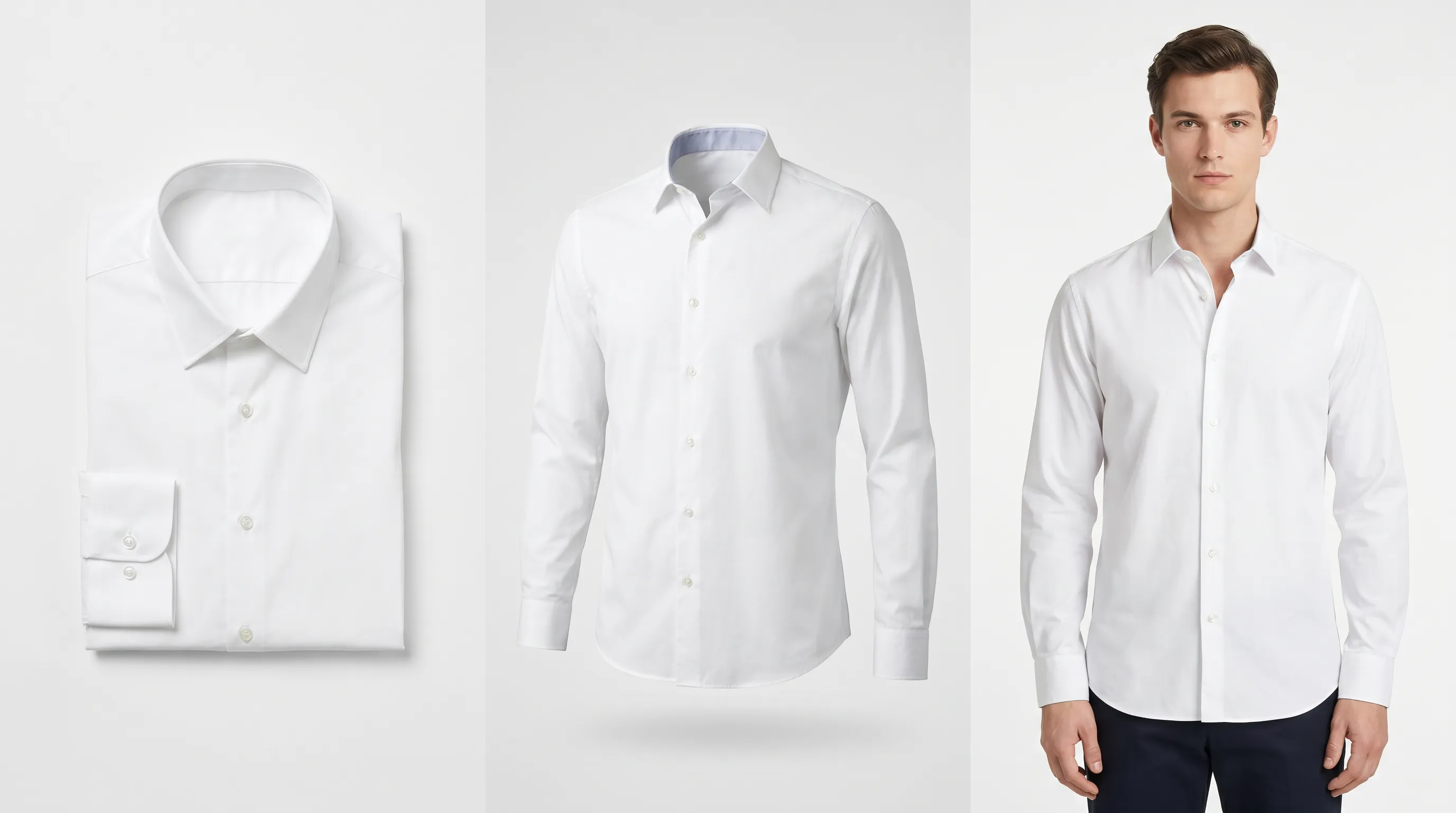
The key nuance: it shows fit and structure without a person. A flat-lay shows a garment lying down; an on-model shot shows it on a specific human. Ghost mannequin sits between them — it communicates drape, cut, and how a piece holds its shape, while staying neutral enough to standardize an entire catalog. For structured garments and mid-to-high price points it tends to convert better than flat-lay, which is why it became the e-commerce default for tailored apparel.
Worked example: shooting one blazer
From four exposures to one hollow-man image
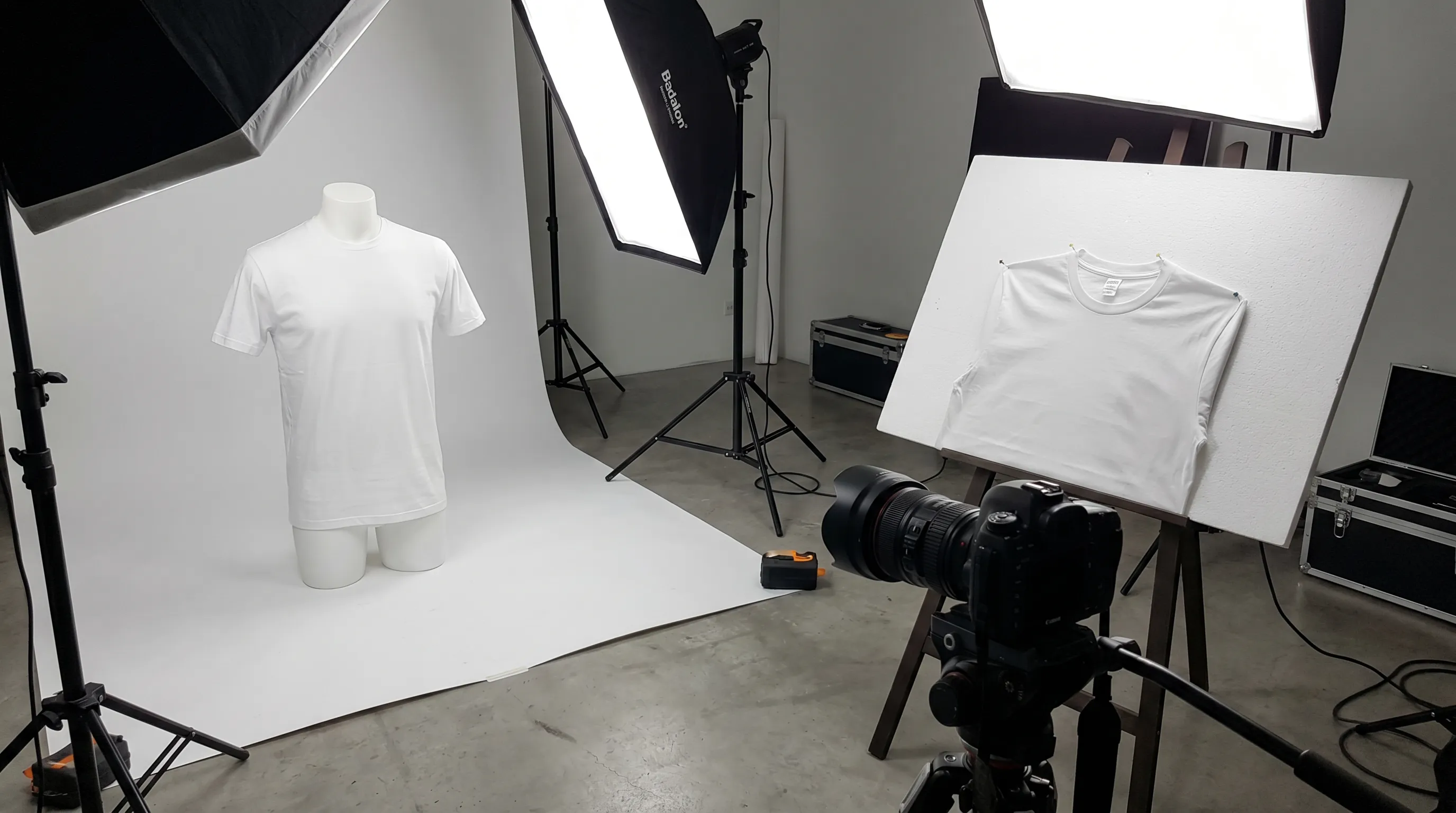
You need a ghost mannequin shot of a navy blazer. You dress a mannequin and take Shot 1: the front view at chest height. Without moving the camera or lights, you rotate the mannequin 180° for Shot 2: the back view. Then you remove the mannequin's neck piece (or pin the collar to a foam board) for Shot 3: the interior collar, and optionally Shot 4: the inner back neck. In Photoshop, a retoucher draws a pen-tool path around the blazer, masks out the mannequin, drops the interior shot behind the neckline, and uses the Warp and Clone tools to stitch the neck joint seamlessly — matching shadow and lighting so the collar looks continuous. A practiced editor finishes a simple top in 5–10 minutes; a layered coat with inner linings takes roughly double. Multiply that by the back view, and a single SKU is a 15–25 minute studio-plus-editing job before it is PDP-ready.
- Front on mannequin — the primary hero exposure
- Back on mannequin — same camera, rotated 180°
- Interior neck / collar — the shot that makes the composite possible
- Composite + neck joint — masked, stitched, shadow-matched in post
How the neck-joint composite works
The hard part of ghost mannequin work is the neck joint. When the mannequin is masked out, it leaves blank space where the back of the collar used to sit behind it — the inside of the garment that was never facing the camera. Left alone, the neckline reads as a hole.
To fix it, the photographer captures the garment's interior separately: the cloth is taken off, clipped to a whiteboard or foam core, and shot focused on the collar and inner neckline. In post-production the mannequin is removed and that interior picture is composited in behind the front shot, so the result looks like a ghost is filling out the clothing (Perfect Retouching's ghost mannequin walkthrough).
The traditional editing workflow is manual: trace a vector path around the garment with the Pen Tool, build a layer mask to hide the mannequin, drag the interior inlay into the document, then use the Warp Tool, Clone Stamp, and Healing Brush to merge the inner neck joint and rebuild any missing fabric. Shadows and lighting are hand-adjusted so the composite reads as one continuous, believable garment. That hand-stitching is exactly why editing costs scale with garment complexity — every extra collar, cuff, vent, and lining is another joint to rebuild.
Why e-commerce uses ghost mannequin photography
Online apparel shoppers cannot touch a garment, so the product image has to do the work of fit, drape, and structure. Ghost mannequin imagery answers "what shape is this?" without committing to a specific model's body, age, or skin tone — which keeps the focus on the product and keeps a catalog visually consistent across thousands of SKUs.
Consistency and standardization. Because every shot uses the same mannequin, lighting, and crop, ghost mannequin galleries make a catalog look uniform — the reason marketplaces and large retailers adopted it for tailored and structured apparel.
Cost relative to model shoots. A full-service studio doing the shoot plus editing runs about $15–$40 per image all-in (Pixel Retouching's e-commerce editing cost guide) — far cheaper than booking models, hair, makeup, and releases for a fashion shoot, which can run thousands per day.
It is not always the conversion winner, though. Per Shopify research cited by industry studios, on-model product pages convert roughly 20–30% higher than mannequin shots, and on-model imagery can lift conversion 30–50% over flat product images. So most brands run a mix: ghost mannequin for the bulk of the catalog, flat-lay for accessories, and on-model for hero products and campaigns — see the AI photoshoots and lookbook approach below for generating that on-model layer without a studio.
Ghost mannequin vs flat-lay vs on-model
Three ways to photograph the same garment, and what each one is best at.
| Method | What it shows | Typical cost / image | Best for |
|---|---|---|---|
| Ghost mannequin (invisible mannequin) | Full 3D shape & drape, no person; inner collar visible | ~$1–$5 retouch · $15–$40 all-in studio | Structured & tailored apparel; consistent catalog PDPs |
| Flat-lay | Garment laid flat, shot from above; pattern & print clear | Cheapest — minimal editing | Accessories, casual/print-focused pieces, fast catalogs |
| On-model | Garment on a real or AI model; fit, scale & styling | $5–$15K/day live studio · ~$1/image with AI | Hero products, campaigns, social; highest conversion |
Cost ranges per FixAnyPhoto, Pixel Retouching, and Squareshot (2025); AI on-model per-image cost per Adstronaut pricing. Most catalogs combine all three.
The ghost mannequin pipeline at a glance
Common ghost mannequin mistakes
Forgetting the interior shot. The single most common error is shooting the front and back but skipping the inner-collar exposure. Without it there is nothing to fill the neckline, and the composite either gets a fabricated collar or an obvious hole. Always shoot the interior before the garment leaves the set.
Moving the camera or lights between shots. The front, back, and interior exposures must share the same camera position, focal length, and lighting, or the composite won't line up — shadows and perspective will fight each other at the neck joint.
Treating it as a quality signal on its own. A clean ghost mannequin shot shows shape, but it doesn't show a customer how a piece looks on a real body. For fit, scale, and lifestyle context you still need on-model imagery — ghost mannequin is the consistent catalog layer, not the whole story.
Underestimating per-image editing time. Because each garment is hand-stitched, a 50-SKU drop is 50 separate composites, not a batch effect. Budget for the retouching queue, not just the shoot day — it is the part that most often delays a launch.
The AI alternative to a ghost mannequin shoot
The slow parts of ghost mannequin work are the mannequin handling, the multi-shot setup, and the per-image neck-joint retouching. AI image generation collapses all three: instead of dressing a mannequin and stitching collars, you upload one garment photo and generate the views you need.
Adstronaut's AI photoshoots take a single garment photo — a flat-lay, a mannequin shot, or an amateur on-model snap — and render editorial on-model imagery on a roster of 22 named models across 8 poses and 12 named scenes, at roughly $1 per finished image (5 credits, about $0.62–$1.16 depending on plan). That is the on-model layer ghost mannequin can't give you, without booking a studio.
For the catalog-consistency job ghost mannequin usually owns — clean front, back, side, and detail angles — the lookbook generator turns one product photo into a multi-angle set, with 35 view types across 10 product classes and consistent lighting across a batch. Together they cover both the neutral PDP angles and the high-converting on-model shots from the same source image, no mannequin or compositing involved. For a head-to-head of the AI photoshoot tools in this space, see the best AI photoshoot tools guide, and the full studio cost math in how much a fashion photoshoot costs.
Frequently asked questions
What is ghost mannequin photography?
It's a product-photography technique that shows a garment in its full 3D shape with the mannequin (or model) digitally removed, so the clothing looks worn by an invisible body. It's a composite of 3–4 shots — front, back, and an interior collar shot — stitched together in post-production. It's also called invisible mannequin or hollow-man photography.
Why is it called a 'ghost' mannequin?
Because the finished image shows the garment holding a body's shape while the body itself — the mannequin or model — has been erased, as if a ghost were wearing it. 'Invisible mannequin' and 'hollow-man' describe the same effect: the form is there, the figure is not.
What is the neck joint in ghost mannequin editing?
The neck joint is the composited section at the collar. When the mannequin is masked out, it leaves blank space where the back of the neckline sat behind it. Editors fill that gap with a separately shot interior-collar image and stitch it in with the Warp and Clone tools, matching shadow and light. It's the hardest and most defining part of the technique.
How many photos do you need for a ghost mannequin shot?
At least three, usually four: a front view on the mannequin, a back view (rotate the mannequin 180° without moving the camera), and an interior shot of the inner collar or neckline. Some garments also need an inner-back-neck or waistband shot. The interior exposure is non-negotiable — it's what fills the neckline in the composite.
How much does ghost mannequin photography cost?
Retouching alone typically runs $1–$5 per image, with budget services from about $0.89 and complex coats reaching $5–$8. A full-service studio doing both the shoot and the editing runs roughly $15–$40 per image all-in. Cost scales with garment complexity — more collars, cuffs, and linings mean more composite work.
How long does a ghost mannequin image take?
A practiced editor finishes a simple top in about 5–10 minutes of retouching; a layered coat with inner linings takes roughly double. Add the shoot itself (front, back, interior exposures), and a single SKU is commonly a 15–25 minute job before it's PDP-ready. Each garment is hand-stitched, so a 50-SKU drop is 50 separate composites.
Ghost mannequin vs flat-lay — which is better?
Flat-lay is cheaper and works well for accessories and casual, print-focused pieces. Ghost mannequin shows 3D shape and drape, and for structured garments and mid-to-high price points it generally converts better. Most catalogs use both: ghost mannequin for tailored apparel, flat-lay for simpler items.
Does ghost mannequin or on-model convert better?
On-model usually wins on conversion. Industry studies citing Shopify research put on-model product pages 20–30% higher than mannequin shots, and on-model imagery can lift conversion 30–50% over flat product images. Ghost mannequin's strength is catalog consistency and cost, not peak conversion — which is why brands run a mix.
Can AI replace a ghost mannequin shoot?
For the on-model layer, yes — tools like Adstronaut's AI photoshoots turn one garment photo into model imagery for about $1 per image, no mannequin or neck-joint compositing. For clean catalog angles, the lookbook generator produces front, back, side, and detail views from a single photo. Together they cover what ghost mannequin does, plus the on-model shots it can't.
What kind of mannequin do you use for ghost mannequin photography?
A removable or segmented mannequin (or a dress form) whose neck and limb pieces can be taken off to expose the garment's interior for the collar shot. A clean studio space of roughly 8×10 feet, even lighting, and a white background are enough — the magic is in the multi-shot setup and the composite, not exotic gear.
Skip the mannequin and the neck-joint retouch
Upload one garment photo and generate on-model imagery or a full multi-angle catalog set — no mannequin, no compositing, no per-image editing queue. First shoot free, then about $1 per image.
Try AI Photoshoots freeRelated reading
Sources and further reading
- Creative Clipping Path — neck joint service — definition of the neck-joint composite; why interior shot is required
- Perfect Retouching — invisible ghost mannequin guide — interior shot on foam board; Pen Tool / Warp / Clone compositing workflow
- soona — how to do ghost mannequin photography — 3–4 shots per garment (front, back, interior); shoot setup and space
- Squareshot — ghost mannequin vs flat lay — on-model converts 20–30% higher than mannequin; method best-for guidance
- Pixel Retouching — e-commerce image editing cost 2025 — $15–$40 per image all-in studio; complexity-driven editing cost
- FixAnyPhoto — ghost mannequin editing cost 2025 — $1–$5 retouch range; editing time by garment complexity