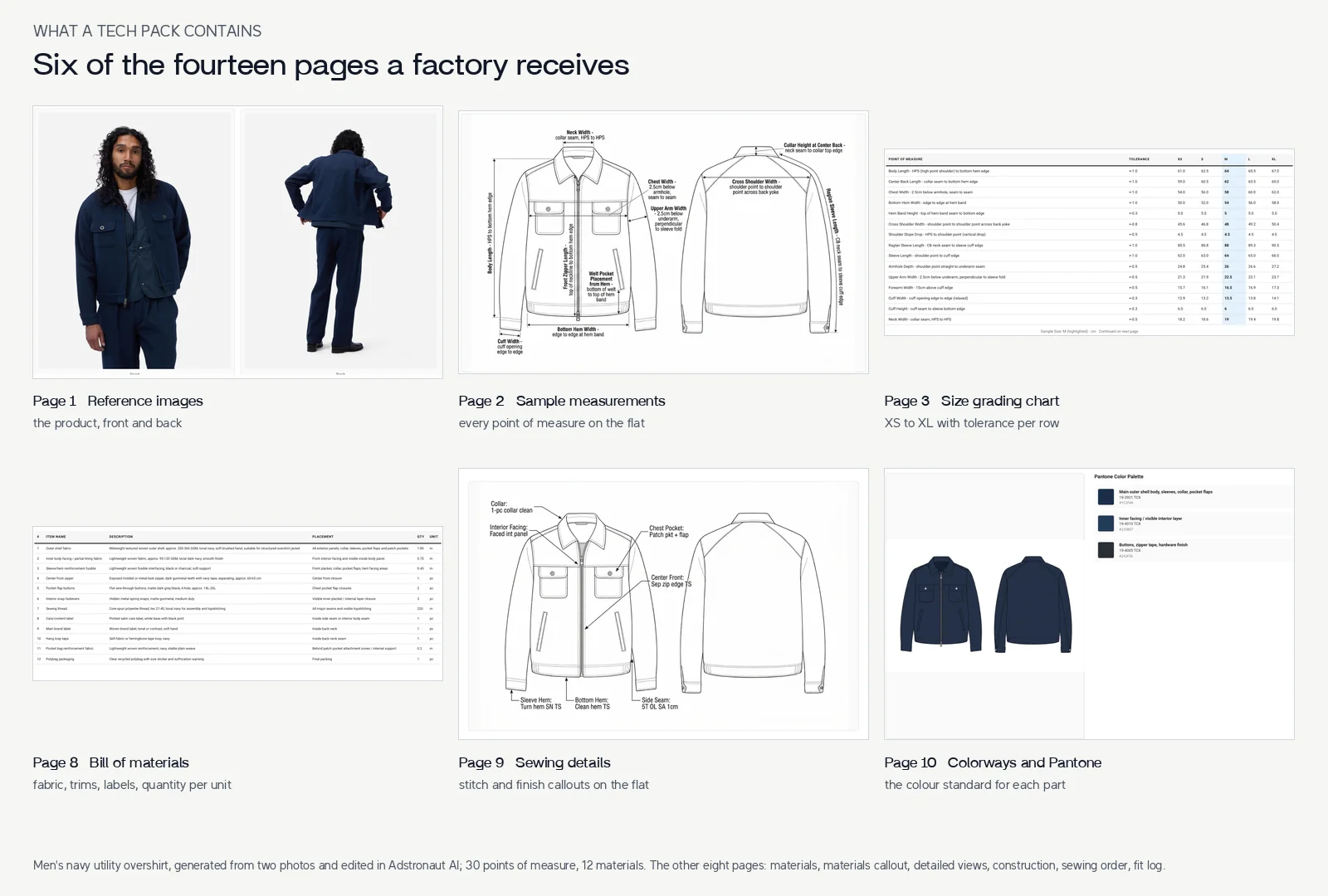
Every page your factory expects, from one generation
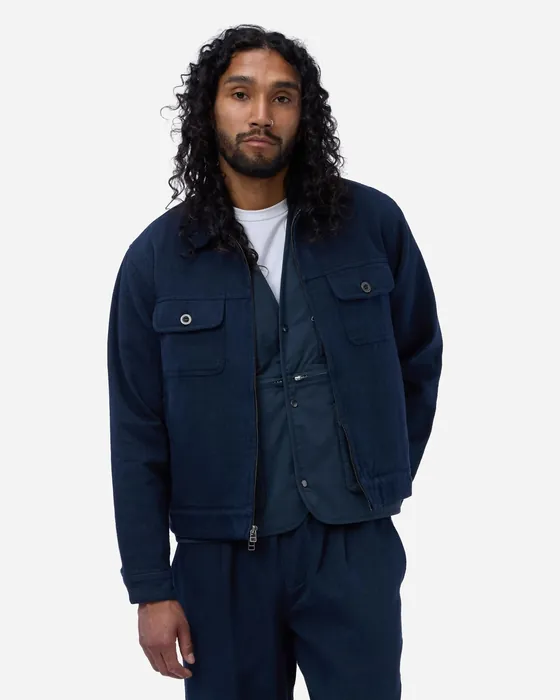
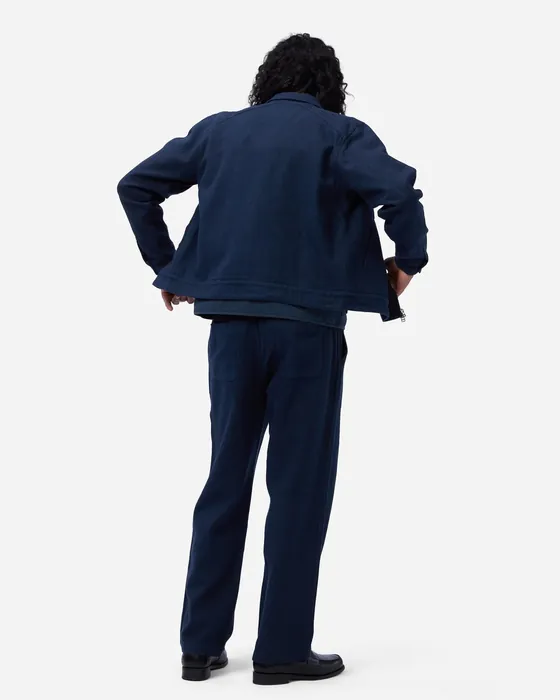
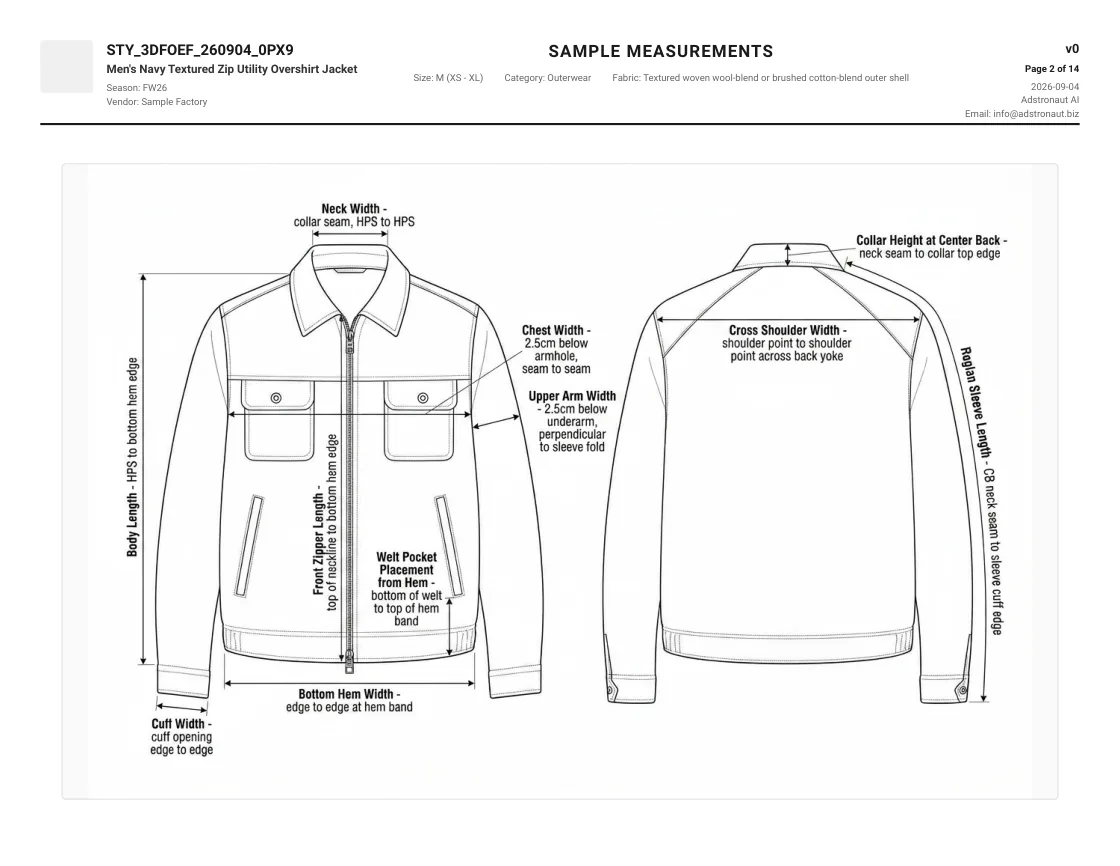
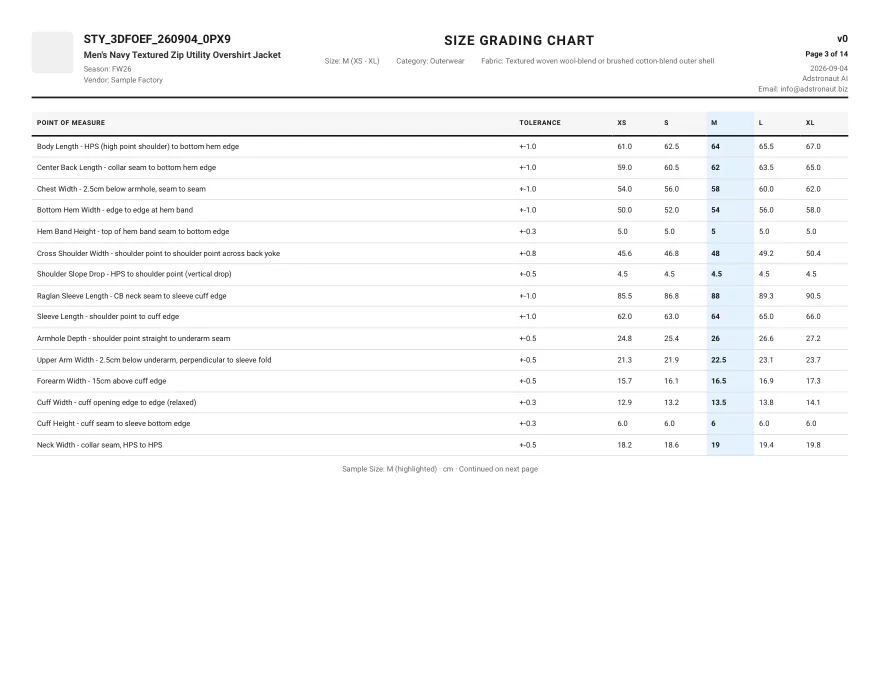
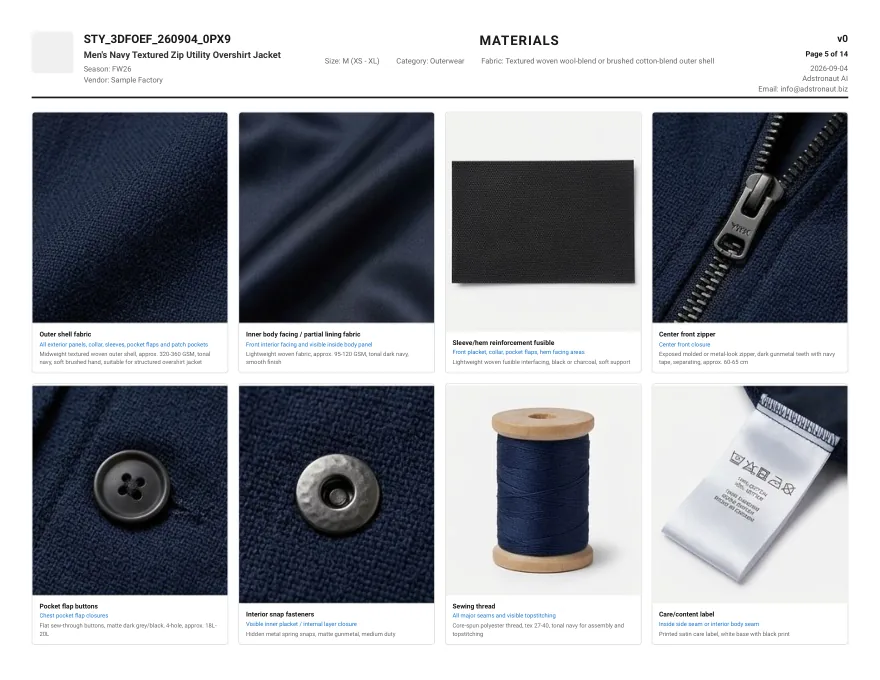
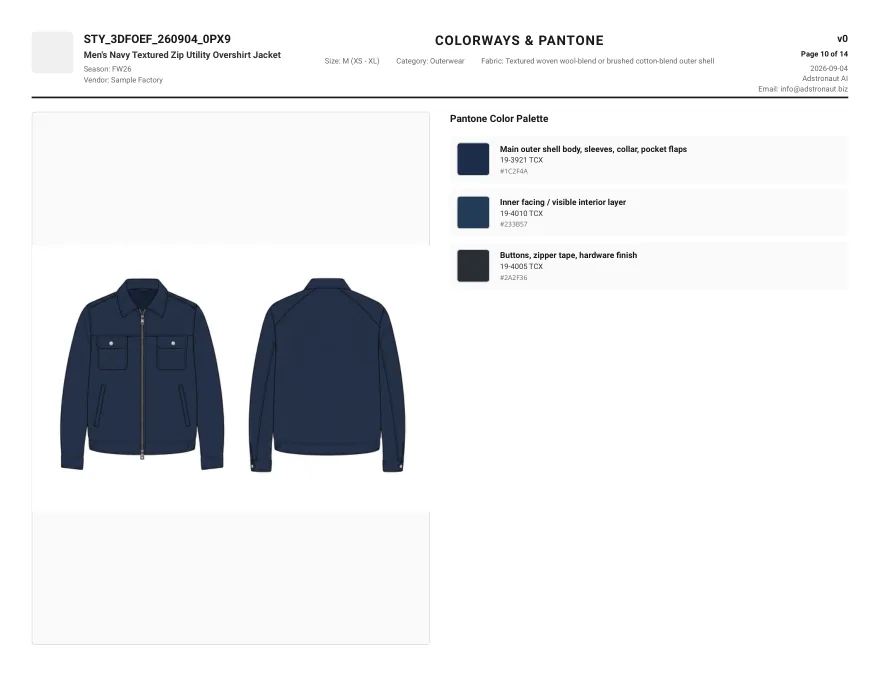
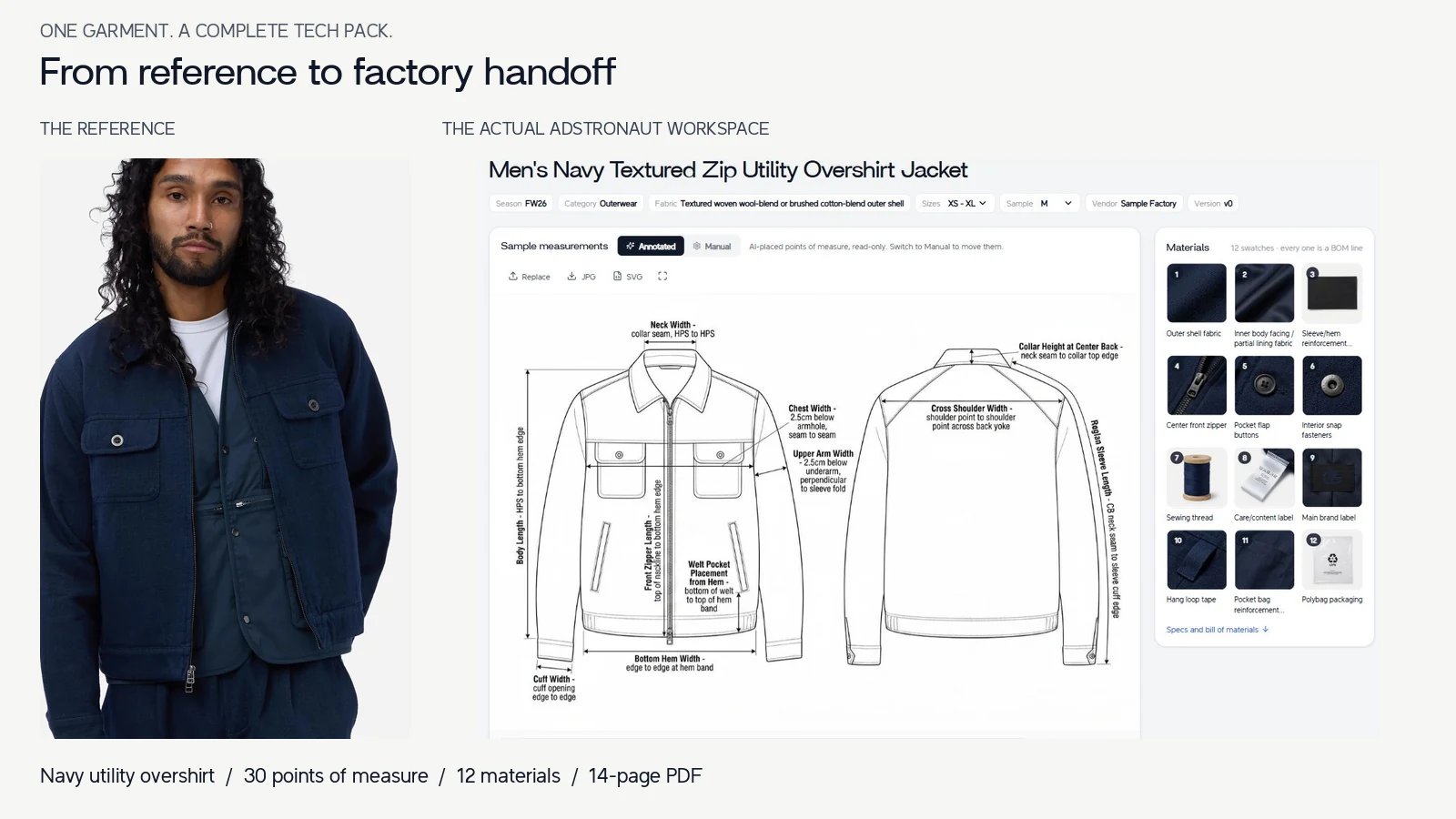
This is a real export, not a mock-up. Two photos of a navy utility overshirt went in, and a 14-page tech pack came out: the reference images, front and back flats with 30 points of measure, a size grading chart from XS to XL, 12 materials with swatches, a materials callout, the bill of materials, sewing details, colorways with Pantone TCX codes, detailed views, a construction guide, sewing instructions and a fit log.
Every page is editable before you export it. Open the full PDF, or follow how this pack was made, step by step.
New to the document itself? What a tech pack is walks through each page and what the factory uses it for.
Generate your first tech pack
Graded sizes, with a tolerance on every point of measure
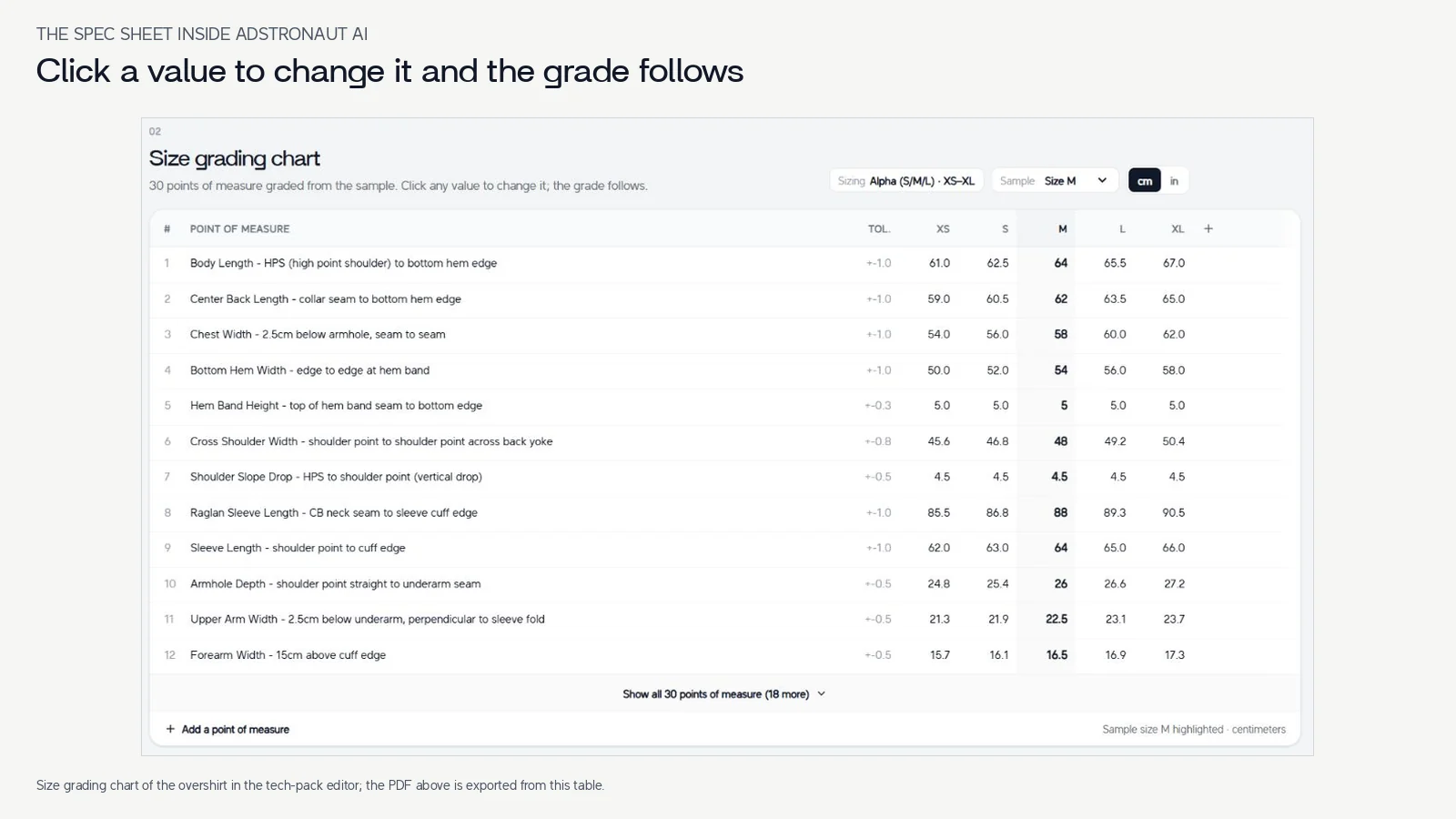
Most templates stop at one sample size. The generator grades every point of measure from your sample size, and each row keeps its own rule: on this overshirt the chest moves 2 cm per size, the cross shoulder 1.2 cm, the cuff 0.3 cm and the hem band not at all. Each row also carries its own tolerance, ±1 cm on the body and ±0.3 cm on small trims.
Click any value to change it and the grade follows. Switch between centimetres and inches, and between 12 sizing systems: alpha, chest-and-fit and waist sizing, US women's and EU numeric, and US, UK and EU footwear, including kids' sizes.
How size grading works explains grade rules and tolerance with this same chart.
Grade your first style
Footwear, bags and knitwear get their own points of measure
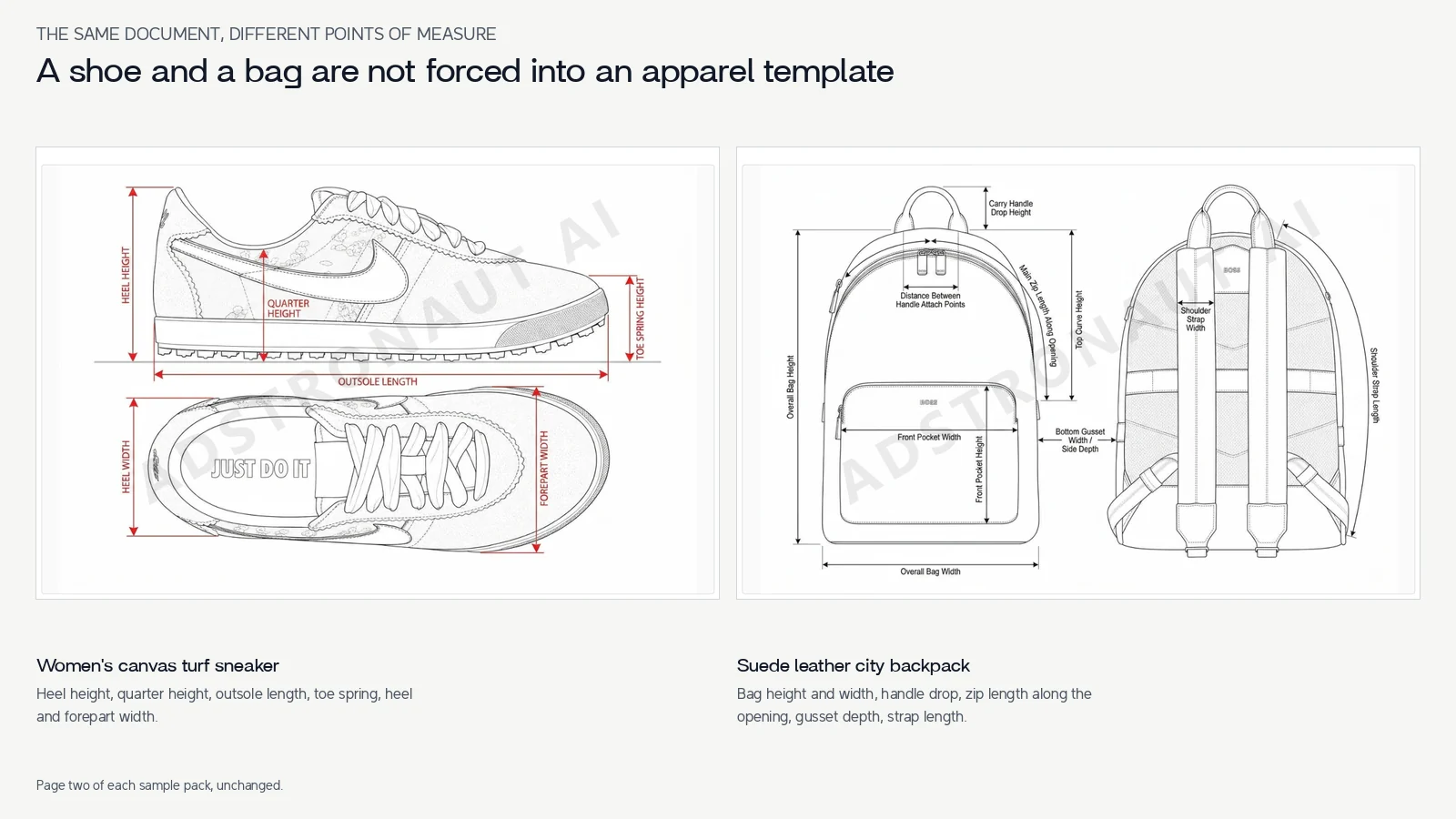
A shoe and a bag are not forced into an apparel template. The sneaker sample is measured by heel height, quarter height, outsole length, toe spring and forepart width; the backpack by bag height and width, handle drop, zip length along the opening, gusset depth and strap length.
The bill of materials follows the product too: suede and smooth leather with thickness ranges, spacer mesh and foam for the backpack; canvas, synthetic overlays, a heel counter, a toe puff and a rubber cup sole for the sneaker.
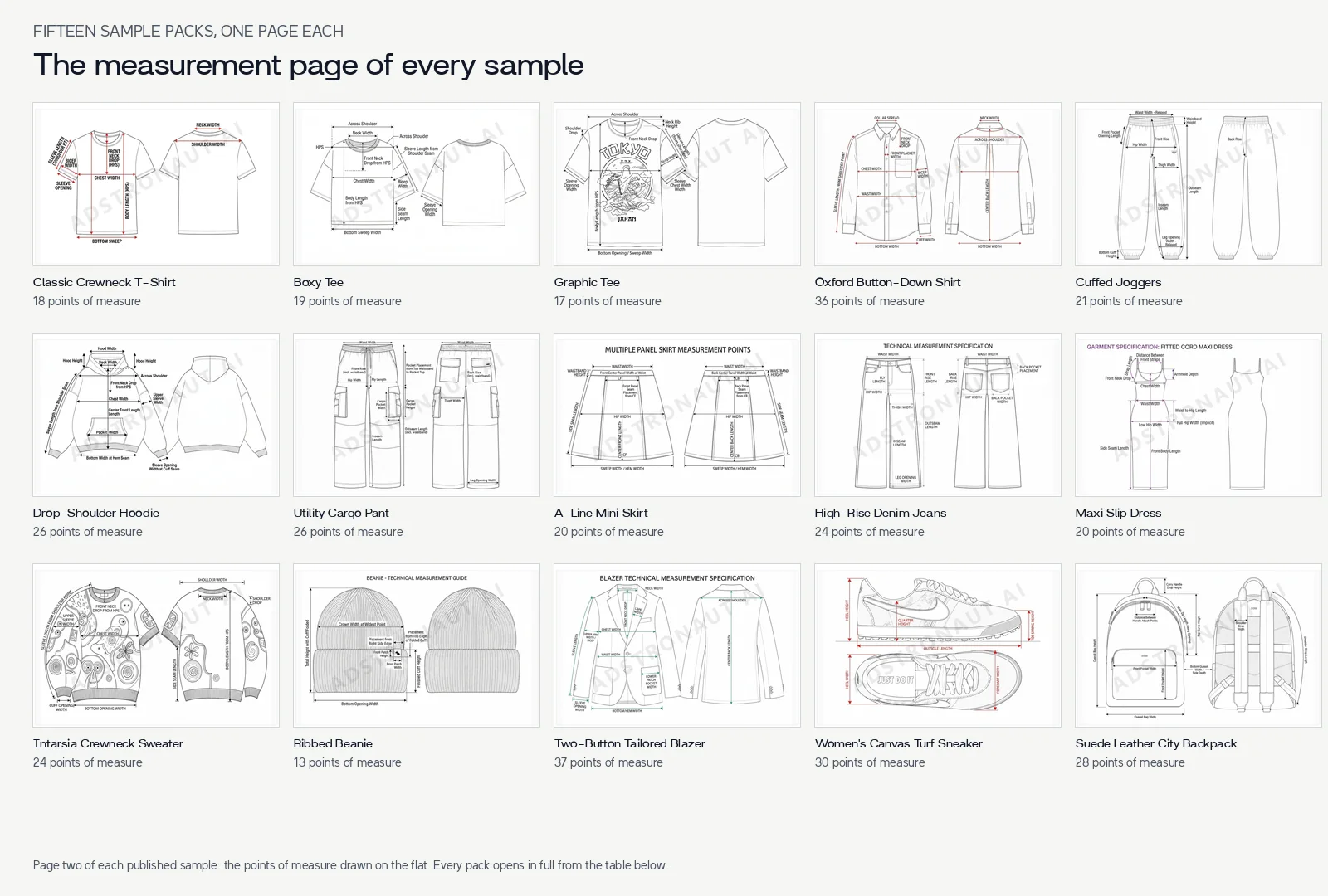
Browse fifteen sample packs across clothing, footwear and bags, or read the leather goods and footwear guides.
Browse sample tech packs
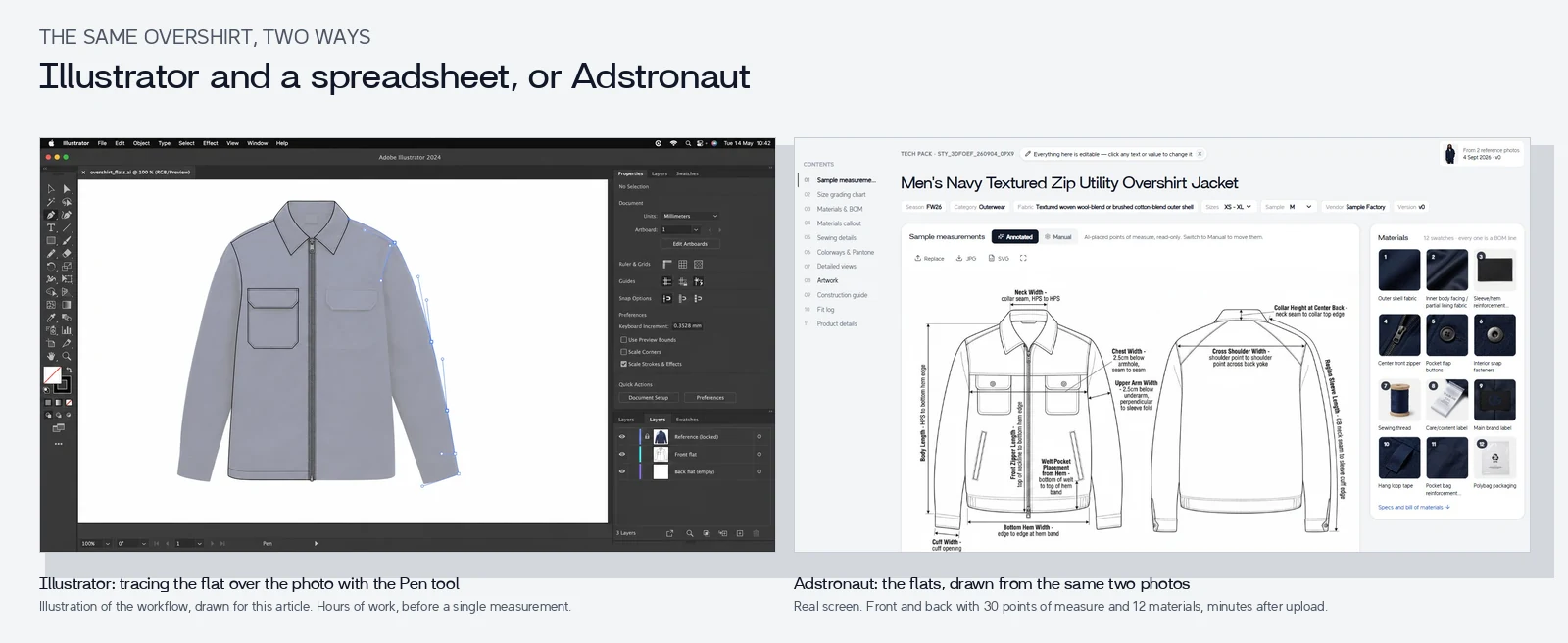
Minutes, instead of a working day in Illustrator and Excel
The traditional way to make a tech pack is to trace the flats in Adobe Illustrator, type the measurements and materials into a spreadsheet, and lay it all out page by page. For a mid-complexity style that is roughly a working day, 6 to 12 hours, once you are fluent, and every change means editing the drawing, the sheet and the layout again.
The generator produces the same document in three to five minutes, and most styles need 10 to 30 minutes of review. There is no vector software to learn and no spreadsheet to keep in sync: edit a value in place and export again. If your designer wants to refine the flats, paid plans download them as editable SVG.
See the same overshirt built both ways, with the hours and the files side by side.
Compare the two workflows
Three ways to get a tech pack
The same first version of a mid-complexity style, made three ways. Adstronaut AI figures come from the overshirt above; the Illustrator hours are technical designers' estimates for a fluent user.
| Adstronaut AI | Illustrator + Excel | Freelance technical designer |
|---|
| Flats with points of measure | Generated from your photo; drag to move, rename in place | Traced by hand with the Pen tool, 3 to 6 hours | Drawn for you |
| Graded size chart | Generated XS to XL with a tolerance per row; edit a value and the grade follows | Built in a spreadsheet in 1 to 2 hours, then rebuilt in the layout | Included |
| Materials and BOM | Generated with swatches, placement and quantity per unit | Typed by hand, 1 to 2 hours | Included |
| Construction and sewing | Callouts on the flat, a construction guide and a sewing order | Written by hand, 1 to 2 hours | Included |
| First version | 3 to 5 minutes, plus 10 to 30 minutes of review | Roughly a working day, 6 to 12 hours | Usually 3 to 7 days |
| Changes | Edit in place and export again | Update the drawing, the sheet and the layout | Usually billed as extra rounds |
| Cost | From $29 a month for 5 packs; $69 for 15; $149 for 40 | Illustrator from $22.99 a month, plus your time | About $150 to $500 per style |
| Best for | A factory-ready first version, fast, for founders and small teams | Designers fluent in Illustrator with time for each style | Fit, pattern and grading judgment on complex styles |
Illustrator hours from technical designers' estimates for a fluent user, as set out in our step-by-step comparison. Adobe Illustrator's public US individual price ($22.99 a month on an annual plan, billed monthly) and Adstronaut AI plans checked 21 September 2026. Freelance range per Maker's Row and general market rates.
Read the step-by-step comparison, see what makes a pack factory-ready, or start from a free tech pack template.
Tech pack generator questions, answered straight.
What founders, designers and production leads ask before their first pack.
What is an AI tech pack generator?
An AI tech pack generator turns a photo or sketch of a product into the document a factory makes it from: flats with points of measure, a graded size chart, the bill of materials, construction and sewing notes, and colorways. Adstronaut AI reads the garment from your photo and writes the first version in three to five minutes. You then review the details only you know, such as your supplier's fabric names and your sample's exact measurements, and export the PDF.
Is it a tech pack maker, a builder or a template?
It is a generator: you do not fill in a blank template field by field or draw flats in a builder. You upload a photo and the whole document is written for you. Every field then stays editable, so it works as a tech pack maker for any change you want to make. If you would rather start from a blank file, the free Excel template is on the tech pack templates page.
Is an AI-generated tech pack factory-ready?
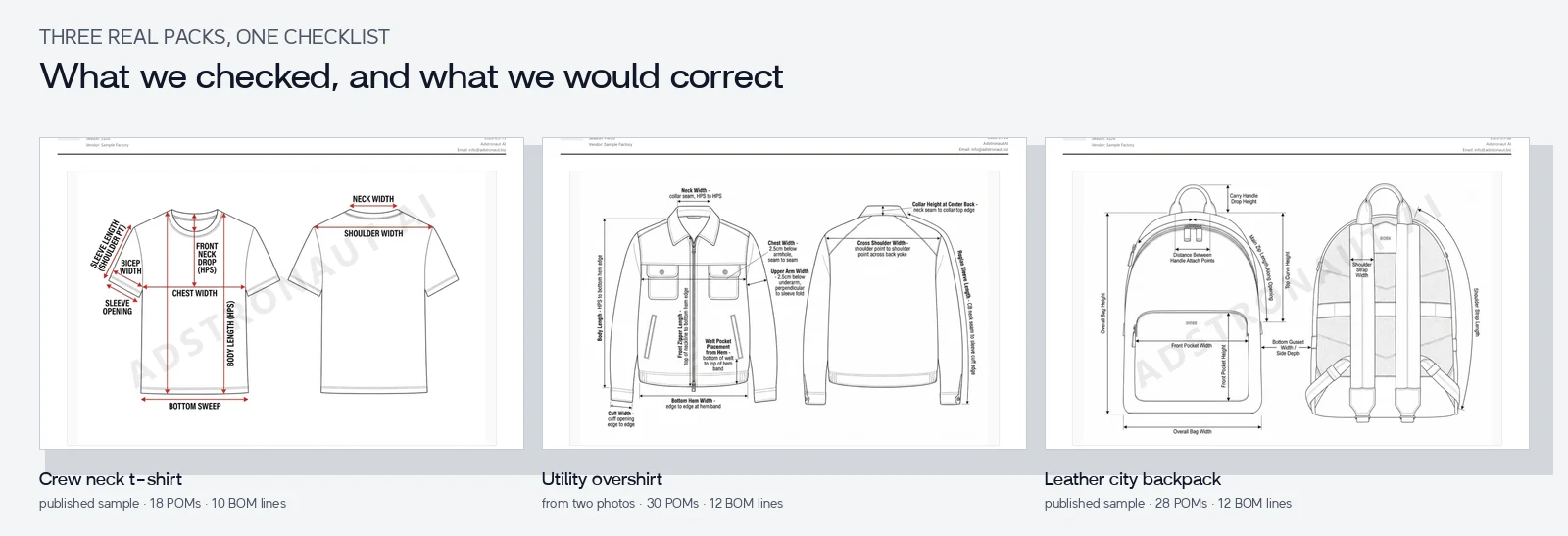
Yes, when it contains what any factory expects, whoever made it: flats with points of measure, graded measurements with tolerances, a bill of materials with quantities and clear construction notes. Adstronaut AI generates all of those. As with any tech pack, you finish it with the specifics only you know before sending it. We ran seven practical checks on three generated packs and published what passed and the one line per pack we would correct.
How much does a tech pack cost?
A freelance technical designer typically charges about $150 to $500 per style, and complex styles or revision rounds cost more. With Adstronaut AI a pack uses 25 credits: plans start at $29 a month for 5 packs, $69 for 15 and $149 for 40, which works out at about $4 to $6 a pack. Your first pack is a free watermarked preview.
Can I make a tech pack for free?
Yes. Signing up gives you 25 credits, enough for one tech pack, with no credit card required. The free pack is a watermarked preview: the core sections are visible, and the rest unlock on a paid plan. Fifteen complete sample tech packs and a blank Excel template are also free to download.
What's the best free AI tech pack generator?
Judge any free tier by what one free pack contains for your own garment: flats with points of measure, a graded size chart with tolerances, a real bill of materials and construction notes. Adstronaut AI's free signup covers one full generation as a watermarked preview, so you can check all of that before you pay. Every free tier is a preview meant to earn a paid plan; the useful test is whether the pack answers a factory's first questions.
How long does it take to generate a tech pack?
Three to five minutes to generate. Reviewing a straightforward style takes 10 to 30 minutes: checking measurements against your sample, naming your supplier's materials, adding artwork. The same first version in Illustrator and Excel takes roughly a working day, and a freelancer usually takes three to seven days.
Can I edit the tech pack after it is generated?
Yes, every field. Change any measurement and the grade follows, drag or rename points of measure on the flats, edit, replace or delete materials and BOM rows, rewrite construction callouts and log fit comments. Edits save automatically, and you export a new PDF whenever you are ready.
Do I need Adobe Illustrator or CAD?
No. The flats are generated from your photo, so there is nothing to draw and no CAD to learn. If your designer wants to refine the flats in Illustrator, paid plans can download them as editable SVG.
Is it an alternative to Excel and Illustrator for tech packs?
Yes. Illustrator plus Excel is the traditional workflow: flats drawn by hand, measurements and the BOM typed into a spreadsheet, then laid out page by page, roughly a working day per style. The generator replaces the drawing and the typing and keeps the editable files: Pro exports the pack as an Excel workbook, and every paid plan downloads the flats as SVG.
Which garments and products can it handle?
Tops, bottoms, dresses, outerwear, tailoring, knitwear and activewear, plus footwear, bags and other accessories. Each product class gets the points of measure it needs: a sneaker is measured by heel height, toe spring and outsole length, and a backpack by handle drop, gusset depth and strap length. Fifteen sample packs, from a crewneck T-shirt to a suede backpack, are free to download.
I've never made a tech pack. Is this for first-time founders?
Yes, it is the most common use. You do not need to know what a BOM or a grade rule is before you start: the pack is written for you and each section is labelled in the editor. What you bring is what only you know: the fit you want, your fabric and trims, and your sample's measurements.
What's the difference between a tech pack and a spec sheet?
A spec sheet is the measurement part of a tech pack: points of measure, how each is taken, the target in every size and the tolerance. A tech pack is the whole document: flats, materials and BOM, measurements and grading, construction, colorways and revisions. Every pack the generator produces includes the spec sheet.
Is there a free tech pack template I can use?
Yes. There is a blank 13-sheet Excel tech pack template, a free garment spec-sheet workbook with a worked example, and fifteen completed sample packs you can download as PDFs. To get one written for your own style, upload a photo to the generator.