How to Create a Tech Pack Without Adobe Illustrator (5 Methods Compared)
You can create a professional tech pack without Adobe Illustrator using five alternative methods: AI-powered tools ($3--$25/pack, 15--30 min), dedicated tech pack software like Techpacker ($49--$99/mo), Google Sheets/Excel templates (free, 4--8 hours), Canva with technical drawing templates ($0--$13/mo, 2--4 hours), or outsourcing to a freelancer ($100--$2,000/pack). The best method depends on your budget, technical skill level, and production volume.
Adobe Illustrator costs $22.99/month and requires an estimated 50+ hours of training to produce factory-acceptable flat sketches for tech packs (Adobe, 2026). That time and cost barrier is why an estimated 68% of independent fashion brands operate without an in-house technical designer, according to industry survey data from Maker's Row. The good news: factories do not care which software you used. They care whether your tech pack is complete, clear, and accurate.
This guide compares all five methods honestly, with real costs, time estimates, and recommendations for each.
Table of Contents
- What Factories Actually Need (Minimum Tech Pack Requirements)
- The 5 Methods Compared: Quick Overview
- Method 1: AI-Powered Tools
- Method 2: Dedicated Tech Pack Software
- Method 3: Google Sheets / Excel Templates
- Method 4: Canva with Technical Templates
- Method 5: Freelancer / Outsource
- Full Comparison Table
- Which Method Should You Choose?
- Frequently Asked Questions
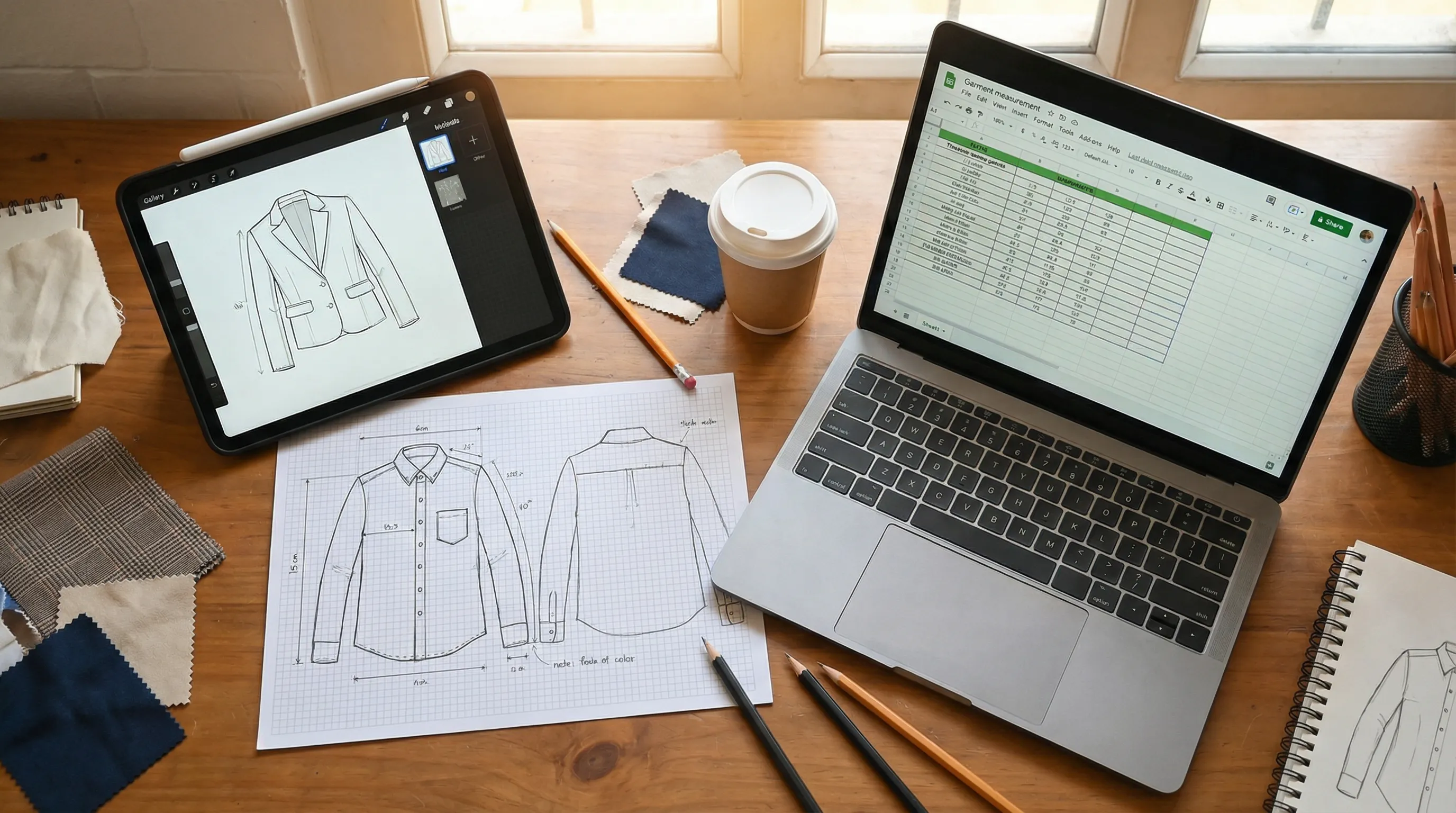 Three alternative tech pack creation methods: tablet with sketch app, hand-drawn flat sketches on graph paper, and laptop with measurement spreadsheet
What Factories Actually Need (Minimum Tech Pack Requirements) {#what-factories-actually-need}
Before choosing a tool, you need to understand what your manufacturer actually requires. A factory does not need a beautifully designed Illustrator file. A factory needs four things:
1. A flat sketch (front and back views) A clean, two-dimensional line drawing showing every seam, pocket, collar, and closure. This does not need to be drawn in Illustrator. It needs to be clear and accurate.
2. A graded measurement chart Exact measurements for every point of measure (chest, length, sleeve, etc.) across all sizes you intend to produce. ASTM International publishes standard body measurement tables (ASTM D5585, D6240) that serve as the baseline for most domestic and international grading.
3. A bill of materials (BOM) Every component: shell fabric (fiber content, weight, color code), lining, thread, zippers, buttons, labels, hang tags, and packaging. If it is not on the BOM, it will not be on the garment.
4. Construction notes Stitch types, seam allowances, finishing methods, and any special instructions. Industry standards reference ISO 4915 stitch type classification (e.g., Type 301 lockstitch, Type 504 overlock).
According to a survey of garment manufacturers conducted by Maker's Row, 92% of factories said they accept tech packs created in any software, as long as the above four elements are present and clearly organized. The remaining 8% had format preferences — typically Excel-based templates used in specific Asian manufacturing hubs.
For a deeper dive into every component, read our complete guide to fashion tech packs.
The 5 Methods Compared: Quick Overview {#the-5-methods-compared}
| Method | Cost | Time per Pack | Skill Level | Flat Sketch | Best For |
|---|---|---|---|---|---|
| AI-Powered Tools | $3--$25/pack | 15--30 min | None | Auto-generated | Speed-focused indie brands |
| Dedicated Software | $49--$99/mo | 30--90 min | Low | Upload your own | Teams needing collaboration |
| Google Sheets/Excel | Free | 4--8 hours | Medium | Manual/external | Zero-budget startups |
| Canva + Templates | $0--$13/mo | 2--4 hours | Low--Medium | Basic drawing tools | Visual-first designers |
| Freelancer | $100--$2,000/pack | 3--14 days | None (outsourced) | Professional | Hands-off approach |
Method 1: AI-Powered Tools {#method-1-ai-powered-tools}
How it works: You upload a photo of your garment (a sample, a reference image, or an AI-generated design). The AI analyzes the image and generates a complete tech pack: flat sketch, BOM, graded measurements, and construction details. You review, edit, and export as a factory-ready PDF.
Cost: $3--$25 per tech pack, depending on the tool and garment complexity. Adstronaut AI uses a credit-based system at approximately $3--$5 per complete pack.
Time: 15--30 minutes (5 minutes for AI generation, 10--25 minutes for review and refinement).
Pros:
- No design software skills required
- Flat sketches generated automatically from photos — this eliminates the single biggest barrier to creating tech packs without Illustrator
- Structured output with all factory-required sections pre-formatted
- Fastest method available
- Per-style cost makes it economical for small collections
Cons:
- AI-generated specs may need manual refinement for highly complex garments (tailored blazers, multi-panel outerwear)
- Output quality depends on input photo quality
- Newer technology — smaller user communities compared to established tools
- Limited collaboration features for larger teams
Best for: Solo designers and indie brands producing 1--30 styles per season who need professional tech packs without Illustrator skills or freelancer budgets.
According to McKinsey's State of Fashion technology report, adoption of AI-powered design tools among independent fashion brands grew 340% between 2023 and 2025, with tech pack generation being the second most common use case after product photography.
For a step-by-step walkthrough of the AI tech pack creation process, see our guide on how to create a tech pack.
Skip Illustrator — generate your tech pack now →
Method 2: Dedicated Tech Pack Software {#method-2-dedicated-tech-pack-software}
How it works: Cloud-based platforms like Techpacker and Techpack.co provide structured tech pack templates with a card-based or form-based interface. You fill in specifications, upload flat sketches (created elsewhere), and export professional PDFs.
Cost: Techpacker: $49/month (Starter) to $149/month (Business). Techpack.co: $29/month to $99/month. Both offer free trials.
Time: 30--90 minutes per tech pack (assuming you already have flat sketches ready).
Pros:
- Professional, standardized output format that factories recognize
- Collaboration features (multi-user access, commenting, version history) — critical for teams
- Spec library allows reusing materials and measurements across seasons
- Techpacker is used by 10,000+ companies and integrates with PLM systems
- More structured than spreadsheets, less complex than Illustrator
Cons:
- Does not generate flat sketches — you still need to create these in Illustrator, Inkscape, or another tool, then upload them
- Monthly subscription cost regardless of usage (painful for seasonal brands)
- Learning curve of 1--2 weeks for new users
- No AI assistance — every field requires manual data entry
Best for: Growing brands with 2+ team members producing 15--50 styles per season who need structured collaboration, version control, and a reusable spec library.
Important note: If the flat sketch is your main Illustrator dependency, dedicated tech pack software alone does not solve that problem. You would need to pair it with a sketch source — either a freelance illustrator, a free vector tool like Inkscape, or an AI sketch generator.
For a detailed comparison of all major platforms, read our best tech pack software guide.
Method 3: Google Sheets / Excel Templates {#method-3-google-sheets--excel-templates}
How it works: Download a free tech pack template (available from Maker's Row, fashion blogs, and design school resources), then manually fill in every field: measurements, materials, construction notes, and supplier information. For flat sketches, you either hand-draw and scan them, use a free vector tool, or source them separately.
Cost: Free. Google Sheets is free. Excel is included with Microsoft 365 ($7/month) or available free through web-based Office.
Time: 4--8 hours per tech pack, including sketch creation. Experienced users with pre-built templates may reduce this to 3--5 hours.
Pros:
- Zero cost
- Complete control over every data field
- Good for learning the anatomy of a tech pack
- No subscription lock-in
- Factories in Asia (particularly China and Bangladesh) often prefer Excel-based formats
Cons:
- Extremely time-intensive — unsustainable beyond 5--10 styles per season
- No flat sketch generation capability (the biggest gap)
- No standardization — every downloaded template is formatted differently
- No version control (unless using Google Sheets with edit history)
- Prone to copy-paste errors, broken formulas, and formatting inconsistencies
- Does not look as professional as dedicated software output
Best for: First-time designers creating 1--3 tech packs to learn the process, or bootstrapped brands with zero budget producing very few styles.
According to Common Objective research on fashion supply chain efficiency, brands using unstructured tools (spreadsheets, PDFs assembled manually) experience 2.3x more sample revision rounds compared to brands using structured tech pack formats — adding an average of 4--6 weeks to the development timeline per style.
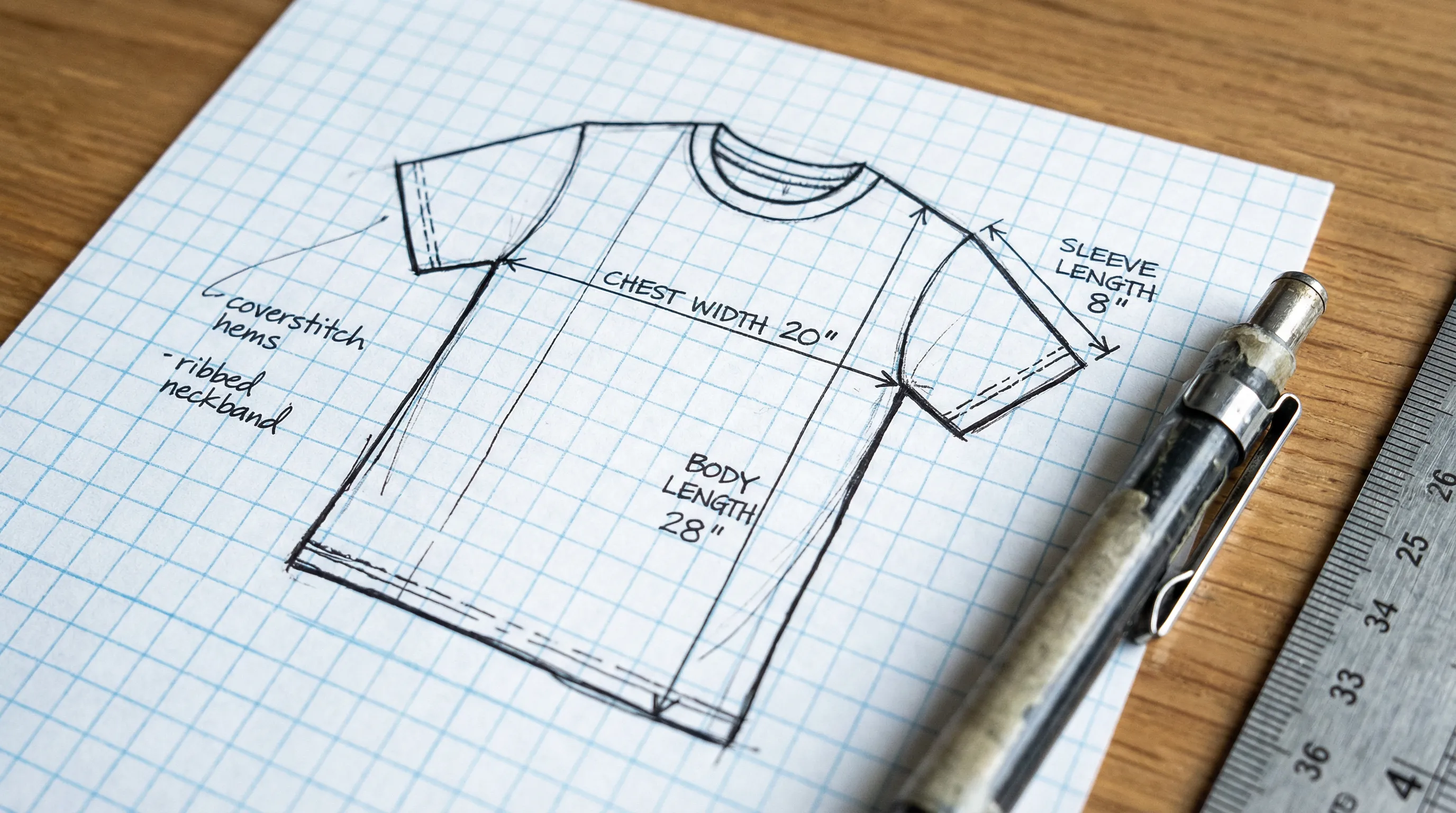 Hand-drawn technical flat sketch of a t-shirt on graph paper with precise measurement annotations and construction notes
Method 4: Canva with Technical Templates {#method-4-canva-with-technical-templates}
How it works: Use Canva's design platform to build tech pack pages visually. Canva offers some basic garment template resources, and you can use its shape and line tools to create simplified flat sketches. Measurements, BOM tables, and construction notes are added as text elements and tables.
Cost: Canva Free ($0) or Canva Pro ($13/month for additional templates and features).
Time: 2--4 hours per tech pack.
Pros:
- Intuitive drag-and-drop interface — no technical training needed
- Visually polished output (good for presentations, lookbooks)
- Basic flat sketch capability using shape tools
- Collaborative editing (on Pro plan)
- Large template ecosystem, including some fashion-specific templates
- PDF export included
Cons:
- Not designed for technical garment documentation — lacks measurement annotation tools, grading calculators, and BOM structure
- Flat sketches created in Canva lack the precision factories expect (no anchor points, no scalable vector output)
- No industry-standard stitch or construction symbol library
- Tables are static (no auto-calculating grade rules)
- Not recognized as a professional tech pack tool by manufacturers
- Risk of producing a document that looks polished but lacks technical substance
Best for: Designers who already use Canva and need a quick, visually clean tech pack for simple garments (basic tees, tote bags) — particularly for communicating with local or small-batch manufacturers who are flexible on format.
Honest assessment: Canva can produce a document that looks like a tech pack, but it lacks the technical infrastructure that makes a tech pack functional. For anything beyond the simplest garments, the time spent fighting Canva's limitations is better invested in a purpose-built tool.
Method 5: Freelancer / Outsource {#method-5-freelancer--outsource}
How it works: Hire a freelance technical designer on platforms like Upwork, Fiverr, or specialized fashion freelancing networks. You provide reference images, measurements, and material preferences. The freelancer creates a complete tech pack in Illustrator (or their preferred software) and delivers a final PDF.
Cost: $100--$500 for simple garments (t-shirts, basic dresses). $500--$2,000+ for complex styles (tailored blazers, technical outerwear, multi-component garments). Rush fees add 25--50%.
Time: 3--14 business days, depending on freelancer availability, revision rounds, and garment complexity.
Pros:
- Hands-off — no software to learn, no tools to configure
- Professional output from experienced technical designers
- Can handle any level of garment complexity
- Good for brands with budget but no time or technical skills
- Freelancer may catch design/construction issues you would miss
Cons:
- Most expensive per-style method
- Communication delays — misunderstandings require revision rounds (industry average: 2--3 rounds)
- You are dependent on the freelancer's availability and schedule
- Quality varies dramatically — vetting is essential
- You do not build internal capability (knowledge stays with the freelancer)
- Slow turnaround makes it impractical for large collections or tight timelines
Best for: Brands with budget ($500+ per style) that need complex tech packs and do not have the time or interest in learning to create them internally.
According to freelance marketplace data aggregated by Upwork, the average tech pack freelancer charges $150--$500 for standard garments, with top-rated specialists commanding $500--$2,000+ for complex projects. Turnaround times average 5--10 business days for a first draft plus revisions.
Full Comparison Table {#full-comparison-table}
| Factor | AI Tools | Dedicated Software | Sheets/Excel | Canva | Freelancer |
|---|---|---|---|---|---|
| Cost per pack | $3--$25 | $4--$15 (at volume) | $0 | $0--$2 | $100--$2,000 |
| Monthly cost | None (credit-based) | $49--$149 | $0 | $0--$13 | None (per-project) |
| Time per pack | 15--30 min | 30--90 min | 4--8 hrs | 2--4 hrs | 3--14 days |
| Flat sketch | Auto-generated | Must upload | Must source externally | Basic (non-technical) | Professional |
| BOM structure | Auto-generated | Templated | Manual | Manual | Professional |
| Size grading | Auto-calculated | Auto-calculated | Manual formulas | Manual | Professional |
| Collaboration | Limited | Excellent | Basic (Google Sheets) | Good (Pro) | Via email/chat |
| Learning curve | Minimal | 1--2 weeks | Low (but tedious) | Low | None |
| Factory acceptance | High | High | Medium | Low--Medium | High |
| Scalability | Excellent | Excellent | Poor | Poor | Moderate |
| Best volume | 1--30 styles | 15--100+ styles | 1--5 styles | 1--5 styles | 1--20 styles |
Which Method Should You Choose? {#which-method-should-you-choose}
The right method depends on three factors: your budget, your production volume, and whether you need flat sketches generated for you.
If you need flat sketches and have no Illustrator skills: Your realistic options are AI-powered tools or hiring a freelancer. Dedicated tech pack software, spreadsheets, and Canva all require you to bring your own sketches.
If you are on a zero budget: Start with Google Sheets templates to learn the tech pack structure. Use Inkscape (free, open-source vector editor) for basic flat sketches. This is slow but costs nothing.
If you produce fewer than 10 styles per season: AI-powered tools give you the best combination of speed, cost, and quality. At $3--$5 per style, 10 tech packs cost $30--$50. The same volume with a freelancer costs $1,000--$5,000.
If you have a team and need collaboration: Techpacker is the strongest option for multi-user workflows, version history, and spec libraries. Pair it with AI-generated sketches if no one on your team uses Illustrator.
If you need complex or highly technical packs: Hire a freelance technical designer for your most complex garments and use AI tools for simpler styles. This hybrid approach gives you professional quality where it matters most while keeping costs manageable.
For more detailed tool-by-tool analysis, see our best tech pack software comparison.
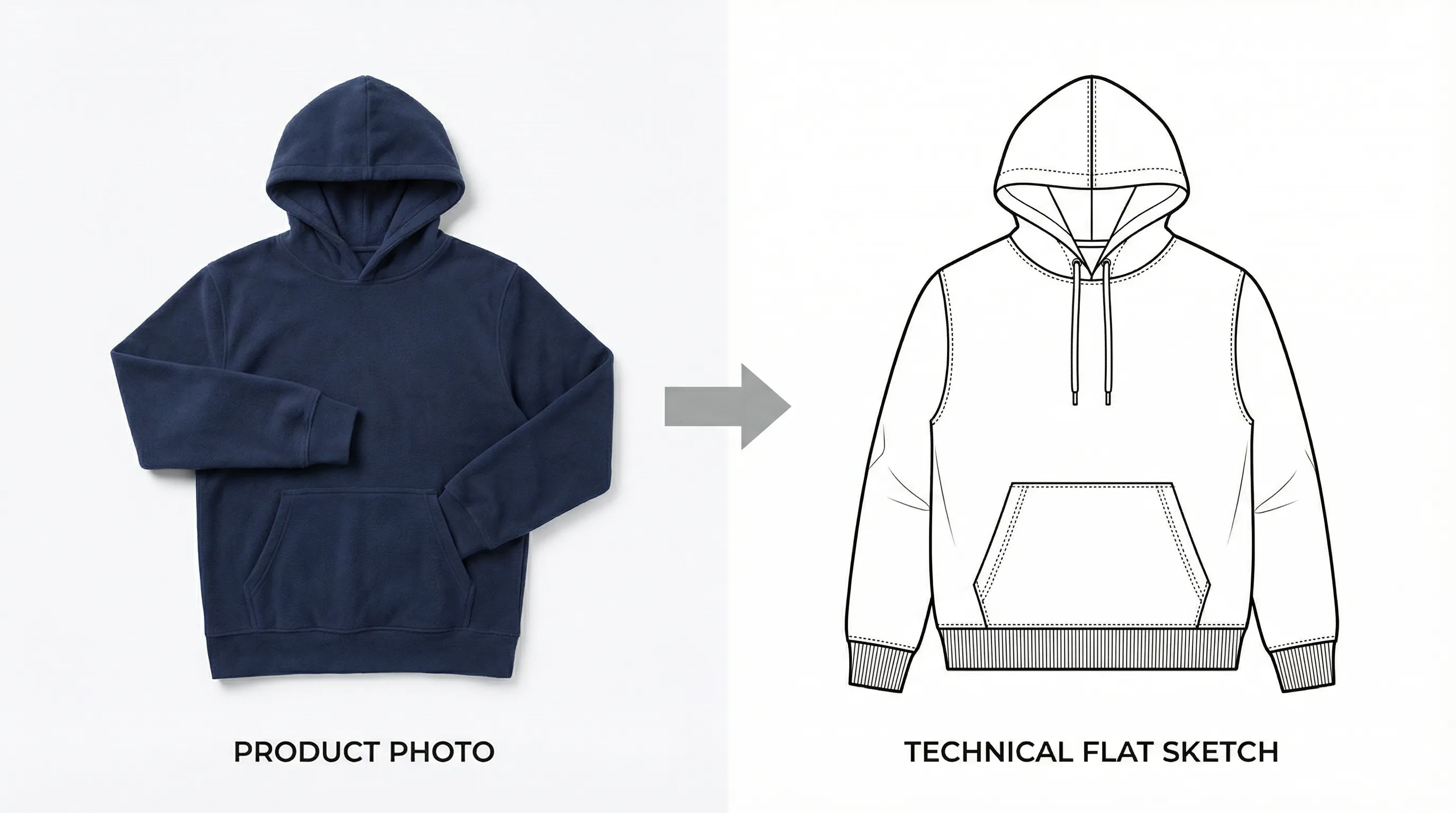 Before and after showing a garment photo transformed into a clean technical flat sketch using AI technology
Frequently Asked Questions {#frequently-asked-questions}
Can I make a tech pack in Google Docs?
Technically yes, but it is not recommended for production use. Google Docs lacks table formatting precision, measurement annotation tools, and structured export capabilities. Google Sheets is a better free option because it handles measurement tables and BOM spreadsheets more naturally. However, neither Docs nor Sheets can generate flat sketches, which are a required component. If budget is your constraint, use Google Sheets for data and pair it with a free vector tool (Inkscape) for sketches.
What is the fastest way to create a tech pack?
AI-powered tools are the fastest method available. Tools like Adstronaut AI generate a complete tech pack — including flat sketch, BOM, measurements, and construction notes — from a single photo in approximately 5 minutes. With 10--25 minutes of review and refinement, you have a factory-ready document in under 30 minutes. By comparison, the Illustrator + Excel method takes 2--8 hours, and freelancers require 3--14 business days. For a step-by-step walkthrough, see our how to create a tech pack guide.
Do factories accept tech packs not made in Illustrator?
Yes. Factories care about content, not software. A well-organized PDF with clear flat sketches, complete measurements, a detailed BOM, and construction specifications will be accepted regardless of the tool used to create it. According to Maker's Row, the majority of garment manufacturers accept tech packs in any format as long as the essential information is present. Some factories in Asia prefer Excel-based formats. Always confirm your specific manufacturer's preferences before sending.
What should a tech pack include?
A complete tech pack includes: (1) technical flat sketches (front and back views), (2) a graded measurement chart with all points of measure across all sizes, (3) a bill of materials listing every component with specifications, (4) construction details including stitch types and seam allowances, (5) colorway specifications with Pantone codes, (6) label and artwork placement, and (7) packaging instructions. For a detailed breakdown of all 10 essential components, read our guide on what is a tech pack.
How many pages should a tech pack be?
A standard tech pack ranges from 6--15 pages depending on garment complexity. A basic t-shirt tech pack is typically 6--8 pages. A hoodie or dress requires 8--12 pages. A tailored blazer or technical jacket may need 12--15+ pages. More pages is not better — clarity and completeness matter more than length. Every page should contain information the factory needs; remove anything decorative or redundant. See our t-shirt tech pack, hoodie tech pack, and dress tech pack guides for specific examples.
Can I use Canva for tech packs?
You can, but with significant limitations. Canva works for visually simple garments where your manufacturer is flexible on format (local, small-batch production). It produces polished-looking documents and offers basic shape tools for simplified flat sketches. However, Canva lacks precision measurement annotation, scalable vector sketch output, grading calculators, industry-standard stitch symbol libraries, and structured BOM templates. For anything beyond basic garments, you will spend more time working around Canva's limitations than you would spend learning a purpose-built tool. A better free alternative is Google Sheets (for data) combined with Inkscape (for flat sketches).
Is it worth learning Adobe Illustrator just for tech packs?
It depends on your long-term plans. If you intend to become a full-time technical designer or plan to create 50+ styles per season for years, learning Illustrator provides maximum control with zero per-style cost. However, Adobe estimates that proficiency takes 50+ hours of focused training, and garment-specific flat sketch skills add months beyond that. For most indie brand founders, AI tools or dedicated software deliver professional results at a fraction of the time investment. The hours saved on Illustrator training are better spent on design, sourcing, and sales.
How do I create flat sketches without Illustrator?
You have four options: (1) AI generation — tools like Adstronaut AI create flat sketches automatically from product photos, (2) Inkscape — a free, open-source vector editor that can produce Illustrator-quality sketches (steep learning curve, but no cost), (3) Hand-draw and scan — some manufacturers accept clean hand-drawn sketches scanned at high resolution, and (4) Hire a freelance illustrator — flat sketch specialists on Fiverr charge $20--$100 per sketch. Option 1 is the fastest; option 2 is the cheapest for someone willing to learn.
Generate your tech pack without Illustrator — try free →
Sources and further reading:
- ASTM International — Standard Tables of Body Measurements (D5585, D6240) (industry-standard measurement and grading references)
- Adobe — Illustrator Pricing and Plans ($22.99/month subscription pricing)
- Maker's Row — Guide to Working with Manufacturers (factory communication standards and tech pack acceptance data)
- Techpacker — Official Platform and Pricing (dedicated tech pack software features and plans)
- McKinsey & Company — The State of Fashion (technology adoption trends in the fashion industry)
- Common Objective — Fashion Supply Chain Research (supply chain efficiency data and sample revision statistics)
- ISO 4915 — Classification of Stitch Types (international standard for stitch type specification in garment manufacturing)