
Free bill of materials template for clothing
Updated September 22, 2026
A garment bill of materials (BOM) lists every component that goes into one piece: fabrics, trims, threads, labels and packaging, each with its specification, placement, quantity per garment and unit. This free template gives you a blank Excel sheet that totals the cost per garment as you type, a printable PDF, and a worked example that is the real 12-line BOM from a generated overshirt tech pack. Download both without signing up.
What is in the download
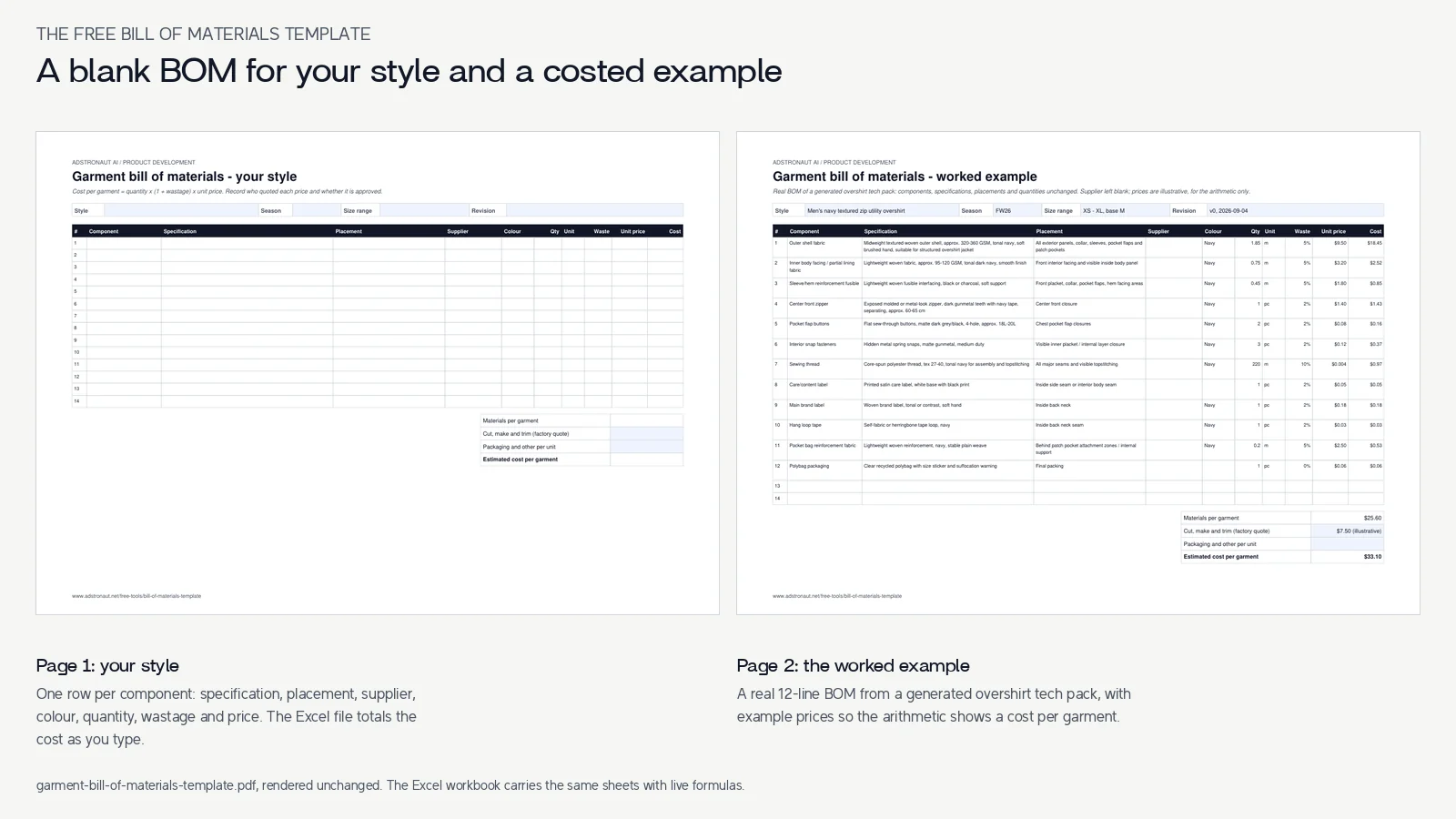
The Excel workbook has two sheets. Your BOM is blank: one row per component with its category, specification, placement, supplier, supplier reference, colour, quantity per garment, unit, wastage, unit price and status. The cost column multiplies quantity, wastage and price for you, and the totals add a cut, make and trim quote to give an estimated cost per garment.
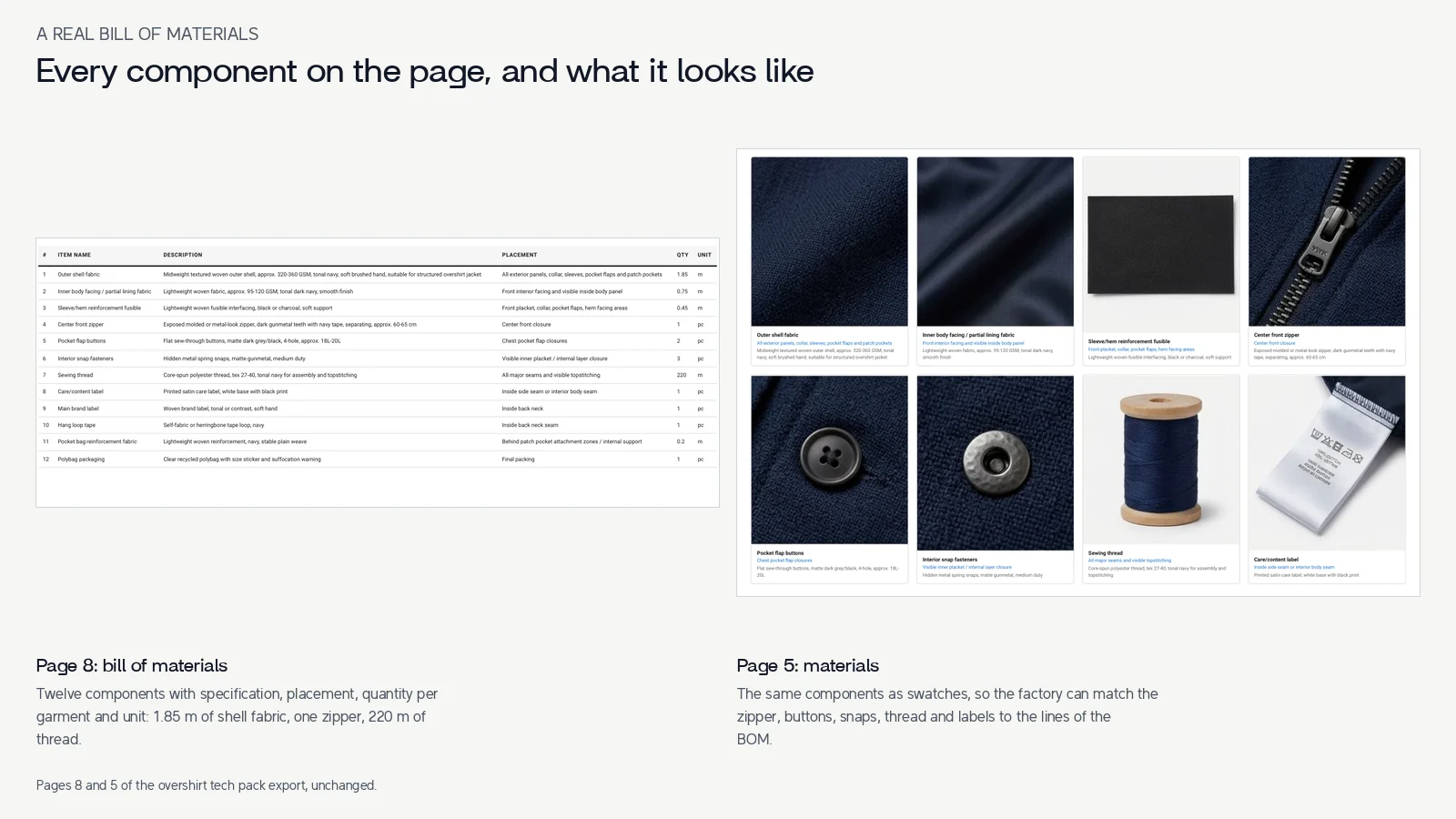
Worked example is filled in with a real bill of materials: the twelve components, specifications, placements and quantities of a men's navy utility overshirt, exactly as they appear on page 8 of its generated tech pack. The supplier names are left blank and the prices are illustrative, so the arithmetic shows a result; replace both with your own quotes.
The printable PDF carries the same two pages for review on paper. Neither file needs an account.
A bill of materials sample: one overshirt, twelve lines
| Component | Qty per garment | Specification | Placement |
|---|---|---|---|
| Outer shell fabric | 1.85 m | Midweight textured woven, approx. 320-360 GSM, tonal navy, soft brushed hand | All exterior panels, collar, sleeves, pocket flaps and patch pockets |
| Inner body facing / partial lining | 0.75 m | Lightweight woven, approx. 95-120 GSM, tonal dark navy, smooth finish | Front interior facing and visible inside body panel |
| Reinforcement fusible | 0.45 m | Lightweight woven fusible interfacing, black or charcoal, soft support | Front placket, collar, pocket flaps, hem facing areas |
| Center front zipper | 1 pc | Exposed molded or metal-look, gunmetal teeth, navy tape, separating, approx. 60-65 cm | Center front closure |
| Pocket flap buttons | 2 pc | Flat sew-through, matte dark grey/black, 4-hole, approx. 18L-20L | Chest pocket flap closures |
| Interior snap fasteners | 3 pc | Hidden metal spring snaps, matte gunmetal, medium duty | Inner placket / internal layer closure |
| Sewing thread | 220 m | Core-spun polyester, tex 27-40, tonal navy | All major seams and visible topstitching |
| Care/content label | 1 pc | Printed satin, white base with black print | Inside side seam or interior body seam |
| Main brand label | 1 pc | Woven, tonal or contrast, soft hand | Inside back neck |
| Hang loop tape | 1 pc | Self-fabric or herringbone tape loop, navy | Inside back neck seam |
| Pocket bag reinforcement | 0.2 m | Lightweight woven, navy, stable plain weave | Behind patch pocket attachment zones |
| Polybag packaging | 1 pc | Clear recycled polybag with size sticker and suffocation warning | Final packing |
Page 8 of the overshirt tech pack export, retyped as a table with the wording shortened slightly. Quantities are per garment in the base size.
How to fill in a garment BOM
- 1
List every component, not just the fabric
Work around the garment: shell and lining fabrics, interlinings, closures, buttons and snaps, thread, every label, tapes and loops, then packaging. The overshirt has twelve lines; a basic tee might have eight, a lined jacket twenty or more. A missing label or snap is a cost the factory quote leaves out. - 2
Write a specification someone else can buy from
Weight in GSM, fibre, weave or knit, colour and finish for fabrics; size, material, colour and finish for trims (a button is 18L or 20L, a zipper has a length, a gauge and a slider type). If you are not sure yet, write a range and mark the status Estimate. - 3
Say where it goes
The placement column is what lets a factory check the BOM against the drawing: "chest pocket flap closures" tells them the two buttons belong on the flaps, not the cuffs. - 4
Give the quantity per garment, in the unit it is bought in
Fabric in metres or yards, thread in metres or cones, trims in pieces. Quantities are for one garment in the base size; the factory adds a wastage percentage for cutting and sewing losses, and the template's wastage column does the same for your cost. - 5
Add the price and who it came from
Enter the unit price and the supplier's reference, and set the status to Quoted or Approved as prices firm up. The sheet totals the materials, adds the cut, make and trim quote and gives you an estimated cost per garment.
What each column is for
| Column | What you enter |
|---|---|
| Category | Fabric, lining, interlining, trim, thread, label, packaging or other; used to group and check the list. |
| Component and specification | What it is and exactly how to buy it: fibre, weight, colour, size, finish. |
| Placement | Where it goes on the garment, matching the drawing. |
| Supplier and reference | Who supplies it and their article number, so a reorder matches. |
| Colour / Pantone | The colour standard, ideally a Pantone TCX code for dyed components. |
| Qty per garment and unit | How much one garment uses, in the unit it is bought in. |
| Wastage % | Allowance for cutting and sewing losses; commonly a few percent on fabric. |
| Unit price and cost per garment | Price per unit; the cost is quantity x (1 + wastage) x price. |
| Status | Estimate, Quoted or Approved, so you know which numbers are firm. |
BOM, tech pack and cost sheet
The bill of materials is one section of a tech pack: the drawings say what the garment looks like, the spec sheet says how big it is, and the BOM says what it is made of. A cost sheet builds on the BOM by adding labour, overheads, duty and freight to reach a landed cost and a price; the clothing pricing calculator takes it from there.
For the full breakdown, with a T-shirt and a technical jacket written out line by line, read what a BOM is in fashion.
Or generate the BOM with the rest of the tech pack
The overshirt's twelve lines were not typed by hand. They came out of the Adstronaut AI tech pack generator with the rest of the pack, from two product photos: the components it could see, a specification and placement for each, a quantity per garment, and a swatch on the materials page. Every line is editable, so you add your supplier names and prices, correct a quantity, or delete a trim you are not using.
Pro exports the finished pack as an Excel workbook, so the BOM you edited in the tech pack drops straight into your own costing.
Bill of materials questions
Is the bill of materials template free?
Yes. The Excel workbook and the printable PDF download without an account. Adstronaut AI's tech pack generator is a separate, credit-based tool.
What should a clothing BOM include?
Every component of one garment: fabrics, linings and interlinings, closures, buttons and snaps, thread, labels, tapes and packaging. For each, a specification a supplier can quote from, where it goes, the quantity per garment and the unit it is bought in. Supplier, colour standard, price and status make it a costing tool as well as a list.
Are the prices in the worked example real?
No. The components, specifications, placements and quantities are the real BOM from a generated overshirt tech pack; the prices and wastage percentages are illustrative, there so the cost formulas show a result. Replace them with your own supplier quotes.
How do I calculate the cost per garment from a BOM?
For each line, multiply the quantity per garment by one plus the wastage allowance and by the unit price, then add the lines up. Add the factory's cut, make and trim price and any per-unit packaging or labelling, and you have the estimated cost per garment. The workbook does this for you.
What is the difference between a BOM and a tech pack?
The BOM is one section of the tech pack. The tech pack also has the flats, the measurement spec and grading, construction and sewing details, and colourways. A factory needs all of them to quote and sample; the BOM is what they price the materials from.
Get the BOM with the rest of your tech pack
Upload a photo of your garment and the generator writes the bill of materials along with the flats, graded sizes and construction. Your first pack is a free watermarked preview.
Explore the tech pack generatorRelated resources
Sources and further reading
- Navy utility overshirt tech pack (PDF) — Page 8 is the bill of materials used as the worked example; page 5 shows the matching material swatches.